
Asana Alternative
for Agencies
Asana is brilliant for marketing teams. GitScrum is built for agencies and dev teams who need releases, time tracking, and invoicing in one tool.

Asana is visual work management. GitScrum is agency operations.
Asana helps marketing teams and non-technical projects. GitScrum is built specifically for agencies and dev teams who need release planning, time tracking, and client billing.
Choose GitScrum if:
- You're an agency billing clients
- You need release planning with delivery pace
- You want time tracking + invoicing built-in
- You need client portals for transparency
Choose Asana if:
- You're a marketing or creative team
- You need portfolio management
- You want 200+ integrations
- You manage non-technical workflows
"Asana is brilliant for marketing teams—I've seen campaigns managed flawlessly there. But agencies billing clients hit a wall. No native time tracking means Harvest subscriptions. No invoicing means more tools. No client portal means sharing views with confused stakeholders. We built GitScrum for the workflow Asana wasn't designed for: track hours, bill clients, show progress."
Renato Marinho
Founder, GitScrum
Feature by feature. Honest comparison.
Asana excels at visual work management. GitScrum excels at agency operations.
| Feature | GitScrum | Asana |
|---|---|---|
| Release Planning | Native delivery pace | Limited |
| Progress Dashboards | ✓ Built-in | ✗ |
| Story Points | ✓ Native | Custom field |
| Time Tracking | Native + Reports | Add-on $ |
| Invoicing | ✓ Built-in | ✗ |
| Client Portal | ✓ Built-in | ✗ |
| Change Requests | ✓ Workflow | ✗ |
| Proposals | ✓ + Approval | ✗ |
| Timeline View | Roadmap | ✓✓ Excellent |
| Portfolios | Workspace view | ✓✓ Powerful |
| Forms | ✗ | ✓ Built-in |
| 200+ Integrations | 50+ | ✓✓ |
| IDE Themes | 54 themes | Light/Dark |
| Price (10 users) | $89/mo all-in | $110/mo + add-ons |
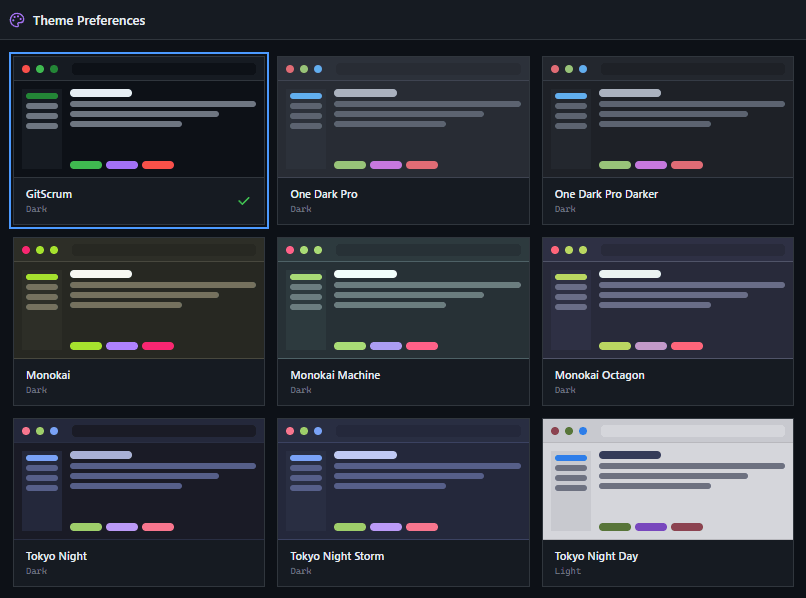
54 IDE themes.
Work your way.
Dracula, Nord, Tokyo Night, Catppuccin—all here. Dark and light modes. One click to switch. Syncs across all devices.
Real cost comparison
for a team of 10
What you actually pay. Asana charges per seat plus premium features. GitScrum includes everything agencies need.
10 × $4.20
10 × $11 + add-ons
- Timeline view
- Portfolios
- Goals
- Time tracking = Harvest add-on
- No invoicing
Agency revenue command.
Not just tasks.
Proposals, invoices, change requests, client portals. Track revenue pipeline from draft to paid. Know exactly where money sits.
Why agencies switch from Asana
Agency Operations Built-in
Proposals, invoices, change requests, client portals—not integrations. Native features that work together.
Real Release Planning
Progress dashboards, delivery pace, health scores. Asana supports tasks, GitScrum supports agile teams.
Time Tracking + Billing
Track hours on tasks. Generate invoices from logged time. No Harvest subscription needed.
54 IDE Themes
Dracula, Nord, Tokyo Night. Work in colors your team loves. Not just light/dark toggle.
Built for agencies & dev teams
Agency owners tracking revenue
Full financial visibility: proposals, invoices, change requests. Know exactly where every dollar is.
Managers running releases
Progress dashboards, delivery pace, health scores. Proactive risk management without status meetings.
Developers wanting focus
54 IDE themes, keyboard shortcuts, minimal UI. Tools that feel like your code editor.
Clients needing visibility
Client portals show progress in plain language. Approve changes, review invoices, watch delivery.
Built for marketing & operations
Marketing teams running campaigns
Visual timelines, portfolios, and forms. Great for content calendars and launch coordination.
Operations teams managing workflows
200+ integrations and automation rules. Connect everything without code.
Large organizations with varied teams
Portfolio view aggregates work across departments. Goals cascade company-wide.
Non-technical project managers
Visual-first interface requires no technical knowledge. Onboarding is immediate.
Switch in minutes
Moving from Asana? We make it easy.
Export Asana data
Export your projects and tasks as CSV
Import to GitScrum
Our importer maps your data automatically
Invite your team
Team members get instant access
Set up clients
Create client portals and start billing
Frequently asked questions
How do agencies use GitScrum instead of Asana for client billing?
Track time directly on tasks → generate invoices from logged hours → send to client portal for approval. With Asana, you need Harvest ($12/user) + external invoicing. GitScrum: $4.20/user total. A 10-person agency saves $1,200+/year while getting a unified workflow.
Can I import my Asana projects to GitScrum?
Yes. Export Asana as CSV, import into GitScrum—fields map automatically. Most teams migrate 50+ projects in under 2 hours. Your task history, assignees, and due dates transfer intact.
What's the real cost difference between Asana and GitScrum for a 10-person team?
Asana Premium: $110/month. Add Harvest for time tracking: +$120/month. Add invoicing tool: +$50/month. Total: $280/month. GitScrum with everything included: $89/month. Annual savings: $2,292.
Does GitScrum have portfolio views like Asana?
GitScrum has workspace-level views to see all projects. For complex portfolio-level timelines and dependencies across 20+ projects, Asana's Portfolio is more powerful. GitScrum optimizes for release delivery, Asana for visual oversight.
How long does it take to migrate from Asana to GitScrum?
Average migration: 2-3 hours for a 10-person team. Export Asana CSV, import to GitScrum, invite team. No training needed—if your team knows Asana, they'll navigate GitScrum immediately. First release running same day.
When should I NOT switch from Asana to GitScrum?
Stay with Asana if: you heavily use portfolio-level timelines, you need 200+ integrations for marketing automation, your team doesn't track billable hours, or you manage non-technical creative campaigns. GitScrum is built for agencies that bill clients, not marketing teams managing content calendars.
Ready to run your agency better? Start now
No credit card. Import your Asana projects in minutes.
Join 2,000+ agencies who unified releases, time tracking, and billing in one tool







