
Unlimited Boards
Zero Workflow Constraints
Every project gets infinite Kanban boards. Custom columns with WIP limits. Auto-assign users, labels, and agents. Drag tasks between workflows. Real-time sync across your team.


One Project
Many Boards
Create separate boards for different workstreams. Frontend team, backend team, QA pipeline. Each board has its own columns and workflow. Switch between boards instantly.
Define Your Process Your Way
Add columns for each stage of your workflow. Set colors to visualize status. Define whether columns represent To Do, In Progress, or Done states.
Limit WIP Prevent Bottlenecks
Set maximum tasks per column. When teams try to add more, they get blocked. Forces focus. Prevents overload. The core Kanban principle, enforced automatically.
Automate Handoffs When Tasks Move
When a task enters a column, automatically assign team members or labels. Option to clear previous assignments. Set up once, forget forever.
Clean Boards
Automatically
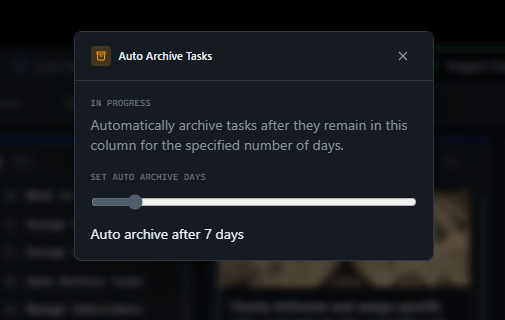
Set tasks to auto-archive after sitting in a column for X days. Keep your Done column clean without manual cleanup. Archived tasks are still searchable.
Same Data
Different Perspectives
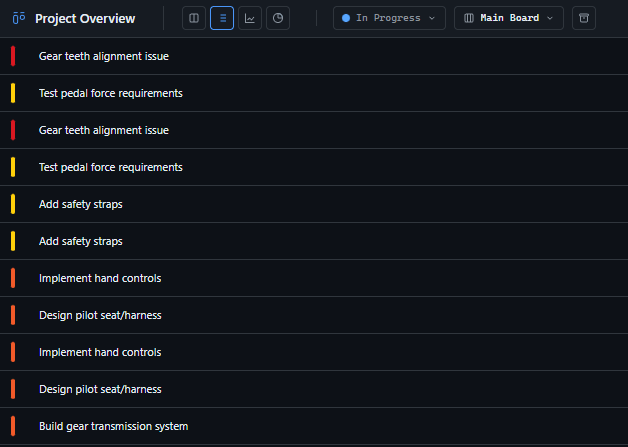
Kanban board for visual flow. List view for scanning. Flow analytics for throughput and delivery pace. Progress view for completion metrics. Choose how you see your work.
Share Boards With Anyone
Generate a public link for stakeholders. Optional password protection. Read-only access. Perfect for client updates without adding them to your workspace.
Right Access For Each Role
Developers see and use boards. Managers and owners can create boards, configure columns, set automation rules. Clear separation of viewing and managing.
Set Up Boards in Minutes
Simple setup. Powerful workflows.
Create a Board
Every project starts with a Main Board. Add custom boards for different workstreams. Name them by team, feature, or release.
Configure Columns
Add columns for your workflow stages. Set colors, status types, WIP limits. Configure auto-assign rules for seamless handoffs.
Start Moving Tasks
Drag tasks between columns. Watch automation kick in. See real-time updates across your team. Your workflow, visualized.
For Agency Owners
Multiple Projects, Multiple Workflows
Different clients need different processes. One board per project isn't enough.
"Each client team has their own board. Same project, separate workflows. Finally makes sense."
— Agency Operations LeadFor Managers
See Bottlenecks Before They Block
You need visibility into where work is stuck. Status meetings show you yesterday's problems.
"WIP limits changed everything. We catch overload before it becomes a delay."
— Engineering ManagerFor Developers
Drag, Drop, Done
Context switching between tools kills focus. Updating status shouldn't be a task.
"Drag to In Progress when I start. Drag to Done when I'm finished. That's it."
— Full-Stack DeveloperFor Clients
Watch Progress Without Asking
You want to know what's happening without pestering your team for updates.
"I check the board link before our calls. Already know what questions to ask."
— Client Product OwnerHow GitScrum Boards Compare
| Feature | GitScrum | Jira | Trello | Asana |
|---|---|---|---|---|
| Unlimited boards per project | Paid | |||
| Custom column workflows | ||||
| WIP limits per column | ||||
| Auto-assign users | ||||
| Auto-assign labels | ||||
| Auto-archive rules | ||||
| Email notifications per column | ||||
| External share links | ||||
| Real-time sync | ||||
| Multiple view modes |
Frequently Asked Questions
How many boards can I create per project?
Unlimited. Every project starts with a Main Board, and you can create as many additional boards as you need for different workstreams, teams, or phases.
What happens when WIP limit is reached?
When you try to drag a task into a column at its WIP limit, you'll see a warning modal. The task won't move until you clear space in that column. This enforces the core Kanban principle of limiting work in progress.
Can I auto-assign both users and labels?
Yes. Each column can have its own auto-assign rules for users and labels. You can also enable 'clear old assignments' to remove previous assignments when a task enters the column.
How does auto-archive work?
Set a number of days (0-60) on any column. Tasks that sit in that column longer than the threshold get auto-archived. They're removed from the board but still searchable and restorable.
Can clients see my boards?
Two ways: Add clients as project members (read-only), or generate a public share link. Share links can be password-protected and show a read-only view of your board.
What's the difference between board views?
Kanban shows columns and cards. List shows all tasks in a table. Flow shows CFD chart and activity timeline. Progress shows completion metrics and workflow distribution.
Can developers create boards?
No. Board management (create, configure, delete) is restricted to Managers and Agency Owners. Developers can use boards and move tasks, but can't change board structure.
Are updates real-time?
Yes. When someone moves a task or updates a card, everyone viewing that board sees the change immediately via WebSocket. No refresh needed.
Visual Workflows That Scale
Unlimited boards. Custom columns. Automated rules. Start now.







