
Project Management for Developers
Timer on the task you're working on.
Kanban that moves as fast as you code.
Releases that actually track.
Built for developers who measure progress in code, not in standups.
Start shipping. No card needed.
No context switching. No tab hunting.
Hit start on the task you're working on. Timer runs. When you stop, time auto-logs to the right project, the right task. No tab switching. No "which project was this again?" No timesheets filled out at 5pm on Friday. You code. System tracks. Done.
Your board stays in sync with your release.
Drag task to In Progress. Board updates live for the whole team—no refresh needed, no "did you see my update?" Slack. Everything syncs instantly. Your work is visible the moment you move it. Team sees what's blocked, what's shipping, what's next.
Red means miss. Green means ship.
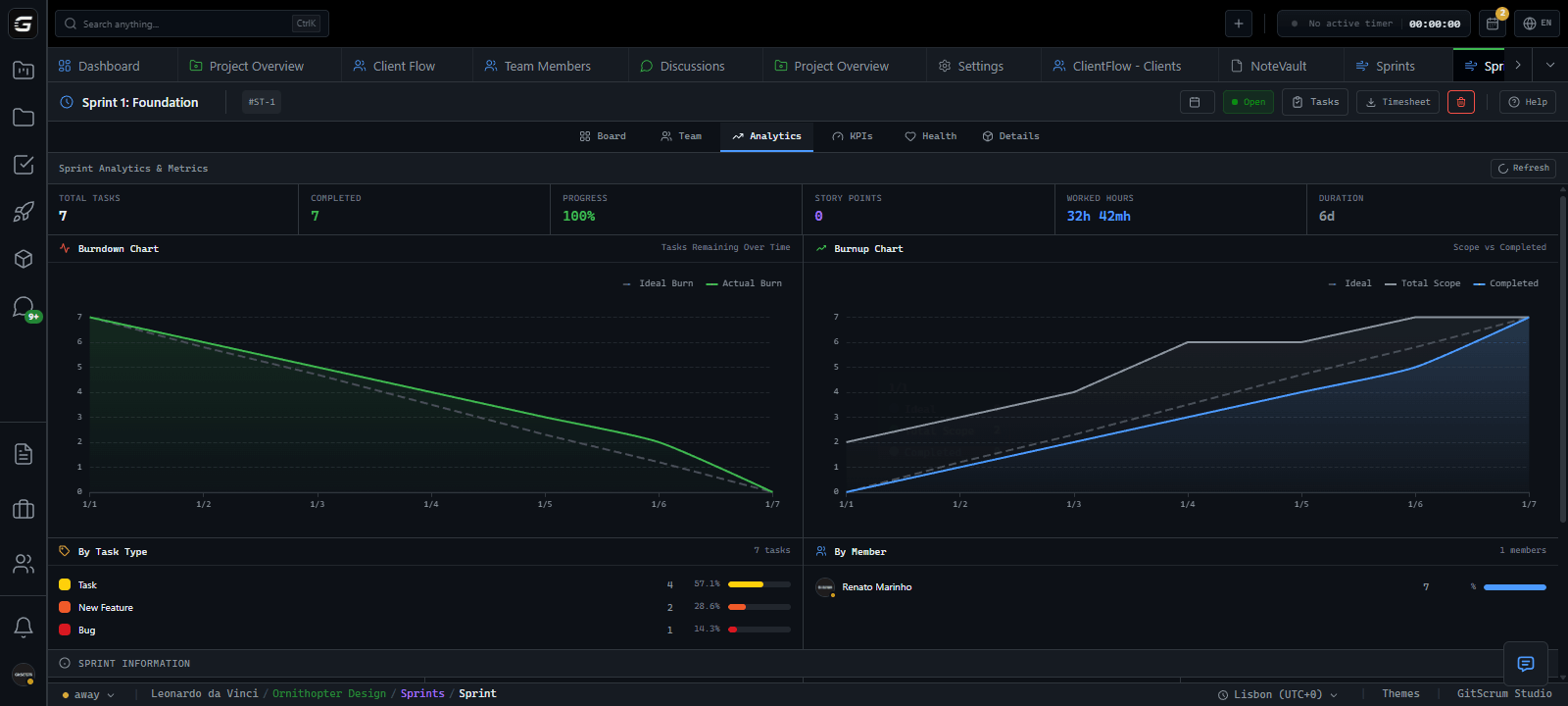
Chart shows actual progress vs. the plan for the release. Color-coded so you see it at a glance: are we on track to deliver or trending to miss? No ambiguity. No "we'll figure it out next release" conversations. You know where you stand every day.
Start timer on task, focus on code. System tracks time automatically.
See progress dashboards update live as you complete tasks.
Drag tasks and see changes sync across team instantly.
Get notified immediately when tasks are blocked.
Link commits to tasks automatically via branch names.
Understand team capacity and predict delivery dates.
Track pull requests and code review status in tasks.
No manual timesheets—system logs time as you work.
Tools that feel like extensions of your code editor.
Visualize and manage task relationships automatically.
Update progress without interrupting coding flow.
Get alerts only for tasks that matter to your work.
Start timer on task, focus on code. System tracks time automatically.
See progress dashboards update live as you complete tasks.
Drag tasks and see changes sync across team instantly.
Get notified immediately when tasks are blocked.
Link commits to tasks automatically via branch names.
Understand team capacity and predict delivery dates.
Track pull requests and code review status in tasks.
No manual timesheets—system logs time as you work.
Tools that feel like extensions of your code editor.
Visualize and manage task relationships automatically.
Update progress without interrupting coding flow.
Get alerts only for tasks that matter to your work.
Monitor project quality with automated health scores.
AI predicts task completion times based on your history.
Track deployments and rollbacks in project timeline.
Link test results to tasks and track coverage.
Visualize feature branches and merge conflicts.
Collaborate on code with shared task timers.
Track technical debt and documentation tasks.
Monitor code performance and optimization tasks.
Navigate and update tasks without leaving your editor.
Create reusable task templates for common workflows.
Maintain task context across coding sessions.
Build workflows that match your development process.
Monitor project quality with automated health scores.
AI predicts task completion times based on your history.
Track deployments and rollbacks in project timeline.
Link test results to tasks and track coverage.
Visualize feature branches and merge conflicts.
Collaborate on code with shared task timers.
Track technical debt and documentation tasks.
Monitor code performance and optimization tasks.
Navigate and update tasks without leaving your editor.
Create reusable task templates for common workflows.
Maintain task context across coding sessions.
Build workflows that match your development process.
Your code. Your flow.
Six systems working together so you don't have to context-switch.
Your IDE Companion
Work tracked. Flow preserved.
Start on task. Stop when done.
02:34:12 runningDrag. Drop. Team sees it live.
Are we shipping on time?
Flag it. Team gets notified.
0 blockersUpdate when you want.
No meetingBreak it down. Check it off.
Start timer on a task. Time logs to the right project, automatically. Move task to Done. Release updates.
// Your workflow, automated
task.startTimer()
task.startTimer()
task.moveTo('done')
// ... 2 hours of focused coding ...Setup in 2 minutes • No credit card
Protect your flow. Ship without friction.
Six productivity killers. Six ways GitScrum eliminates them.
Context Switch Assassin
Stay in flow state, not in 12 different tabs
Every interruption costs 23 minutes to recover. Tool-hopping. Tab hunting. "Which board was that on again?" Your deep work dies a death of a thousand context switches.
→ You're not unproductive. Your tools are. Each app is an island. Integration is your job. Your brain becomes the router between systems.
Unified workspace. Tasks, timer, board, docs—one interface. Start timer, do work, mark done. Zero tab switching. Your IDE's extension, not another app demanding attention.
Task timer in header bar
Always visible, one click
Kanban + list + flow views
Switch views, keep context
Task drawer overlay
Edit without navigation
Keyboard-first navigation
Hands on keyboard, not mouse
saved per interruption
Per-event-type toggles
PRs, commits, deployments—you choose
Exclude own actions
No self-notifications
Category master toggles
Silence entire systems
Blocker alerts only
What blocks you, nothing else
fewer interruptions
Signal Over Noise
Get only the updates that matter to your work
Slack pings. Email floods. GitHub notifications. Every tool screaming for attention. 50% of developers lose 10+ hours weekly to notification chaos. Deep work becomes impossible.
→ Most notifications aren't for you. They're for the system's peace of mind. Every "FYI" is a focus assault disguised as communication.
Granular notification control. Filter by event type, exclude your own actions, mute entire categories. Blockers surface. Noise disappears. Focus protected.
Autonomous Execution Zone
Work without asking permission for basic decisions
Every estimate needs approval. Every status change needs a meeting. Every blocked task needs a manager. You're a senior dev treated like an intern. Autonomy is a myth.
→ Micromanagement isn't malice. It's missing systems. When nothing tracks itself, someone has to. Usually the wrong person.
Self-service task management. Estimate your own work. Flag your own blockers. Move tasks through workflows. Track your own time. Ownership means autonomy.
Self-assign tasks
Pick up work, no approval
Effort estimation control
You estimate, you commit
Blocker self-flagging
Surface issues without meetings
Workflow state control
Move tasks when ready
faster task turnover
Wiki with revisions
Version history, always
Full-text search
Find anything instantly
Side-by-side diffs
GitHub-style changes
Task-level checklists
Acceptance criteria built-in
faster onboarding
Documentation That Doesn't Suck
Find what you need in seconds, not Slack archaeology
"Where's the spec?" Slack search. Google Docs. Notion. Confluence. Some random PDF someone emailed. Documentation exists everywhere and nowhere. Onboarding takes months because tribal knowledge dies in DMs.
→ The problem isn't writing docs. It's finding them. Scattered documentation is effectively no documentation.
Wiki with full-text search. Version history. Diff viewer. Task descriptions with rich formatting. Checklists as acceptance criteria. Documentation where work happens, not in another tool.
Deployment Without Drama
Ship when ready, not when process allows
Code ready. PR approved. But deploy day is Thursday. Because reasons. Manual coordination. Status meetings. "Did anyone tell QA?" Shipping is a ceremony, not a capability.
→ Deployment friction isn't technical. It's visibility. Nobody trusts the state of things because nothing shows the state of things.
Git integration that links branches to tasks. PR status in task context. Workflow states matching your deployment pipeline. CI/CD notifications filtered to what matters. Ship when code is ready.
Branch-to-task linking
GitHub, GitLab, Bitbucket
PR status in context
Open, merged, closed—visible
CI/CD notifications
Workflow runs, deployments
Release tracking
Tag → shipped → visible
faster ship cycles
Public board links
Share without adding users
Progress KPI dashboards
Progress auto-calculated
Time reports export
CSV/PDF for billing
Project status badges
Active, paused, complete
fewer status meetings
Client Visibility Without Interruption
Let them see progress without pulling you out of code
"Quick update?" becomes 45-minute call. Weekly status reports become full-day projects. Clients need visibility. You need focus. Both feel mutually exclusive. Every transparency request is a productivity tax.
→ Clients don't want meetings. They want confidence. The call exists because they can't see. Give them a window, they stop knocking on the door.
Shareable boards with optional password. Progress indicators updated by work, not reports. Progress dashboards. Time tracking exports. Async visibility that updates itself.
Stop firefighting. Start shipping.
Your flow state is sacred. GitScrum protects it.
Setup in 2 minutes • No credit card







