
Client Insights Dashboard Right now.
Overdue invoices. Expiring proposals. Draft invoices ready to send. GitScrum surfaces the items that need action, ranked by urgency.
Critical → Important → Opportunity. Priority-ranked insights.
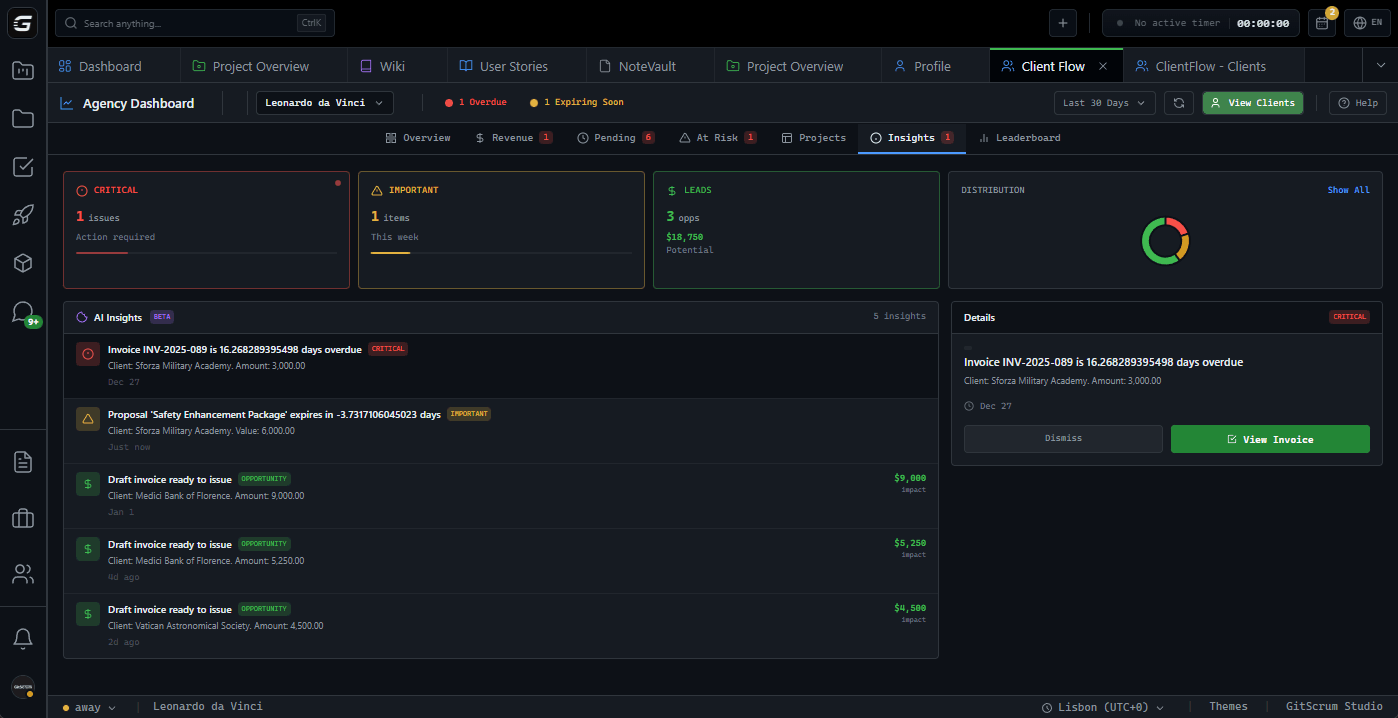
Three levels.
Clear action.
Invoices past due date. Revenue at risk. These items need immediate attention to prevent loss.
Invoice #2847 is 23 days overdue. Client: Acme Corp. Amount: $12,500
Proposals expiring within 7 days. Proposals pending response for over a week. Schedule follow-ups.
Proposal 'Q1 Redesign' expires in 4 days. Value: $35,000
Draft invoices ready to review and send. Revenue waiting to be captured with minimal effort.
Draft invoice for Omega Inc ready. Amount: $8,750
Stop hunting.
Start acting.
Revenue slips through cracks. An invoice goes 30 days overdue because no one noticed. A proposal expires because follow-up never happened. You only find out when the client mentions it.
Critical: Overdue invoices
Invoices past due date surface immediately. Days overdue, client name, amount at risk. Red priority, impossible to miss.
Important: Expiring proposals
Proposals expiring within 7 days get flagged. Proposals pending too long get flagged. Yellow priority, schedule follow-ups.
Opportunity: Draft invoices
Revenue waiting to be captured. Draft invoices ready to review and send. Green priority, quick wins.
Tuesday morning, I saw 3 critical items. Two overdue invoices I didn't know about, one proposal about to expire. All resolved before lunch.
Daniel F.
Agency Owner, 8-person team
I check insights every morning. 5 minutes to know exactly what needs attention. No spreadsheet hunting, no email searching.
Rachel M.
Operations Manager
Priority triage.
Built in.
You're juggling client requests, team tasks, and financial follow-ups. Some things are urgent. Some can wait. Without clear prioritization, everything feels urgent.
Three clear levels
Critical = act today. Important = act this week. Opportunity = capture when ready. No ambiguity.
Insight detail panel
Click any insight to see full context: client, amount, days overdue/pending, suggested action. One-click to open the item.
Dismiss when done
Handled an item? Dismiss it. It won't reappear unless the condition recurs. Clean dashboard, clear mind.
Specific. Actionable.
Every insight has a clear item, clear context, and clear next step.
Overdue Invoices
Days past due, client name, amount. Opens directly to invoice.
Expiring Proposals
Days until expiration, client name, proposal value. Opens directly to proposal.
Pending Proposals
Days since sent, client name. Follow up before it goes cold.
Draft Invoices
Ready to review and send. Potential revenue displayed.
Project Health
Budget utilization, task progress, health scores. Spot troubled projects.
Client Analytics
Per-client view: revenue, pending, win rate, history.
Context matters.
Now you have it.
You're working on a client project. Scope change requested. Is this a client with $50K pending? Is the account in good standing? You have no visibility.
Client financial context
Client insights tab shows total revenue, pending amounts, proposal win rate. Understand the relationship before making decisions.
Revenue over time chart
Cumulative revenue visualization per client. See if revenue is growing, stable, or declining.
Invoice and proposal status
Visual distribution of invoice statuses (paid, pending, overdue) and proposal pipeline (draft, sent, approved, rejected).
Client asked for rush changes. Checked insights — they have $30K pending. Explained the situation to PM. Context changed everything.
Marcus L.
Senior Developer
Real-time analysis.
Zero configuration.
GitScrum continuously analyzes invoices, proposals, and client data. When something needs attention, it surfaces automatically.
Continuous monitoring
Every invoice due date, proposal expiration, and pending status is tracked automatically.
Priority classification
Items are ranked: Critical (overdue, immediate risk), Important (expiring soon, pending too long), Opportunity (ready to capture).
Dashboard feed
Open the Insights tab. See what needs attention. Click to act. Dismiss when done.
They called about a proposal expiring before I even remembered sending it. That's the attention to detail I want from a partner.
Karen S.
VP Operations, Enterprise Client
Your agency
is on top of things.
You want to work with an agency that tracks what matters. That follows up proactively. That doesn't let invoices slip or proposals expire without action.
Proactive follow-up
When a proposal is about to expire, they reach out. They don't wait for you to ask.
Clear financial tracking
They know your history. Total projects, revenue, payment patterns. No 'let me check' delays.
Professional relationship
An agency with visibility into client health operates differently. Faster responses, better communication.
GitScrum vs. alternatives
| GitScrum | Spreadsheets | Generic PM Tools | |
|---|---|---|---|
| Priority-ranked insights | Automatic surfacing | Manual filtering | Task lists |
| Three urgency levels | Critical / Important / Leads | Manual sorting | Due date only |
| Overdue detection | Days + amount shown | Formula setup | Not available |
| Expiring proposal alerts | 7-day warning | Calendar reminder | Not available |
| One-click to item | Direct to invoice/proposal | Find the file | Not available |
| Client context | Full client data | Tab switching | Separate system |
| Real-time updates | Live monitoring | Already outdated | Varies |
| Dismiss completed | Clean when done | Delete rows | Complete task |
Questions
What agency owners ask about the insights dashboard.
What triggers a Critical insight?
Invoices past their due date. The moment an invoice becomes overdue, it appears as Critical with days overdue and amount at risk.
What triggers an Important insight?
Proposals expiring within 7 days, and proposals that have been pending (sent but no response) for over 7 days. Both indicate follow-up needed.
What triggers an Opportunity insight?
Draft invoices ready to send. These represent revenue you can capture by reviewing and issuing the invoice.
Can I dismiss insights?
Yes. Click dismiss on any insight. It won't reappear unless the condition recurs (e.g., another invoice becomes overdue).
How do I act on an insight?
Click the insight to see details. Click the action button to open the invoice or proposal directly. Handle it, then dismiss.
What's in the client insights view?
Per-client analytics: total revenue, pending amount, proposal win rate, average invoice value, revenue over time chart, proposal pipeline chart, invoice status distribution.
How often are insights updated?
Real-time. When an invoice becomes overdue or a proposal expires, it surfaces immediately.
Is there a limit to how many insights show?
The dashboard shows the top 5 items per priority level to keep focus. Handle the most urgent first.
Know what needs attention.
Critical, Important, Opportunity. Three levels. Clear action. No more hunting through invoices to find overdue items.
No card required · Built for agencies · 5-minute setup







