
Project updates.
Where your team talks.
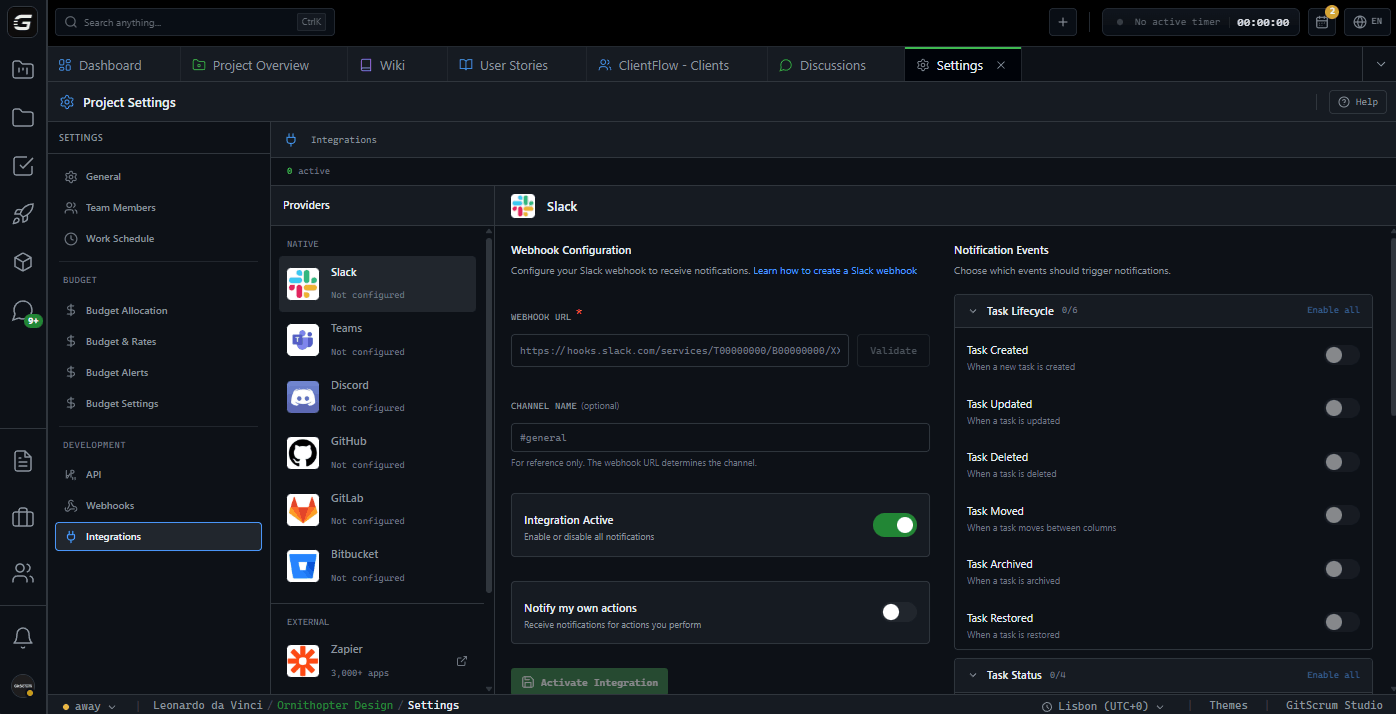
Connect Slack, Discord, or Microsoft Teams. Configure which events matter. Task blocked, epic completed, release started—notifications arrive instantly. No tab switching. No missed updates.
38 events. Three platforms. Your channels stay informed.
Your chat app.
Already supported.
Slack, Discord, Microsoft Teams—native webhook integration. Same events, same control. Connect where your team already communicates.
Slack
Incoming Webhooks with Block Kit formatting. Rich messages with task details, avatars, and action buttons. Channel-specific notifications
Discord
Webhook integration with Discord embeds. Color-coded messages, avatar thumbnails, and direct links. Perfect for dev communities
Microsoft Teams
Incoming Webhooks with Adaptive Cards. Enterprise-ready formatting, structured data, action buttons. Native Teams experience
Every event.
Your control.
Granular Event Control
Toggle individual events: task created but not updated, comments on mentions only. Fine-tune signal vs noise
Rich Message Format
Slack Block Kit, Discord embeds, Teams Adaptive Cards. Structured data, not plain text dumps
Direct Task Links
Every notification includes clickable links. Task, project, workstream—one click to context
Test Before Save
Validate webhook URL and send test message before saving. No broken integrations
Filter Own Actions
Toggle whether you see notifications for your own actions. Reduce self-generated noise
Multi-Channel Support
Different channels per project. Dev updates to #dev, client projects to #client-name
12 categories.
38 events.
From task lifecycle to release milestones. Every meaningful project event can trigger a notification.
Task Lifecycle
- Task created
- Task updated
- Task deleted
- Task moved
- Task archived
- Task restored
Task Status
- Task completed
- Task reopened
- Task blocked
- Task unblocked
Assignment
- Task assigned
- Task unassigned
Properties
- Due date changed
- Task overdue
- Priority changed
- Type changed
- Effort changed
- Labels changed
Comments
- Comment created
- Comment updated
- Comment deleted
- User mentioned
Attachments
- Attachment added
- Attachment removed
Checklists
- Checklist item completed
- Checklist fully completed
Time Tracking
- Time logged
Releases
- Release started
- Release completed
- Task added to release
- Task removed from release
Features & Notes
- Feature created
- Feature completed
Epics
- Epic created
- Epic completed
Team
- Member joined
- Member left
- Daily summary
Rich notifications.
Not text dumps.
Structured messages with context. Task title, assignee, project, priority—formatted for quick scanning.
Event Header
Clear event type with project context
Task Details
Title, status, priority, assignee with avatar
Action Links
Direct links to task, project, workstream
Metadata
Timestamp, actor, and relevant changes
Color-Coded Events

API-1024 Implement rate limiting
Assigned to Alex Chen by Sarah Kim
Project pulse.
In your Slack.
You manage multiple client projects. Updates scattered across boards, emails, and standups. With chat notifications, project pulse arrives where you already are—your Slack workspace. Key events surface without context switching.
Release Completion Alerts
Release ended? Know immediately. See what shipped without opening the board
Blocked Task Visibility
Task blocked notifications catch problems early. Address blockers before standup
Client Project Channels
Each client project to its own channel. Context stays organized, history searchable
I have 12 active client projects. Each one posts to its own Slack channel. I scan channels in the morning—blocked tasks, completed releases, new team members. I know the state of every project before coffee.
Rachel Martinez
Agency Director, Digital Studio (45 clients)
Standups used to be status reports. Now they're problem-solving sessions. I already know task status from Discord notifications. We spend standup time on actual blockers.
Kevin Park
Scrum Master, Software Company
Real-time awareness.
Zero effort.
You need to know when tasks complete, when releases ship, when someone's blocked. But checking the board constantly isn't practical. Chat notifications bring the board to you—updates arrive as they happen.
Task Completion Flow
See tasks complete in real-time. Track delivery pace without refreshing boards
Release Event Tracking
Release started, task added, release completed. Full release lifecycle in your channel
Assignment Notifications
Know when tasks get assigned or reassigned. Team workload shifts visible immediately
Stay informed.
Stay in flow.
You need to know when you're assigned tasks, when someone comments on your work, when reviews are needed. But checking the board breaks flow. Discord notifications bring updates to you—scan quickly, return to code.
Assignment Alerts
Task assigned to you? Notification with context. Know what's expected without leaving your IDE
Comment Mentions
Someone [at]mentioned you in a comment? Notification arrives. Respond without hunting through tasks
Filter Own Actions
Disable notifications for your own actions. See what others do, not echoes of yourself
I keep Discord open while coding. Task assigned, quick glance, back to code. Comment mention, check context, respond. I never open the board unless I need to. Notifications are my board.
Sarah Kim
Full-Stack Developer
My agency sends project updates to our Teams channel. I see tasks completing throughout the week. By Friday, I already know what shipped. The weekly call became optional.
David Chen
VP of Product, Enterprise Client
Progress updates.
Delivered automatically.
You want to know what's happening on your project without asking. Email updates feel outdated by arrival. With Teams notifications to your channel, you see real progress—tasks completing, releases shipping—as it happens.
Completion Visibility
Task done? You know immediately. No waiting for weekly reports
Release Milestones
Release completed notifications show what shipped. Concrete progress, not promises
Your Existing Tools
Updates arrive in Microsoft Teams. No new app to install, no new login to remember
Connect in 2 minutes.
Notifications forever.
Create webhook in your chat app. Paste URL. Select events. Every future update posts automatically.
Create Webhook
In Slack, Discord, or Teams, create an Incoming Webhook for your desired channel. Copy the webhook URL
Configure Integration
In GitScrum project settings, paste webhook URL. Test connection to verify it works
Select Events
Choose which event categories and individual events trigger notifications. Save and start receiving updates
GitScrum vs Alternatives
| GitScrum Chat Integration | Jira + Slack App | Asana + Slack | |
|---|---|---|---|
| Chat platforms | Slack, Discord, Teams | Slack, Teams | Slack only |
| Event types | 38 events | 15-20 events | 10-12 events |
| Event control | Individual toggle | Category only | Limited |
| Message format | Rich (Block Kit/Embeds/Cards) | Basic cards | Simple text |
| Direct links | Task, project, workstream | Issue only | Task only |
| Test webhook | Built-in | Not available | Not available |
| Filter own actions | Yes | No | No |
| Per-project config | Yes | Workspace level | Limited |
Frequently Asked Questions
Technical details about chat integrations
Which chat platforms are supported?
Slack, Discord, and Microsoft Teams. All three use webhook integrations—you create an Incoming Webhook in your chat app and paste the URL into GitScrum. Custom webhook URLs are also supported for other platforms.
How do I create a Slack webhook?
In Slack, go to your workspace settings → Apps → Incoming Webhooks → Add New Webhook to Workspace. Select the channel, copy the webhook URL. Paste it in GitScrum project integration settings.
What events can trigger notifications?
38 events across 12 categories: task lifecycle, task status, assignment, properties (due date, priority, effort), comments, attachments, checklists, time tracking, releases, features, epics, and team changes. Each event can be toggled individually.
Can I have different channels for different projects?
Yes. Each project has its own integration settings. Create different webhooks for different channels, configure each project to post to its designated channel.
What does 'Filter own actions' do?
When enabled, you won't receive notifications for actions you performed yourself. Create a task? No notification. Someone else creates a task? You get notified. Reduces self-generated noise significantly.
How do I test if my webhook works?
After entering the webhook URL, click 'Test Webhook' before saving. GitScrum sends a test message to verify the URL is valid and the channel receives messages. Fix issues before saving.
Are notification messages formatted nicely?
Yes. Slack uses Block Kit, Discord uses rich embeds, Teams uses Adaptive Cards. Messages include event type, task details, assignee with avatar, priority, and direct links. Color-coded by event type.
Can I receive a daily digest instead of real-time notifications?
Yes. Enable daily summary notification and configure the time. You'll receive a digest of the day's activity at your specified time. Works alongside or instead of real-time notifications.
Connect your team chat today.
Slack, Discord, Microsoft Teams—instant project notifications. 38 events. Rich formatting. Direct links. Stay informed without leaving your chat app.
No credit card required · Setup in 2 minutes







