
Global Search Find anything.
Command palette that searches across all your workspaces. Projects, tasks, notes, members, invoices—everything accessible in milliseconds. No more clicking through menus.
Cmd+K opens your entire workspace. Start typing, hit Enter, done.
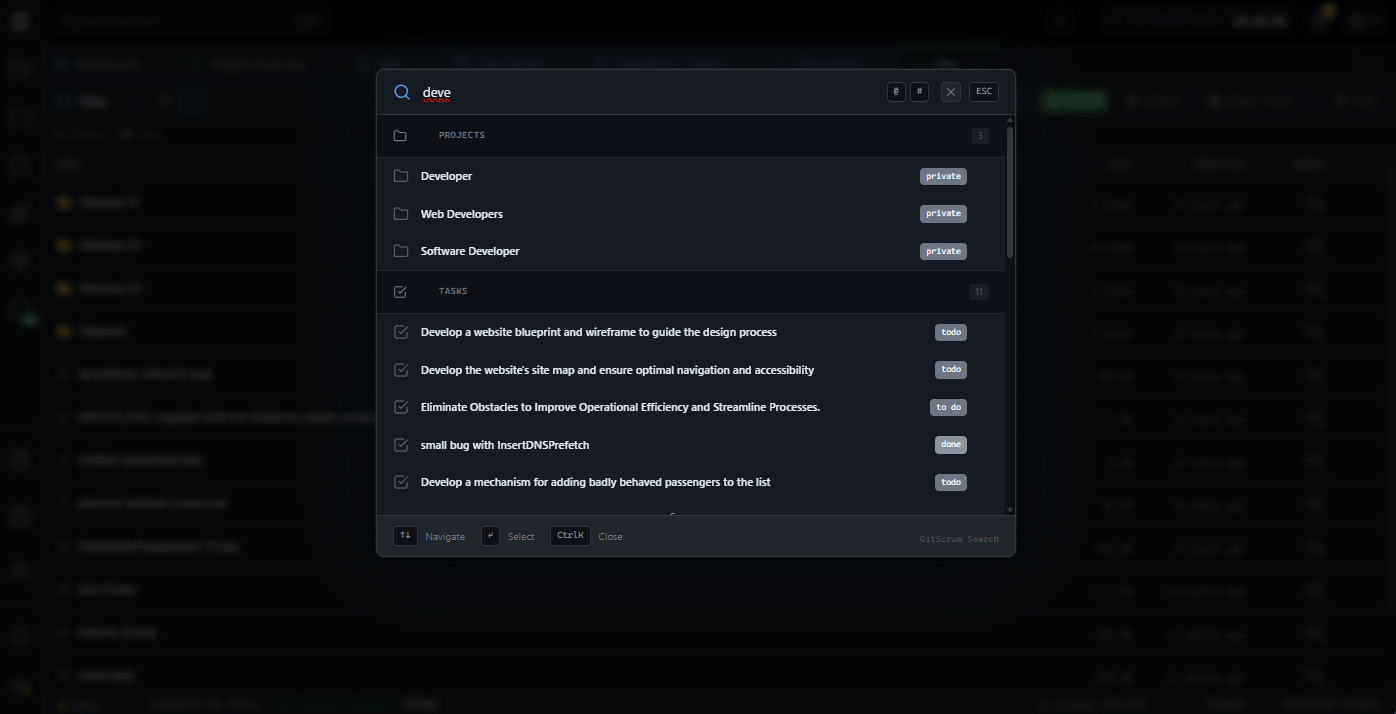
Search everything.
From anywhere.
Cmd+K Anywhere
Press Cmd+K (Ctrl+K on Windows) from any screen. Search modal opens instantly. Start typing immediately
Cross-Workspace Search
Search across ALL workspaces you belong to in one query. Results grouped by workspace automatically
Smart Prefixes
For members, # for projects, ! for tasks, $ for invoices. Power users skip filtering entirely
Recent Searches
Your last 5 searches saved locally. One click to repeat. Clear history anytime
Keyboard Navigation
Arrow keys to navigate, Enter to select, Esc to close. Never touch the mouse
Role-Based Results
See only what you have access to. Developers see dev stuff. Clients see client stuff. Automatic
Everything searchable.
One input.
From project management to client flow, every entity in GitScrum is instantly searchable. Results show status, path, and timestamp.
Project Management
- Projects
- Tasks
- Notes
- Epics
- globalSearch.entityTypes.categories.projectManagement.items[4]
Collaboration
- Members
- Discussions
- Wiki
- Files
- Labels
Productivity
- Time Tracking
- Notes (NoteVault)
Client Flow
- Clients
- Proposals
- Invoices
- Change Requests
- Workspaces
Type faster.
Find faster.
Skip category selection with smart prefixes. for people, # for projects, ! for tasks, $ for invoices.
Members
joao
Find team members by name or email
Projects
#dashboard
Jump to projects by name
Tasks
!fix login
Search tasks by title or description
Invoices
$INV-001
Find invoices by number
Zero mouse required.
Full keyboard control.
Every action accessible via keyboard. Navigate, select, close—all without moving your hands.
Full workspace visibility.
Zero overhead.
You manage multiple workspaces, dozens of clients, hundreds of projects. Finding that one invoice from last quarter or that specific task discussion shouldn't take 5 minutes of clicking through menus.
Cross-Workspace Search
Search all your workspaces simultaneously. Results show which workspace each item belongs to
Client Flow Access
Invoices, proposals, change requests—all searchable. Find $INV-2024-089 in seconds
Member Lookup
Find any team member across any workspace. [at]maria shows her profile instantly
I manage 8 workspaces across 23 clients. Before Cmd+K, I'd lose 20 minutes daily just navigating. Now I find anything in under 3 seconds. It's not a feature, it's a time machine.
David Chen
Founder, Digital Agency (45 team members)
In standups, someone mentions a blocker. I Cmd+K the task name while they're still talking. By the time they finish, I've already opened it and can ask specific questions. Saves 5 minutes per standup.
Sarah Mitchell
Engineering Manager, SaaS Platform
Context switch instantly.
Stay in flow.
You're on a call, someone asks about task #847. You're reviewing a project, need to check a related note. Every context switch costs you 23 minutes of focus. Unless you can search in 2 seconds.
Task Deep Dive
!fix authentication finds all tasks with 'fix authentication' in title or description. Click opens task drawer
Project Overview
Search project names directly. Jump to the board without navigating through the project first
Team Coordination
[at]developer shows their profile with current assignments. Know who's working on what instantly
IDE-native feel.
Search like you code.
You live in VS Code, Terminal, and browser DevTools. Command palettes are muscle memory. Project management tools that require mouse navigation feel like punishment. GitScrum search feels like home.
Keyboard-First Design
Cmd+K, type, arrows, Enter. Same pattern as VS Code Cmd+P. No relearning required
Technical Entities
Search tasks, notes, and wiki docs. All the things you actually need during development
Time Tracking Search
Find your time entries by comment. 'API integration' shows all time logged with that description
Finally, a PM tool that respects my workflow. Cmd+K is the same shortcut I use in VS Code, Figma, Slack. When I need to update a task, I don't break focus—I just search and update.
Marcus Weber
Senior Full-Stack Developer
I'm not technical, but Cmd+K is universal. Type what I need, click result. Found the Q3 proposal in 2 seconds instead of asking my account manager to send it again.
Rachel Torres
VP Marketing, Enterprise Client
Find your project info.
No training needed.
You need to check project status, review a proposal, or find an invoice. Navigating complex project management tools isn't your job. Search makes it simple—type what you're looking for, find it.
Project Status
Search your project name, see open work, recent tasks, progress at a glance
Document Access
Find proposals, invoices, change requests by searching any keyword in the title
Team Contact
[at]name shows who's working on your project. No hunting through org charts
Search in milliseconds.
Navigate instantly.
Global search is always one keystroke away. No setup, no configuration. Just press Cmd+K and start typing.
Press Cmd+K
From any screen, press Cmd+K (Ctrl+K on Windows). Search modal opens instantly with cursor focused
Type Your Query
Start typing what you're looking for. Results appear after 3 characters. Use prefixes for faster filtering
Navigate & Select
Arrow keys to move through results. Enter to open. Item opens in appropriate context (drawer, tab, or page)
GitScrum Search vs Alternatives
| GitScrum Global Search | Jira Search | Asana Search | |
|---|---|---|---|
| Single keystroke open | Cmd+K anywhere | / or click | Tab+/ or click |
| Cross-workspace search | All workspaces | Single project | Single workspace |
| Smart prefixes | [at] # ! $ | Limited | None |
| Full keyboard nav | Full support | Partial | Basic |
| Entity types | 17 types | Issues only | Tasks, projects |
| Results caching | 60s cache | Varies | Unknown |
| Role-based filtering | Automatic | Manual | None |
| Recent searches | Last 5 saved | Limited | None |
Frequently Asked Questions
Quick answers about global search
What's the minimum characters to search?
3 characters minimum. This prevents unnecessary API calls and ensures meaningful results. Prefixes ([at], #, !, $) don't count toward the minimum.
Can I search across all my workspaces at once?
Yes. When you don't specify a workspace, search queries all workspaces you belong to. Results include workspace name so you know where each item lives.
How do prefixes work?
Type the prefix before your query: [at]joao searches members, #dashboard searches projects, !bug searches tasks, $INV searches invoices. Prefix auto-filters to that category.
Are search results cached?
Yes. Results are cached for 60 seconds to improve performance. Accessible project IDs are cached for 5 minutes. Cache invalidates automatically when data changes.
Why can't I see certain categories?
Search is role-filtered. Developers see dev-related entities (tasks, notes, wiki). Clients see client-related entities (proposals, invoices). Agency owners see everything.
Does search work on mobile?
Yes. The search modal is responsive. Keyboard shortcuts don't apply, but you can tap the search icon in the header to open the same search interface.
Can I search file contents?
Currently, search matches file names only, not contents. For full-text search within files, open the file in the appropriate viewer.
How do I clear recent searches?
In the search modal, recent searches show a 'Clear' button. Click it to remove all saved searches. This clears localStorage data only.
Start searching smarter today.
One keystroke to find anything. 17 entity types. Cross-workspace. Keyboard-first. The search you've always wanted.
No credit card required · Setup in 2 minutes







