
Shareable Project Boards Skip the meeting.
Public board links that show real-time project status. Clients see exactly what you see. Password-protected when needed. No account creation, no training, no friction.
From status update emails to self-service visibility in one link
One link.
Complete transparency.
Public Link Generation
Generate unique URL for any board. Share via email, Slack, or client portal
Password Protection
Optional password layer for sensitive projects. You control who sees what
Context Filtering
Share the entire project, a workstream, or a single feature. Granular control
Real-Time Sync
Board updates instantly when tasks move. Clients always see current state
Read-Only Access
External viewers can see but not modify. Your workflow stays protected
Zero Login Required
Click link, see board. No signup, no password creation, no friction
Share what matters.
Hide what doesn't.
Three levels of granularity. Share the entire project, a workstream, or just one feature.
Project Board
All tasks in the project. Complete overview for stakeholders who need the big picture
Workstream Board
Tasks from a specific workstream only. Perfect for feature reviews and demos
Feature Board
Tasks related to one feature. Ideal for focused client feedback on specific deliverables
Protected by design.
Not by obscurity.
Security features that enterprise clients expect. Without the enterprise complexity.
Unique Token per Context
Each shared link has its own token. Revoke one without affecting others
Password Hashing
Passwords stored with bcrypt. Even we can't see them
Instant Revocation
Disable sharing with one click. Link stops working immediately
Token Regeneration
Generate new link anytime. Old links automatically invalidated
Clean board view.
No clutter.
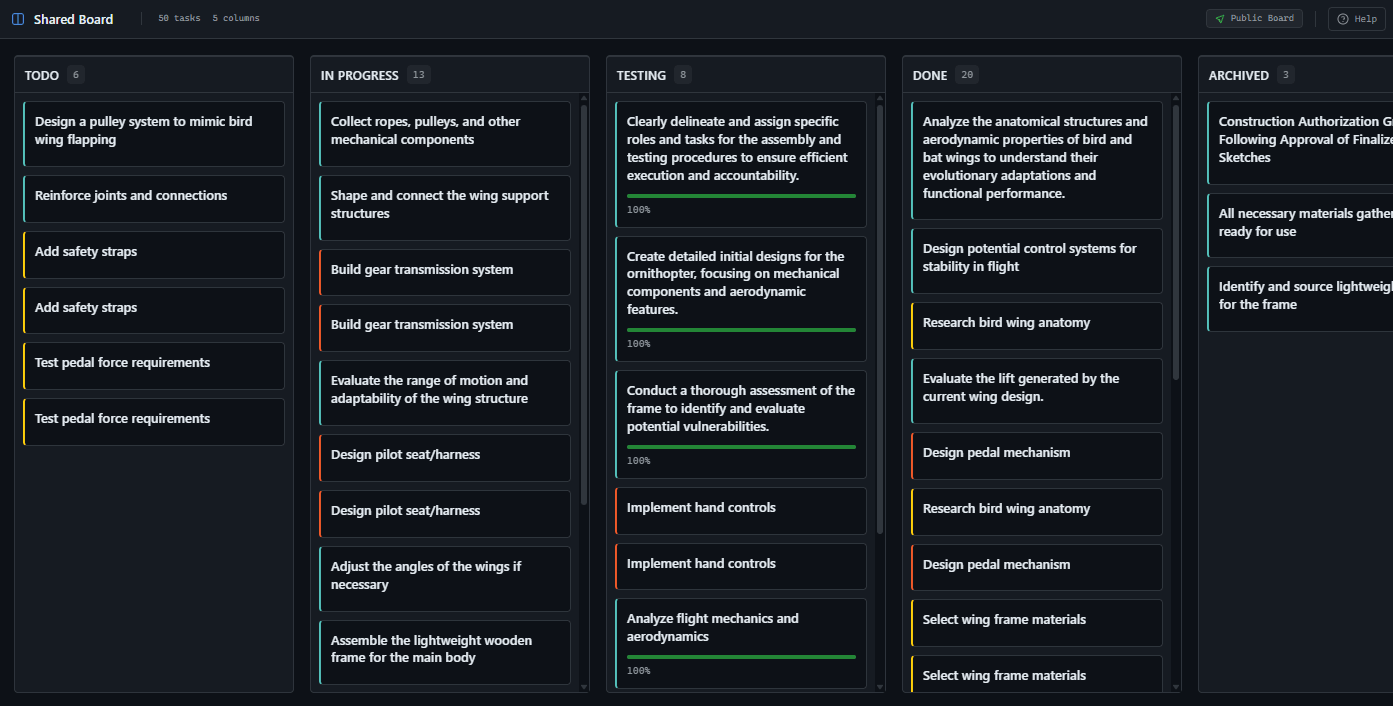
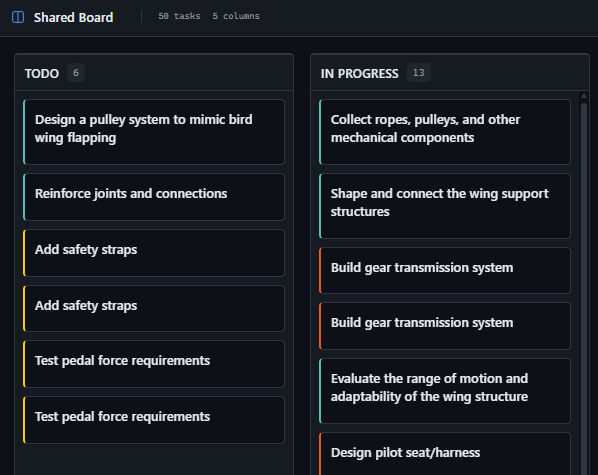
External viewers see a focused Kanban board. Task titles, status, progress, assignees. Everything relevant, nothing overwhelming.
Client updates.
Without client meetings.
Every client wants to know project status. Every status meeting takes an hour. Every hour you spend in meetings is an hour not delivering. Shared boards turn 'where are we?' emails into self-service.
Self-Service Client Portal
Clients check progress when they want. No scheduling, no prep, no follow-up
Trust Through Transparency
Real-time visibility builds confidence. Fewer anxious check-in calls
Project Scope Protection
Read-only access means clients can see but not edit. No accidental task changes
We send the board link after kickoff and barely get status questions anymore. Clients see tasks moving daily. That visibility reduced our weekly calls from 4 to 1.
Rachel Torres
Owner, Digital Consultancy (8 clients)
I stopped building status slides. Board link goes in the email, executives click when they have time. If task moved from 'In Progress' to 'Done', they see it instantly.
Daniel Park
Delivery Manager, Enterprise Software
Stakeholder reporting.
Without the reports.
Executives want updates. You want to manage projects. Building slides every week steals time from actual delivery. A shared board link replaces the status deck.
Live Status Page
Link to board in weekly email. Done. No PowerPoint, no screenshots
Workstream Demo Links
Share a workstream board before the review. Stakeholders arrive prepared
Multi-Stakeholder Access
Different links for different audiences. Technical team sees all, exec sees summary
Show your work.
Without the interruption.
You're deep in code. Slack message: 'Quick status check?' You lose 23 minutes of focus recovering context. A shared board answers the question before it's asked.
Async Progress Visibility
Tasks in 'Done' column speak for themselves. No need to explain what you shipped
Demo Without Context Switch
Share the feature board for a preview. Stakeholders see progress without disturbing you
Team Coordination
Remote teammates check board instead of asking. Fewer interruptions, better flow
My PM shares the workstream board link in standups. I update task status, everyone sees it immediately. Zero questions about what I'm working on.
Kenji Watanabe
Senior Frontend Developer
I check the board link every morning with coffee. I see exactly what shipped yesterday and what's in progress today. I've never felt more informed about a project.
Maria Santos
Product Owner, E-commerce Startup
Your project.
Always visible.
You hired a team. You want to know what they're doing. Waiting for weekly reports feels like flying blind. A board link shows exactly where your project stands, right now.
Real-Time Project Pulse
See tasks moving across columns. Progress is visible, not reported
No Software to Learn
Click link, see board. Works in any browser. Nothing to install or configure
Confidence Through Visibility
Watch your investment turn into deliverables. Every task completed is visible immediately
Three clicks.
Board is shared.
No configuration. No permissions setup. Open modal, enable sharing, copy link. Done.
Open Share Modal
Click share icon on any board. Modal shows sharing options
Enable Public Link
Toggle switch to enable. Unique URL generated instantly
Copy and Share
Copy link, paste anywhere. Recipients see board immediately
GitScrum vs Status Quo
| GitScrum Shareable Boards | Screenshots & Slides | Guest Accounts | |
|---|---|---|---|
| Real-time updates | Instant sync | Stale on send | After login |
| Setup time | 3 clicks | 15+ minutes | Account creation flow |
| Client experience | Click link, see board | Open email, scroll | Remember password |
| Security control | Password + toggle | Email forwarding risk | Permission matrix |
| Maintenance effort | Zero | Weekly rebuild | Account management |
| Access revocation | One click, instant | Cannot revoke sent | Admin intervention |
| Context filtering | Project/Workstream/Feature | Manual selection | Complex permissions |
| Mobile access | Fully responsive | Attachment download | App or responsive |
Frequently Asked Questions
Quick answers about shareable board links
Can viewers modify tasks?
No. Shared boards are read-only. External viewers can see tasks, columns, progress, and assignees but cannot make any changes. Your workflow remains protected.
What happens when I disable sharing?
The link stops working immediately. Anyone with the old URL gets a 401 unauthorized response. Re-enabling creates a new unique token, so old links never work again.
Can I share different views to different people?
Yes. Each context (project, workstream, feature) has its own independent share token. You can share the full project with executives and a specific workstream with QA.
How does password protection work?
When you set a password, viewers see a password prompt before the board loads. Passwords are hashed with bcrypt. You can change or remove the password anytime.
Do viewers need to create an account?
No. That's the entire point. Click link, see board. No signup, no login, no friction. If you add a password, they enter that—still no account needed.
Is the shared view real-time?
Yes. When team members move tasks, the shared board updates. Viewers might need to refresh to see latest changes, but there's no manual sync or delay.
Can I track who viewed the board?
Currently no. Shared boards are anonymous for simplicity. If you need view tracking, consider adding viewers as read-only project members instead.
What if a client needs to comment?
Shared boards are view-only. For clients who need to comment or interact, add them as project members with appropriate permissions. Shared links are for visibility, not collaboration.
Share your first board today.
Three clicks to client visibility. No configuration, no training, no friction. Just progress, shared instantly.
No credit card required · Setup in 2 minutes







