







VS Code

GitScrum for VS Code, Google Antigravity, Cursor and Windsurf!

GitScrum logo
Solution

Trello Alternative Software Dev 2026 | Built-In Sprints

Trello is great for simple task boards. But software development isn't simple. You need sprints—Trello has workarounds. You need GitHub integration—Trello has basic Power-Ups. You need time tracking—Trello requires third-party addons. GitScrum gives you Trello's simplicity with development-specific features built in. No Power-Up stacking. No workarounds. Real sprint planning, native GitHub integration, and time tracking that just works.

Trello Alternative Software Dev 2026 | Built-In Sprints

Trello's genius: drag-and-drop simplicity.

Cards, lists, boards. Anyone can use it in 5 minutes.

But Trello's limitation: it's a blank canvas. For software development, you need more than cards and lists: - Sprint planning → Trello has no sprint concept.

You fake it with labels or due dates. - GitHub integration → Trello's GitHub Power-Up shows basic info.

PRs don't move cards automatically. - Time tracking → Trello needs third-party Power-Ups.

Each adds complexity and often cost. - Burndown charts → Doesn't exist in Trello.

Export to spreadsheet if you want one. - Velocity tracking → Calculate manually or don't have it.

Every missing development feature requires a workaround or Power-Up. After stacking 5 Power-Ups, you've built a Frankenstein tool that's no longer simple.

GitScrum preserves Trello's simplicity—cards, drag-and-drop, visual boards—while building in development features natively. Sprint planning works out of the box.

GitHub syncs automatically. Time tracking is one click.

No assembly required.

The GitScrum Advantage

One unified platform to eliminate context switching and recover productive hours.

01

problem.identify()

The Problem

Trello has no native sprint concept

GitHub Power-Up is basic—no automatic card movement

Time tracking requires third-party Power-Ups

Burndown charts don't exist

Velocity tracking requires manual calculation

Stacking Power-Ups creates complexity

Free tier limits Power-Up usage

What started simple becomes Frankenstein tool

02

solution.implement()

The Solution

Trello-like simplicity with development features built-in

Native sprint planning with capacity and velocity

GitHub integration that moves cards automatically

One-click time tracking on any card

Burndown charts generated from sprint data

Velocity calculated from sprint history

All features included—no addon stacking

Stays simple because features are designed together

03

How It Works

1

Familiar Visual Experience

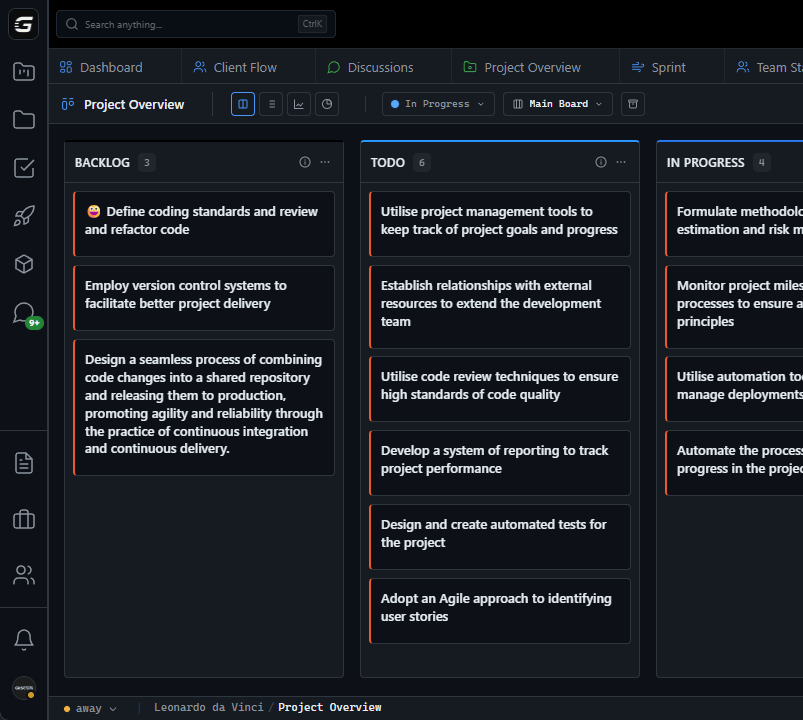
If you know Trello, you know the basics of GitScrum. Cards. Lists (columns). Drag and drop. But lists have meaning: Backlog, To Do, In Progress, Done. Sprint-aware by default.

2

Development Features Built In

Connect GitHub during setup. Now when you open a PR, cards move. When you merge, cards complete. Time tracking is a button on every card. Burndown generates automatically. No Power-Up hunting.

3

Sprint Planning That Works

Trello workaround: labels for sprints, due dates for deadlines, manually track what's in which sprint. GitScrum: actual sprint planning with backlog, capacity, velocity history. Drag cards to sprint. Done.

4

Simplicity Preserved

Because features are designed together, not stacked via plugins, the experience stays cohesive. No conflicting UI patterns. No redundant data entry. The tool grows with your process without growing in complexity.

04

Why GitScrum

GitScrum addresses Best Trello Alternative for Software Development through Kanban boards with WIP limits, sprint planning, and workflow visualization

Problem resolution based on Kanban Method (David Anderson) for flow optimization and Scrum Guide (Schwaber and Sutherland) for iterative improvement

Capabilities

  • Kanban boards with WIP limits to prevent overload
  • Sprint planning with burndown charts for predictable delivery
  • Workload views for capacity management
  • Wiki for process documentation
  • Discussions for async collaboration
  • Reports for bottleneck identification

Industry Practices

Kanban MethodScrum FrameworkFlow OptimizationContinuous Improvement

Frequently Asked Questions

Still have questions? Contact us at customer.service@gitscrum.com

Can we import our Trello boards?

Yes. Trello import brings cards, lists, labels, comments, and attachments. The structure transfers cleanly. You'll need to set up sprints (which didn't exist in Trello), but existing work migrates smoothly.

Is GitScrum as simple to use as Trello?

For basic operations: equally simple. Drag cards, add tasks, assign people. The difference: GitScrum has more features available when you need them. But they don't complicate basic workflows—they're there when you're ready.

What about Trello's free tier—is GitScrum free?

GitScrum offers a free tier with core features. Unlike Trello, you're not limited by Power-Up count. Development features (GitHub integration, time tracking, sprints) are included, not paywalled behind Business Class.

We have non-developers on our team who love Trello's simplicity—will they adapt?

The visual board experience is nearly identical. Non-developers use the same drag-and-drop interface they know. Development-specific features (GitHub sync, burndown) don't affect non-dev team members' workflows.

Ready to solve this?

Start free, no credit card required. Cancel anytime.

Works with your favorite tools

Connect GitScrum with the tools your team already uses. Native integrations with Git providers and communication platforms.

GitHubGitHub
GitLabGitLab
BitbucketBitbucket
SlackSlack
Microsoft TeamsTeams
DiscordDiscord
ZapierZapier
PabblyPabbly

Connect with 3,000+ apps via Zapier & Pabbly