
GitScrum PRO Annual — 2,500+ SaaS apps via MCP

GitScrum logo
Industry Vertical

Cloud Team PM 2026 | AWS Azure GCP Multi-Region DR

Cloud teams architect scalable AWS, Azure, GCP solutions with disaster recovery and cost optimization. Git tracks Terraform/CloudFormation, Wiki documents ADRs, Boards separate architecture from impl. Ship cloud 40% faster. Free trial.

Cloud Team PM 2026 | AWS Azure GCP Multi-Region DR

Cloud teams architect and implement cloud-native solutions where multi-region deployments, cost optimization, and vendor management require specialized expertise.

Your team designs scalable architectures, implements disaster recovery, and manages cloud spend while applications demand high availability. Reserved instance planning affects annual budgets, multi-region failures require coordinated response, and cloud provider limitations force architectural compromises.

Sprint planning coordinates architecture work with implementation, Wiki documents cloud architecture decisions and patterns, and Git integrations track Terraform and CloudFormation changes. Discussions coordinate multi-cloud strategy decisions.

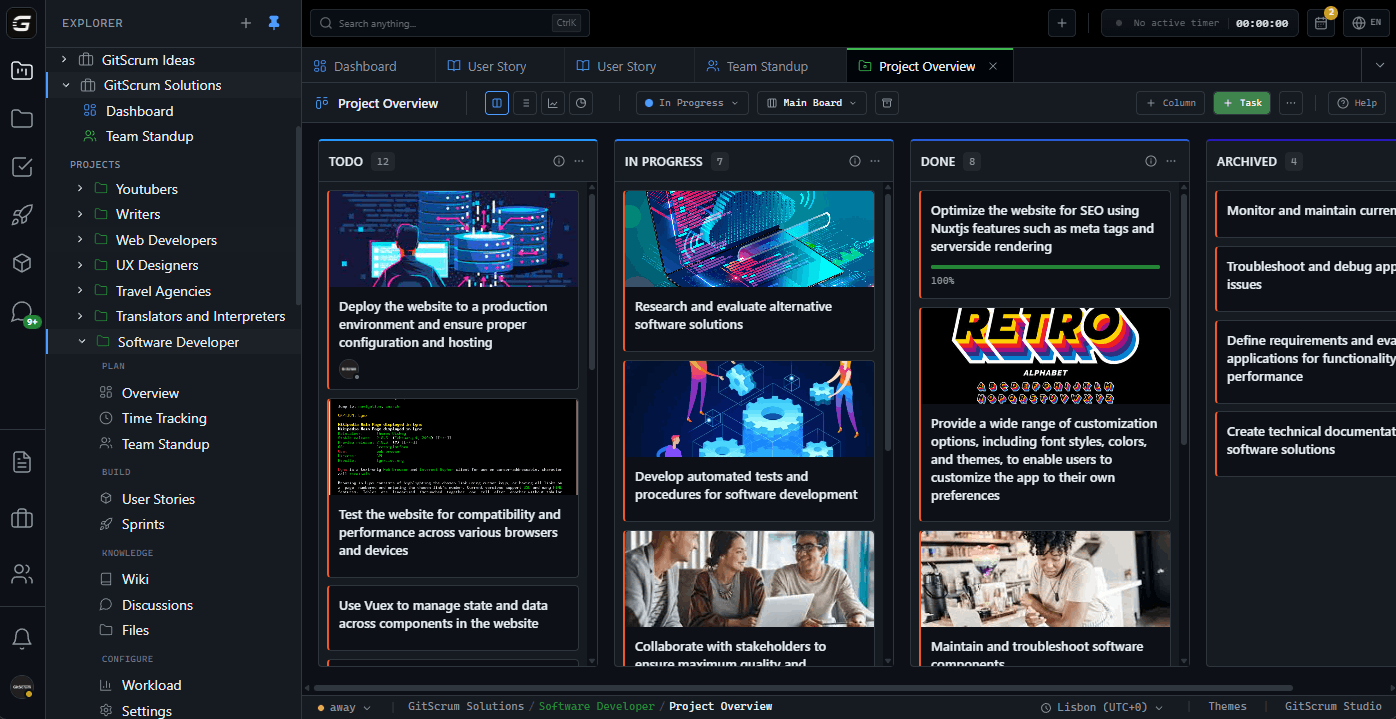
GitScrum helps cloud teams: boards separate architecture from implementation, user stories capture non-functional requirements, and time tracking monitors cloud optimization efforts.

The GitScrum Advantage

One unified platform to eliminate context switching and recover productive hours.

01

challenges.identify()

Challenges

Cloud cost optimization complexity

Multi-region disaster recovery coordination

Reserved instance planning for budgets

Vendor limitations forcing compromises

02

solution.implement()

How GitScrum Helps

Boards separate architecture from implementation

Wiki documents cloud architecture decisions

Git integration tracks IaC changes

User stories capture non-functional requirements

Discussions coordinate multi-cloud strategy

03

useCases.list()

Use Cases

Designing multi-region architectures

Implementing disaster recovery

Optimizing cloud costs

Managing reserved instance planning

Documenting architecture decision records

04

Why GitScrum

GitScrum provides Kanban boards, sprint planning with burndown charts, and workflow automation for Cloud Team teams

Project management based on Scrum Guide (Schwaber and Sutherland) and Kanban Method (David Anderson)

Capabilities

  • Kanban boards with customizable columns and WIP limits
  • Sprint planning with burndown and burnup charts
  • Time tracking with billable rates
  • Wiki for documentation
  • Git integration for code linkage
  • Client Portal for stakeholder visibility

Industry Practices

Scrum FrameworkKanban MethodAgile Project ManagementContinuous Improvement
features.related()

Key Features

View all features

Visual project management that actually fits how {vertical} work. Create unlimited Kanban boards with custom columns—from 'Client Review' to 'Ready to Deploy'—and set WIP limits that prevent the bottlenecks {city} teams know too well. Every card, comment, and status change syncs instantly across devices, so whether your {vertical} team is in the office or remote across {city}, everyone sees the same real-time picture.

Ship faster without the chaos. Drag-and-drop backlog prioritization, velocity tracking across iterations, and burndown charts that update as work gets done—not when someone remembers to update a spreadsheet. Your team always knows what's next, stakeholders see progress without asking, and {vertical} across {city} consistently hit their sprint commitments.

Code and project management finally speak the same language. Connect GitHub, GitLab, or Bitbucket in two clicks—every commit, branch, and pull request automatically links to the right task. Developers in {city} push code and managers see progress instantly, no status meetings required. {vertical} teams ship faster when the code tells the whole story.

New hires asking the same questions. Process docs scattered across Google Docs, Notion, and Slack pins. Sound familiar? Build your team's single source of truth with rich text editing, nested pages, and instant search. {vertical} in {city} onboard new members 3x faster when everything is documented once and findable forever.

{vertical} make hundreds of decisions weekly—and most get lost in chat noise. Threaded discussions keep conversations attached to the work they reference. Tag teammates, attach files, and search past decisions instantly. When clients in {city} ask 'why did we do it this way?'—you'll have the receipts.

Every unbilled hour is money walking out the door. One-click timers capture billable minutes automatically—no more end-of-week timesheet scrambles that plague {city} teams. Set custom rates per project, get nudges when timers run too long, and export reports that make invoicing effortless. {vertical} using GitScrum track 23% more billable hours on average.

Frequently Asked Questions

Still have questions? Contact us at customer.service@gitscrum.com

How do we track cloud costs?

Cost optimization board tracks initiatives. Link cost reduction tasks to architecture changes. Time tracking shows effort invested in optimization.

How do we plan disaster recovery?

DR board tracks recovery procedures by region. Wiki documents runbooks and failover procedures. Test DR periodically and track results.

How do we document architecture decisions?

Wiki organizes Architecture Decision Records (ADRs). Link ADRs to implementation tasks. Review and update as architecture evolves.

How do we manage multi-cloud strategy?

Discussions track strategic decisions with context. Boards separate work by cloud provider. Wiki documents provider-specific patterns and limitations.

Ready to get started?

Start free, no credit card required. Cancel anytime.

Works with your favorite tools

Connect GitScrum with the tools your team already uses. Native integrations with Git providers and communication platforms.

GitHubGitHub
GitLabGitLab
BitbucketBitbucket
SlackSlack
Microsoft TeamsTeams
DiscordDiscord
ZapierZapier
PabblyPabbly

Connect with 3,000+ apps via Zapier & Pabbly






