
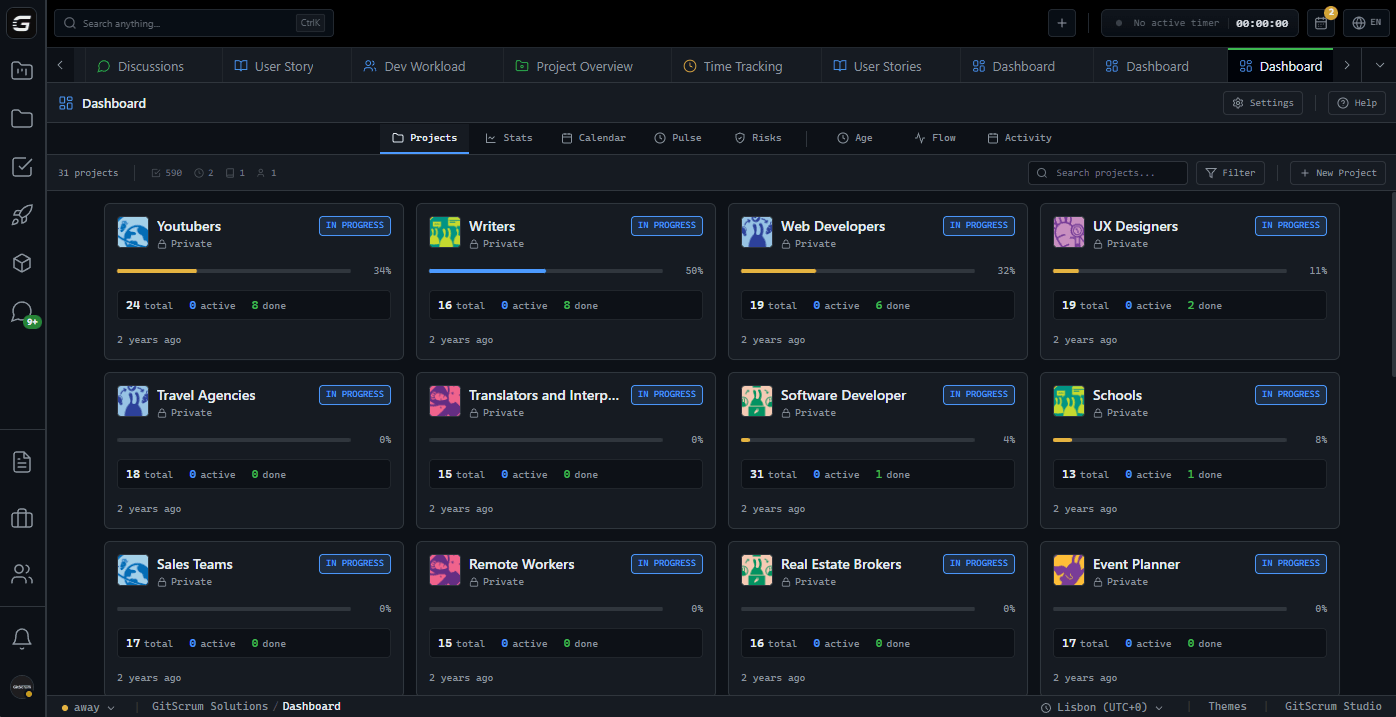







The New PM Tool Generation Legacy tools (2010s design): - Jira: Enterprise complexity for everyone - Asana: Marketing teams wearing dev clothes - Monday: Pretty but shallow - Basecamp: Great philosophy, dated execution New generation (2020s design): - Linear: Speed and beauty first - GitScrum: GitHub-native and complete - Height: AI-forward - Plane: Open source option - Shortcut: API-first design The difference: New tools are built for how teams work NOW, not how enterprises worked in 2012.
What Makes New Tools Different 1. Git-Native Architecture Old approach: - PM tool is source of truth - Developers update tickets manually - GitHub integration = webhook notifications - Status meetings to sync PM and code New approach: - Code is source of truth - Commits update tasks automatically - GitHub integration = real-time sync - PM tool reflects reality automatically 2.
Speed as Feature Old approach: - Features over performance - 3-second page loads acceptable - 'Power comes with complexity' - Users wait for the tool New approach: - Sub-second everything - Instant search, instant navigation - 'Fast IS the feature' - Tool waits for users 3. Developer Experience Priority Old approach: - Built for project managers - Developers 'use' the tool - Generic workflows - Mouse-first design New approach: - Built for developers - Developers 'live in' the tool - Code-workflow specific - Keyboard-first design 4.
Transparent Pricing Old approach: - 'Contact sales' for pricing - Enterprise tier required for features - Per-user costs hidden - Annual commitments pushed New approach: - Pricing on website - All features included - Per-user costs clear - Monthly flexibility New Tools Worth Trying in 2025 1. GitScrum Why it's different: - GitHub integration at the core, not edge - Time tracking included (rare!) - 2 users free forever (not trial) - Client portals for agency work Best for: - Development teams using GitHub - Agencies needing time tracking - Startups wanting to start free - Teams wanting complete tool Pricing: - 2 users: FREE forever - $8.90/user/month after - All features at all tiers Try if: You're tired of tools that don't understand GitHub workflow.
2. Linear Why it's different: - Fastest PM tool available - Beautiful, minimal design - Strong developer community - Excellent keyboard shortcuts Best for: - Pure software teams - Teams prioritizing speed above all - Design-conscious organizations Pricing: - $8/user/month minimum - No free tier for teams Try if: Speed and aesthetics are your top priority.
3. Height Why it's different: - AI features integrated throughout - Smart task organization - Modern, clean interface - Growing feature set Best for: - Teams interested in AI assistance - Product teams - Companies betting on AI future Pricing: - Free tier available - Paid tiers for advanced AI Try if: You want AI in your PM workflow now.
4. Plane (Open Source) Why it's different: - Self-hosted option - Open source transparency - Community-driven development - No vendor lock-in Best for: - Teams wanting control over data - Companies with self-hosting infrastructure - Open source enthusiasts Pricing: - Free (self-hosted) - Managed hosting available Try if: Data control and open source matter to you.
5. Shortcut Why it's different: - API-first design - Good balance of features - Mature but not bloated - Strong automation capabilities Best for: - Teams building automations - Medium-sized dev teams - API-centric workflows Pricing: - Free tier available - $8.50/user/month Pro Try if: You want to automate your PM workflow heavily.
Feature Comparison Matrix Feature GitScrum Linear Height Plane Shortcut ------- -------- ------ ------ ----- -------- GitHub native Deep Good Basic Good Good Speed Fast Fastest Fast Good Good Time tracking Yes No No Basic No Free tier 2 users No Yes Yes Yes Client portals Yes No No No No Sprint planning Yes Yes Yes Yes Yes Kanban boards Yes Yes Yes Yes Yes Wiki/docs Yes No No Yes No Mobile app Yes Basic Yes No Yes Dark mode Yes Yes Yes Yes Yes Keyboard first Yes Yes Yes No Yes Open source No No No Yes No AI features Basic Basic Advanced Basic Basic GitScrum: Most complete. Best for teams needing everything.
Linear: Fastest. Best for speed-first teams.
Why Try Something New? If you're on legacy tools: 1.
Jira fatigue - Configuration complexity - Admin burden - Speed issues - Overpaying for unused features 2. Monday disappointment - Pretty but shallow - Pricing inflation - Not really for developers - Integration gaps 3.
Asana mismatch - Built for other teams - Git integration lacking - Developer workflow ignored - Feature bloat 4. Trello outgrown - Great for simple - No sprint planning - Limited reporting - Needs level up New tools solve these specific problems.
Trying New Tools: Best Practices 1. Run parallel trial - Keep old tool read-only - Use new tool for current sprint - Compare velocity after 2 weeks - Make data-driven decision 2.
Involve the team - Developers have opinions - Let them try keyboard shortcuts - Check actual daily usage friction - Team buy-in matters 3. Test real workflows - Not demo project - Actual current work - Real GitHub integration - True velocity impact 4.
Check migration path - Can you import history? - How hard to switch back?
- What's the learning curve? - Support during transition?
GitScrum New Tool Trial Trying GitScrum specifically: Day 1: Setup - Sign up (30 seconds) - Connect GitHub (1 click) - Import from current tool or start fresh - Configure first board Day 2-7: First Sprint - Plan sprint with actual backlog - Let commits link automatically - Use time tracking if relevant - Note friction points Day 8-14: Assessment - Compare to old tool - Measure time saved - Check team sentiment - Make decision Why GitScrum Among New Tools GitScrum wins for teams wanting: 1. Complete solution - Sprint planning - Kanban boards - Time tracking - Wiki/docs - Client portals - All in one tool 2.
GitHub integration depth - Not just webhooks - Commits auto-link - PRs auto-update - Branch automation - Repository dashboard 3. Real free tier - 2 users forever - All features included - Not limited trial - Grow when ready 4.
Fair pricing - $8.90/user/month - Everything included - No enterprise gatekeeping - Predictable costs 2025 PM Tool Decision Framework Pick based on primary need: Speed above all: Linear (but no free tier, no time tracking) Complete feature set: GitScrum (GitHub + time + client portals) AI features: Height (but newer, less proven) Self-hosted: Plane (but requires infrastructure) API automation: Shortcut (but no time tracking) Most teams: GitScrum offers best balance of features, integration, and price. The New vs Legacy Reality Metric Legacy Tools New Tools (GitScrum) ------ ------------ -------------------- Setup time Days-weeks 30 minutes Learning curve Steep Minimal Admin burden High None Git integration Plugin/webhook Native Time tracking Extra cost Included Pricing transparency Contact sales On website Speed Variable Consistently fast Modern UX Dated Current New tools aren't just 'different' - they're better for modern teams.
Make the Switch 2025 is the year to try something new. GitScrum: - New generation PM tool - GitHub-native architecture - Complete feature set - 2 users free forever - $8.90/user/month Try GitScrum: Experience what new PM tools should feel like.
The GitScrum Advantage
One unified platform to eliminate context switching and recover productive hours.


