







VS Code

GitScrum for VS Code, Google Antigravity, Cursor and Windsurf!

GitScrum logo
Solution

Task Assignment for Dev Teams 2026 | Self Pull System

PM assigns every task? Bottleneck. GitScrum: pull system, devs self-assign from prioritized backlog. Ownership by choice, not command. $8.90/user. 2 free forever. Free trial.

Task Assignment for Dev Teams 2026 | Self Pull System

The Assignment Bottleneck Typical workflow: ├─ PM creates task ├─ PM decides who does it ├─ PM assigns to developer ├─ Developer gets notification ├─ Developer starts (maybe) Problems: ├─ PM doesn't know who's busy ├─ PM doesn't know who's best fit ├─ PM becomes bottleneck ├─ Developers wait for assignment ├─ No ownership - 'I was told to do this' Push System Failure Push = Manager decides, developer receives.

Symptoms: ├─ 'Why am I doing this?' ├─ 'This should be John's task' ├─ 'I'm blocked waiting for assignment' ├─ 'Nobody owns this problem' ├─ 'Ask the PM what to work on' Push creates: ├─ Dependency on manager ├─ Passive developers ├─ Resentment ├─ Mismatched skills to tasks ├─ Slow response to priorities Pull System: Developers Choose Pull = Developer picks from prioritized backlog. Workflow: ├─ PM prioritizes backlog ├─ Top items are highest priority ├─ Developer finishes task ├─ Developer pulls next from top ├─ No waiting for assignment Benefits: ├─ Developers own their choices ├─ Self-selection matches skills ├─ No bottleneck at PM ├─ Immediate next task available ├─ Intrinsic motivation Prioritized Backlog Model Backlog structure: ├─ Sprint Backlog (This Sprint) │ ├─ 1.

User auth - High priority │ ├─ 2. Payment integration - High │ ├─ 3.

Dashboard charts - Medium │ ├─ 4. Email notifications - Medium │ └─ 5.

Settings page - Low ├─ Product Backlog (Future) │ └─ Lower priority items Rule: ├─ Take from top of sprint backlog ├─ Can't skip to item 5 if 1-4 available ├─ Priority set by PM, selection by developer ├─ Trust the system When Assignment Makes Sense Some tasks need explicit assignment: ├─ Specialized expertise │ └─ 'Only Sarah knows the payment system' ├─ Development opportunity │ └─ 'Junior dev needs auth experience' ├─ Context continuation │ └─ 'Alex started this, should finish' ├─ Client relationship │ └─ 'Tom is the client contact' ├─ Critical deadlines │ └─ 'Must be done by Friday, ensuring coverage' Default to self-assignment. Assign when necessary.

Workload Visibility See who's doing what: ├─ Alex: 3 tasks in progress ├─ Sarah: 1 task in progress ├─ Tom: 2 tasks in progress ├─ Jordan: 0 tasks in progress Self-correction: ├─ Jordan sees they have no work ├─ Jordan pulls next task ├─ No manager intervention needed ├─ System balances itself Transparency: ├─ Everyone sees assignments ├─ No hidden workloads ├─ Fair distribution visible WIP Limits Prevent overcommitment: ├─ WIP Limit: 2 tasks per person ├─ Developer has 2 in progress ├─ Must finish one before pulling another ├─ Focus over multitasking Team WIP: ├─ Column limit: 5 items in 'In Progress' ├─ Team collectively manages flow ├─ Prevents bottlenecks ├─ Encourages helping others finish Skill-Based Self-Selection Developers know their strengths: ├─ Frontend dev sees UI task → Takes it ├─ Backend dev sees API task → Takes it ├─ Full-stack sees either → Chooses ├─ Learning opportunity → Stretch assignment Better matching: ├─ PM guess: 60% accurate ├─ Self-selection: 90% accurate ├─ Developers know their capacity ├─ Developers know their interest Mentorship Assignments Combine autonomy with growth: ├─ Senior developer tags complex task ├─ Junior can take with mentor assigned ├─ Both names on task ├─ Junior does work, senior reviews ├─ Skill transfer built in Balance: ├─ Autonomy for experienced ├─ Guidance for learning ├─ Not micromanagement Urgent Task Protocol Production issue at 3 PM: ├─ Task created with 'Urgent' flag ├─ Appears at top of board ├─ Anyone available pulls it ├─ Clear protocol, no confusion ├─ No waiting for PM to assign Escalation: ├─ Urgent not taken in 15 min ├─ Notify team channel ├─ Still not taken ├─ PM directly assigns Default: Pull. Fallback: Push.

Assignment Notifications When you need to assign: ├─ Assign developer to task ├─ Developer gets notification ├─ Reason in comment: 'Assigning because you know this system best' ├─ Developer can discuss if wrong fit ├─ Clear communication Self-assignment: ├─ Developer assigns self ├─ Team sees who took what ├─ No notification needed ├─ Natural transparency Team Capacity View Sprint planning support: ├─ Alex: 25 hours available ├─ Sarah: 30 hours available ├─ Tom: 20 hours (PTO Friday) ├─ Jordan: 30 hours available ├─ Team: 105 hours capacity Task estimates: ├─ Auth feature: 16 hours ├─ Payment: 24 hours ├─ Dashboard: 12 hours ├─ Total: 52 hours (50% capacity) Room for: ├─ Meetings ├─ Bug fixes ├─ Code reviews ├─ Unexpected work Assignment History Track patterns: ├─ Sarah: 80% backend tasks ├─ Alex: 90% frontend tasks ├─ Tom: 60% bugs, 40% features ├─ Jordan: 50/50 mix Insights: ├─ Is work distributed fairly? ├─ Is anyone doing only bugs?

├─ Are skills being developed? ├─ Any silos forming?

Data for retrospectives. Manager Role Shifts From: Task assigner To: Priority setter Manager responsibilities: ├─ Keep backlog prioritized ├─ Clarify requirements ├─ Remove blockers ├─ Coach and develop ├─ Handle exceptions Not: ├─ Decide who does what ├─ Track daily progress ├─ Micromanage execution ├─ Be the bottleneck Trust the team.

Focus on outcomes. Onboarding New Team Members New developer starts: ├─ Week 1: Assigned starter tasks ├─ Week 2: Self-select with mentor ├─ Week 3+: Full autonomy Gradual transition: ├─ Build confidence ├─ Learn codebase ├─ Understand priorities ├─ Join self-selecting team Getting Started 1.

Sign up GitScrum ($8.90/user, 2 free) 2. Create prioritized backlog 3.

Explain pull system to team 4. Let developers self-assign 5.

Review in retrospectives 6. Adjust as needed Trust breeds ownership.

Ownership breeds quality.

The GitScrum Advantage

One unified platform to eliminate context switching and recover productive hours.

01

problem.identify()

The Problem

Manager assigns every task - PM becomes bottleneck. Developers wait for assignments. Work slows while manager decides who does what.

Top-down kills ownership - 'I was told to do this' mentality. Developers as ticket-takers, not problem-solvers. No pride in work selection.

Poor skill matching - PM guesses who should do what. Often wrong. Backend dev assigned frontend task. Frustration and slow delivery.

Developers passive - Wait for instructions. Don't proactively take work. 'What should I work on?' instead of just grabbing next priority.

Overloaded individuals - PM assigns based on past performance. Best developers get overloaded. Others sit idle. Unfair distribution.

No visibility into workload - Who's busy? Who's available? PM doesn't know. Assignments based on guesswork. Some overwhelmed, some bored.

02

solution.implement()

The Solution

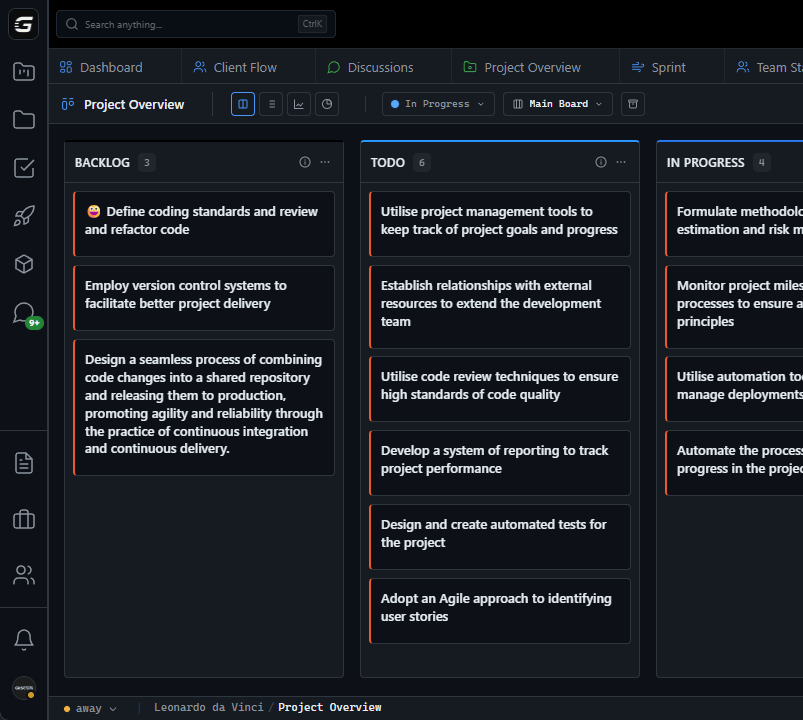
Pull system - Developers self-assign from prioritized backlog. No waiting for manager. Work flows continuously. Bottleneck eliminated.

Ownership by choice - Developers choose their tasks. 'I picked this' vs 'I was assigned this'. Pride in selection. Better outcomes.

Self-matching skills - Developers know their strengths. Frontend dev takes frontend. Backend takes backend. 90% accuracy vs PM's 60% guess.

Proactive developers - See prioritized backlog. Finish task, take next. No waiting. No asking. Autonomy drives engagement.

Visible workloads - See who has what. Self-balancing. Developer with nothing grabs task. Team manages itself.

WIP limits - Max 2 tasks per person. Prevents overload. Forces focus. Finish before starting. Quality over quantity.

03

How It Works

1

PM Prioritizes Backlog

Product manager orders tasks by priority. Top = most important. Team trusts the prioritization. Clear what matters most.

2

Developers Self-Assign

Developer finishes task. Looks at top of backlog. Assigns self to next available. No waiting. No asking permission.

3

Visibility Balances Workload

Everyone sees who has what. Someone overloaded? Others can help. Someone idle? Takes next task. Self-correcting system.

4

Exceptions When Needed

Specialized task? PM assigns to expert. Learning opportunity? Pair assignment. Default pull. Exception push.

04

Why GitScrum

GitScrum addresses Task Assignment Software for Development Teams - Self-Assignment Over Top-Down Assignment through Kanban boards with WIP limits, sprint planning, and workflow visualization

Problem resolution based on Kanban Method (David Anderson) for flow optimization and Scrum Guide (Schwaber and Sutherland) for iterative improvement

Capabilities

  • Kanban boards with WIP limits to prevent overload
  • Sprint planning with burndown charts for predictable delivery
  • Workload views for capacity management
  • Wiki for process documentation
  • Discussions for async collaboration
  • Reports for bottleneck identification

Industry Practices

Kanban MethodScrum FrameworkFlow OptimizationContinuous Improvement

Frequently Asked Questions

Still have questions? Contact us at customer.service@gitscrum.com

Won't developers just pick easy tasks?

Not with prioritized backlog. Rule: take from top. Priority set by PM, sequence enforced. Can't skip to easy task #10 when hard task #1 is next. Trust plus structure.

How do we handle specialized tasks?

Assign when needed. Auth system expert? Assign directly. But don't over-specialize. Most tasks can be done by multiple people. Default to self-assignment. Exception: direct assignment.

What if someone never takes hard tasks?

Visible in data. Assignment history shows patterns. Address in 1:1. But often self-corrects: peer pressure is real when workload is visible. Team norms develop organically.

How do we onboard new developers?

Gradual autonomy. Week 1: Assigned starter tasks with mentor. Week 2: Self-select with guidance. Week 3+: Full autonomy. Build confidence before full self-assignment.

Ready to solve this?

Start free, no credit card required. Cancel anytime.

Works with your favorite tools

Connect GitScrum with the tools your team already uses. Native integrations with Git providers and communication platforms.

GitHubGitHub
GitLabGitLab
BitbucketBitbucket
SlackSlack
Microsoft TeamsTeams
DiscordDiscord
ZapierZapier
PabblyPabbly

Connect with 3,000+ apps via Zapier & Pabbly