







VS Code

GitScrum for VS Code, Google Antigravity, Cursor and Windsurf!

GitScrum logo
Solution

Task Management Remote Dev Teams 2026 | Async-First

65% of devs work remote. GitScrum: async-first design, timezone-aware notifications, Git sync, Wiki knowledge. Work ships while you sleep. $8.90/user. 2 free forever. Free trial.

Task Management Remote Dev Teams 2026 | Async-First

The Remote Development Reality Distributed teams are normal: - 65% of developers work remote - Teams span continents - 10+ hour timezone gaps common - Different cultures, languages, styles Yet tools assume: - Everyone in same office - Same working hours - Instant availability - Real-time collaboration Mismatch causes friction.

Friction causes burnout. The Timezone Problem Team distribution: - San Francisco: -8 UTC - London: +0 UTC - Berlin: +1 UTC - Bangalore: +5:30 UTC - Tokyo: +9 UTC Overlap: Maybe 2 hours.

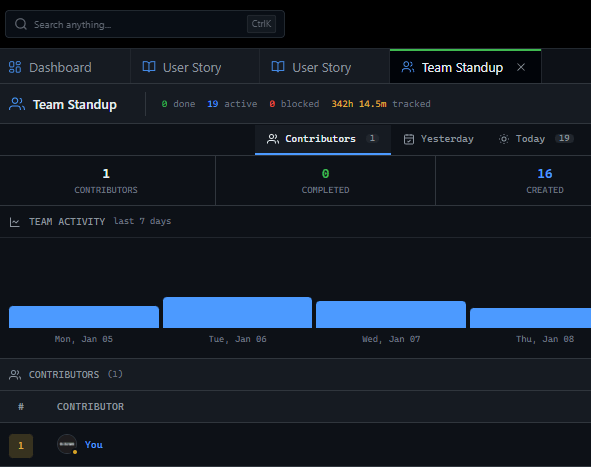
Rest of day: Working alone. Sync-first tools mean: - Meetings at midnight (someone's midnight) - Blocked waiting for response - Progress halted until timezone wakes - Work only happens during overlap Async-first means: - Work continues 24 hours - Handoffs between timezones - No one waits for anyone - Global velocity Standup Anti-Pattern Sync standup for remote teams: - 4 AM for Tokyo developer - 6 PM for SF developer - 30 minutes of status theater - Information already stale Async standup: - Each person writes update when they start - Done / Doing / Blocked - Everyone reads when they start their day - Written record for reference - No timezone penalty Same information.

Zero scheduling conflict. Actually useful.

Written Communication as Feature Remote development requires: - Decisions documented - Context preserved - Searchable history - No 'you had to be there' GitScrum supports: - Discussion threads on tasks - Decision logging - mentions for attention - Email notification fallback If it's not written, it didn't happen. Git as Universal Clock Time zones confuse humans.

Commit timestamps don't lie. GitScrum Git integration: - Branch creation = work started - Commit frequency = progress indicator - PR opened = ready for review - PR merged = done No status update needed.

Code is the synchronization point. Works any timezone.

Handoff Culture 24-hour productivity pattern: 1. EU team works 9-5 UTC 2.

EU team hands off to Americas 3. Americas works 14-22 UTC 4.

Americas hands off to Asia 5. Asia works 0-8 UTC 6.

Asia hands off to EU GitScrum enables: - Task assignments across timezones - Clear status visibility - Blocker flags for urgent items - Notification when someone needs you Your sleep is their work time. Work never stops.

Blocking vs. Non-Blocking Work Blocking work: - Needs approval to continue - Requires specific person's input - Creates bottleneck Non-blocking work: - Next task can start - Review happens async - Multiple paths forward GitScrum practices: - Clear task dependencies visible - Backlog always available - Context included on tasks - Never single-person bottleneck Plan for async.

Never be blocked. Code Review Without Waiting Sync code review: - Open PR - Ping reviewer - Wait for response - Reviewer in different timezone - Wait 12+ hours - Reviewer responds with questions - Another 12-hour round trip Async code review: - Open PR with full context - Self-review checklist completed - Reviewer picks up when available - Comments are comprehensive - Approve or request changes (not 'looks good') - Small PRs for quick turnaround GitScrum shows: - PR waiting time - Reviewer workload - Review completion patterns Visibility reduces wait time.

Documentation as First-Class Citizen Remote team problems: - 'How does this work?' (person offline) - 'Why did we decide this?' (conversation lost) - 'Where is that config?' (tribal knowledge) GitScrum Wiki: - Project documentation - Decision records - Process documentation - Searchable by everyone - No waiting for someone to wake up Write it once. Answer forever.

Meeting Reduction Strategy Sync meetings remote teams actually need: - Sprint planning (1x per sprint) - Retrospective (1x per sprint) - 1:1s (async possible) - Emergency (rare) Replace with async: - Daily standup (written updates) - Status checks (board visibility) - Quick questions (task comments) - Code review (PR comments) From 10 hours/week to 2 hours/week. Remaining meetings are high-value.

Timezone-Aware Notifications Bad notification: - 3 AM alert - Not urgent - Broken sleep - Resentment building GitScrum notifications: - Quiet hours per user - Digest delivery options - Urgency levels - Local time consideration Respect sleep. Respect work-life.

Respect timezones. Onboarding Distributed Team Members New remote developer challenges: - No physical shadowing - Different timezone than mentor - Context missing - Isolation common GitScrum onboarding support: - Documented processes in Wiki - Onboarding task board - Async buddy check-ins - Clear first tasks with context - Discussion threads for questions New hire productive without synchronous handholding.

Culture Without Co-location Remote team bonding: - Harder but not impossible - Shared context through documentation - Visible work appreciation - Async social channels GitScrum small touches: - See who's working on what - Celebrate completed sprints - Visible contributions - Team activity feed Connection through shared work. Why GitScrum for Remote Teams Built for distributed reality: - Async-first design - Written communication native - Git integration (true universal sync) - Timezone-aware notifications - Wiki for documentation - Discussion threads for context $8.90/user/month 2 users FREE forever No per-seat enterprise pricing.

No timezone limits. All features included.

Getting Started with Distributed Team 1. Create project 2.

Add team (any timezone) 3. Connect Git repository 4.

Set up notification preferences per member 5. Create sprint with backlog 6.

Enable written standups 7. Ship code around the clock Team spread globally.

Work flows continuously. No one waits for anyone.

The GitScrum Advantage

One unified platform to eliminate context switching and recover productive hours.

01

problem.identify()

The Problem

Sync-first tools - Built for co-located teams. Assume instant availability. Force real-time collaboration. Fail distributed reality.

Timezone penalty - Standups at midnight for someone. 12-hour wait for response. Progress blocked until timezone overlap. Work only during shared hours.

Context lost in chat - Important decisions in Slack thread. Scrolled away. Not searchable. New team member can't find history.

Meeting overload - Every sync point becomes meeting. Calendar full. Productive hours gone. Different timezones equally punished.

Single-person bottlenecks - Approval needed from specific person. Different timezone. 24-hour delay minimum. Work halted.

Tribal knowledge problem - How things work is in someone's head. That person is asleep. Question waits until they wake.

02

solution.implement()

The Solution

Async-first design - Written communication native. Updates when convenient. No real-time requirement. Distributed teams equal.

24-hour productivity - Handoffs between timezones. Work continues while you sleep. No waiting for overlap. Global velocity.

Documented decisions - Discussion threads on tasks. Wiki for processes. Searchable history. Context always available.

Meeting reduction - Async standups replace daily meetings. Board visibility replaces status checks. High-value meetings only.

Multiple paths forward - Clear backlog always available. No single-person dependencies. Work never blocked by timezone.

Wiki knowledge base - Processes documented. Questions answered permanently. No waiting for person to wake up.

03

How It Works

1

Set Up Distributed Team

Add team members from any timezone. Configure notification preferences per person. Set quiet hours respecting local time.

2

Enable Async Standups

Team members write daily updates on tasks. Done/Doing/Blocked format. Everyone reads when starting their day. No scheduling conflicts.

3

Connect Git for Timezone-Free Sync

Code activity updates tasks automatically. Branch, PR, merge visible regardless of timezone. Code is universal clock.

4

Document in Wiki

Processes, decisions, how-tos in searchable Wiki. Questions answered permanently. New team members self-onboard.

04

Why GitScrum

GitScrum addresses Task Management for Remote Development Teams - Async-First Collaboration through Kanban boards with WIP limits, sprint planning, and workflow visualization

Problem resolution based on Kanban Method (David Anderson) for flow optimization and Scrum Guide (Schwaber and Sutherland) for iterative improvement

Capabilities

  • Kanban boards with WIP limits to prevent overload
  • Sprint planning with burndown charts for predictable delivery
  • Workload views for capacity management
  • Wiki for process documentation
  • Discussions for async collaboration
  • Reports for bottleneck identification

Industry Practices

Kanban MethodScrum FrameworkFlow OptimizationContinuous Improvement
features.related()

Related Features

View all features

Async communication - Threaded discussions on tasks. Written record preserved. No chat scroll loss. Context always available.

Knowledge base - Processes documented. Questions answered permanently. New members self-serve. No waiting for person to wake.

Code and project management finally speak the same language. Connect GitHub, GitLab, or Bitbucket in two clicks—every commit, branch, and pull request automatically links to the right task. Developers in {city} push code and managers see progress instantly, no status meetings required. {vertical} teams ship faster when the code tells the whole story.

Timezone-aware alerts - Quiet hours per user. Digest delivery. Urgency levels. Sleep respected across timezones.

Visual project management that actually fits how {vertical} work. Create unlimited Kanban boards with custom columns—from 'Client Review' to 'Ready to Deploy'—and set WIP limits that prevent the bottlenecks {city} teams know too well. Every card, comment, and status change syncs instantly across devices, so whether your {vertical} team is in the office or remote across {city}, everyone sees the same real-time picture.

Junior devs shouldn't access client billing. Contractors shouldn't see other projects. Set granular permissions that match how {vertical} actually work—by role, project, or even specific boards. Invite freelancers in {city} with time-limited access, track who did what, and revoke credentials in one click.

Frequently Asked Questions

Still have questions? Contact us at customer.service@gitscrum.com

How do async standups work?

Each team member writes a daily update on their current tasks: Done (yesterday), Doing (today), Blocked (if any). Posted when starting their workday. Everyone reads when convenient. Blockers trigger immediate notifications to relevant people. Same sync value, no 4 AM meetings.

How does GitScrum handle timezone differences?

Notifications respect user's quiet hours (set per person). Git integration provides universal sync point - code activity updates tasks regardless of who's awake. Board shows activity feed so anyone can see progress. Wiki documents decisions for async reference.

Can we still have synchronous meetings when needed?

Yes. Async-first doesn't mean async-only. Sprint planning and retrospectives benefit from sync time. GitScrum doesn't force anything - use what works for your team. The goal is reducing unnecessary sync, not eliminating all meetings.

How do we onboard new team members remotely?

Wiki contains documented processes and how-tos. Onboarding board has clear first tasks with full context. Discussion threads allow async questions. Buddy system works across timezones with written check-ins. New members can self-serve most information.

Ready to solve this?

Start free, no credit card required. Cancel anytime.

Works with your favorite tools

Connect GitScrum with the tools your team already uses. Native integrations with Git providers and communication platforms.

GitHubGitHub
GitLabGitLab
BitbucketBitbucket
SlackSlack
Microsoft TeamsTeams
DiscordDiscord
ZapierZapier
PabblyPabbly

Connect with 3,000+ apps via Zapier & Pabbly