
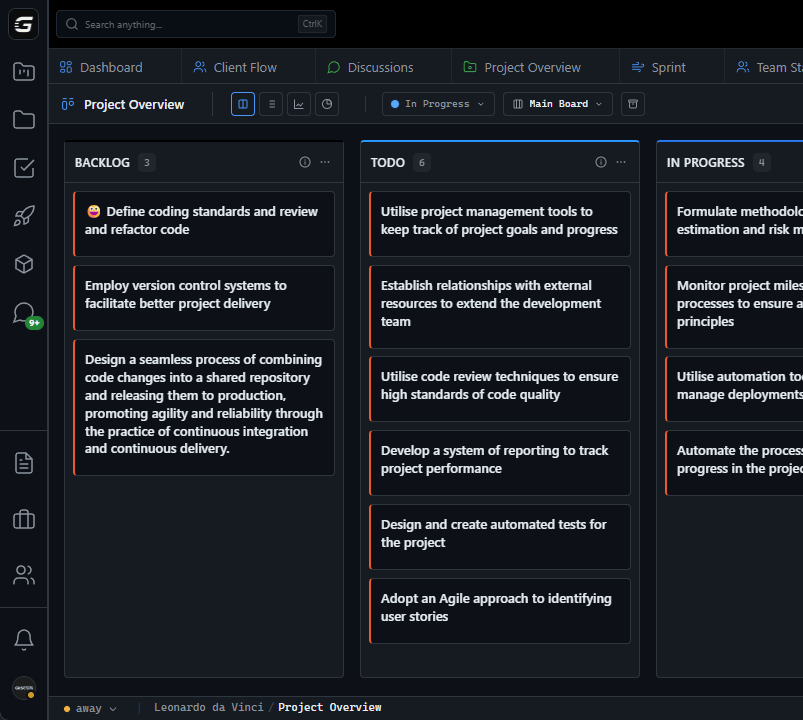







VS Code

GitScrum for VS Code, Google Antigravity, Cursor and Windsurf!

GitScrum logo
Solution

Bug Tracking Agile Teams 2026 | GitHub Auto-Sync

Bug tracking in one tool, work management in another. You log bugs in Jira, but actual work happens in GitHub issues. Bug reported, ticket created, but where's the fix? Hunting through two systems wastes time. GitScrum unifies bugs and work. GitHub issues sync automatically. See bug status, PR progress, and fix deployment in one view. Stop switching systems. 2 users free. $8.90/user/month.

Bug Tracking Agile Teams 2026 | GitHub Auto-Sync

The Bug Tracking Split Most development teams track bugs in two places: Place 1: The Bug Tracker - Customer reports bug - Support creates ticket - Product triages - Assigned to sprint Place 2: GitHub - Developer creates issue - Links to bug ticket (maybe) - Creates branch, PR - Merges fix The problem: These don't automatically connect.

Where's the Fix? Customer asks: 'Is my bug fixed?' Support checks bug tracker: - Status: 'In Progress' - Last update: 3 days ago - No other information Reality in GitHub: - PR merged yesterday - Fix deployed to staging - Waiting for production release Nobody updated the bug tracker.

Customer thinks bug is still being worked on. The Coordination Tax Developers: - Create GitHub issue for bug - Update Jira ticket to link it - Update Jira when PR opened - Update Jira when PR merged - Update Jira when deployed Time spent updating two systems: 10-15 min/bug With 20 bugs/sprint: 3-5 hours/sprint just updating.

Support/Product: - Check Jira for status - Status unclear, ask developer - Developer checks GitHub - Relay information back - Repeat for every bug Why Bug Trackers Fail Development Teams Built for Support, Not Code: - Track tickets, not branches - Track status, not PRs - Track assignments, not commits - No visibility into actual development Manual Everything: - Manual status updates - Manual linking to code - Manual deployment tracking - Human error guaranteed Stale Information: - Bug tracker shows 'In Progress' - PR merged a week ago - Nobody remembered to update - Customer frustrated No Development Context: - Which branch has the fix? - Is CI passing?

- Who's reviewing? - When will it deploy?

Bug tracker can't answer any of these. GitScrum: Bugs Connected to Code GitScrum treats bugs as what they are: work that happens in GitHub.

Automatic GitHub Sync: - GitHub issues appear as bugs - Labels sync (bug, critical, etc.) - Branch creation visible - PR status shown - Merge reflected Complete Bug Lifecycle: 1. Bug reported (GitHub issue or GitScrum task) 2.

Assigned to developer 3. Branch created -> Status auto-updates 4.

PR opened -> Shows PR status 5. Review approved -> Visible 6.

Merged -> Bug auto-closes 7. Deployed -> Deployment status shown How Bug Tracking Works in GitScrum Bug Creation: From GitHub: - Create issue with 'bug' label - Appears in GitScrum automatically - All GitHub metadata synced From GitScrum: - Create task marked as Bug - Syncs to GitHub issue - Same result, different entry point Bug Triage: - View all bugs in dedicated view - Sort by severity, age, reporter - Drag to sprint or assign - Priority visible Development Tracking: On Bug Card: - Branch indicator when work starts - Commit count - PR status (draft/open/merged) - CI status (pass/fail) - Review status - Merge readiness No manual updates needed.

Bug Resolution: Traditional: 1. Developer merges PR 2.

Developer remembers to update ticket 3. (Developer forgets) 4.

PM asks 'Is this done?' 5. Developer confirms 6.

PM updates ticket GitScrum: 1. Developer merges PR 2.

Bug status automatically updates 3. Everyone sees it's fixed Bug Views and Filters Bug Dashboard: - Total open bugs - By severity (Critical/High/Medium/Low) - By age (>7 days, >14 days, >30 days) - By status (New/Triaged/In Progress/Fixed) Filter Options: - Severity - Reporter - Assignee - Sprint - Repository - Label - PR status - Age Special Filters: - 'Bugs with open PRs' (almost done) - 'Bugs waiting for review' (blocked) - 'Bugs merged not deployed' (in pipeline) - 'Old bugs with no activity' (forgotten) Bug Metrics Time Metrics: - Time to triage (report -> assigned) - Time to fix (assigned -> merged) - Time to deploy (merged -> production) - Total bug lifecycle Volume Metrics: - Bugs opened per week/sprint - Bugs closed per week/sprint - Bug backlog trend - Bug debt ratio Quality Metrics: - Reopened bugs - Bugs per feature - Critical bug frequency - Customer-reported vs internal Bug Notifications Developers Get: - New bug assigned - Bug severity changed - Bug blocking release Product/Support Gets: - Bug fixed (PR merged) - Bug deployed - Bug reopened Team Leads Get: - Critical bug reported - Bug aging past threshold - Bug backlog growing Integration with Sprint Planning Bug Allocation: - See bug backlog during planning - Drag bugs into sprint - Bug velocity tracked separately - Balance bugs vs features Capacity Consideration: - Historical bug time shown - Bug interrupt factor - Realistic sprint planning Release Readiness: - 'No critical bugs' gate - Bug burndown for release - Blocking bugs highlighted Comparison: Bug Tracking Tools | Feature | Jira | GitHub Issues | GitScrum | |---------|------|---------------|----------| | Bug tracking | Yes | Basic | Full | | PR visibility | Manual link | Native but limited | Full | | CI status | Plugin | Native | Integrated | | Auto status update | No | Limited | Full | | Deployment tracking | Plugin | Actions | Integrated | | Sprint planning | Yes | No | Yes | | Unified workflow | No | Partial | Yes | Real Scenarios Scenario 1: Customer Bug Report Old Way: - Customer reports bug - Support creates Jira ticket - Dev creates GitHub issue, links manually - Dev fixes, merges PR - Dev forgets to update Jira - Customer asks for status - Support checks Jira: 'In Progress' - Support asks dev - Dev: 'Fixed last week' - Everyone frustrated GitScrum Way: - Customer reports bug - Support creates GitScrum bug - Syncs to GitHub issue - Dev fixes, merges PR - Bug auto-updates to 'Fixed' - Customer notified - No manual handoff Scenario 2: Release Preparation Old Way: - 'What bugs are fixed in this release?' - Check Jira...

not accurate - Check GitHub... scattered across repos - Manual compilation of list - 2 hours to create release notes GitScrum Way: - Filter: Bugs merged since last release - Instant list with PR links - Export for release notes - 5 minutes Scenario 3: Sprint Retrospective Old Way: - 'How much time on bugs?' - Guess based on tickets - No actual data - 'Felt like a lot' GitScrum Way: - Bug time automatically tracked - 23% of sprint on bugs - 3 critical, 12 medium, 8 low - Average fix time: 2.3 days - Data-driven discussion Pricing - 2 users: FREE forever - 3+ users: $8.90/user/month - Full bug tracking included - GitHub sync for bugs - Bug analytics dashboard 5-person team: $26.70/month - All bug tracking features - Automatic status updates - Bug metrics and trends - Sprint bug allocation 10-person team: $71.20/month - Everything above - Cross-repo bug visibility - Custom bug workflows - Deployment tracking The Bottom Line Bugs are code work.

Track them where code happens. When bugs connect to code: - No duplicate tracking - No stale statuses - No 'Is it fixed yet?' questions - Automatic lifecycle management GitScrum: Bug tracking that connects to your code.

2 users free. $8.90/user/month.

Know where every bug stands.

The GitScrum Advantage

One unified platform to eliminate context switching and recover productive hours.

01

problem.identify()

The Problem

Bug tracking in one tool, development in another - constant context switching

Manual status updates between systems waste 3-5 hours/sprint

Bug status stale - tracker says 'In Progress' but PR merged days ago

No visibility into fix progress - branch created? PR open? Reviews done?

Customer asks 'Is it fixed?' and nobody knows without checking GitHub

Release prep requires manual bug-by-bug verification

02

solution.implement()

The Solution

Unified bug and development tracking - one tool, one truth

Automatic status updates from GitHub activity - no manual sync

Real-time bug status reflects PR and merge state

Full visibility: branch, commits, PR, review, merge, deploy

Instant answer to 'Is it fixed?' - check the card

Release readiness view shows all bugs and their code status

03

How It Works

1

Bug Entry

Create bugs in GitScrum or GitHub. Either way syncs automatically. Label with severity, assign to developer.

2

Development Tracking

Branch created shows work started. PR opened shows code ready for review. All visible on bug card without manual updates.

3

Resolution

PR merged automatically updates bug to fixed. No manual status change needed. Deployment status shows when fix is live.

4

Reporting

Filter bugs by status, severity, age, PR state. See bug metrics, trends, and release readiness instantly.

04

Why GitScrum

GitScrum addresses Bug Tracking Software for Agile Development Teams through Kanban boards with WIP limits, sprint planning, and workflow visualization

Problem resolution based on Kanban Method (David Anderson) for flow optimization and Scrum Guide (Schwaber and Sutherland) for iterative improvement

Capabilities

  • Kanban boards with WIP limits to prevent overload
  • Sprint planning with burndown charts for predictable delivery
  • Workload views for capacity management
  • Wiki for process documentation
  • Discussions for async collaboration
  • Reports for bottleneck identification

Industry Practices

Kanban MethodScrum FrameworkFlow OptimizationContinuous Improvement

Frequently Asked Questions

Still have questions? Contact us at customer.service@gitscrum.com

Can I use GitScrum for bugs without replacing our existing bug tracker?

Yes. GitScrum syncs with GitHub issues. If you want to keep your current tracker, just create GitHub issues from it and GitScrum will show the development progress. Eventually most teams consolidate.

How does severity/priority work?

Use GitHub labels (bug, critical, high, medium, low) and they sync to GitScrum. Or set priority in GitScrum and it syncs back. Filter and sort bugs by severity in either place.

Can support team members use GitScrum?

Yes. Support can create bugs, see status updates, and communicate with customers—all without needing GitHub access. They see bug progress without learning developer tools.

What about bugs found in production after release?

Same workflow. Create the bug, assign, fix, deploy. GitScrum can show which version/release a bug was fixed in, helping track hotfixes vs scheduled releases.

Ready to solve this?

Start free, no credit card required. Cancel anytime.

Works with your favorite tools

Connect GitScrum with the tools your team already uses. Native integrations with Git providers and communication platforms.

GitHubGitHub
GitLabGitLab
BitbucketBitbucket
SlackSlack
Microsoft TeamsTeams
DiscordDiscord
ZapierZapier
PabblyPabbly

Connect with 3,000+ apps via Zapier & Pabbly