







VS Code

GitScrum for VS Code, Google Antigravity, Cursor and Windsurf!

GitScrum logo
Solution

Actual vs Estimated Time 2026 | Improve Dev Estimates

Developers estimate tasks but never compare to actuals. How to improve? Track time, compare estimates. Accuracy improves 40% in 3-5 sprints. Free trial.

Actual vs Estimated Time 2026 | Improve Dev Estimates

Estimation is a skill—and like any skill, it improves with feedback.

The problem is that most teams never close the loop. They estimate tasks, complete them, and move on without ever comparing what they predicted to what actually happened.

This means estimation errors compound: developers who underestimate by 2x continue underestimating by 2x forever. GitScrum closes the feedback loop.

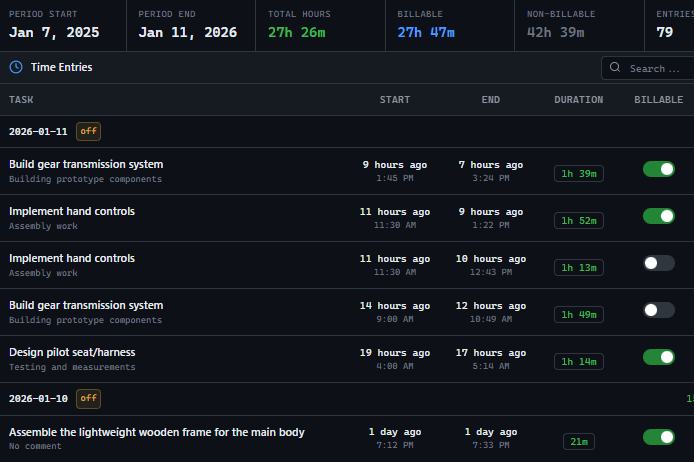
Every task has an estimatedminutes field for time predictions. IssueTimeTracker records actual time spent with start/stop functionality, calculating durationtimeinminutes automatically.

After tasks complete, developers can compare their estimate to actual time. Over sprints, patterns emerge: 'I always underestimate database migrations by 50%' or 'My frontend estimates are accurate but backend ones are 2x off.' This awareness improves future estimates.

Analytics aggregate the data: estimation accuracy ratios, variance by task type, improvement trends over time. The goal isn't perfect estimates—it's progressively better ones.

The GitScrum Advantage

One unified platform to eliminate context switching and recover productive hours.

01

problem.identify()

The Problem

Developers estimate tasks but never compare estimates to actual time spent

Estimation errors compound over time because there's no feedback loop

No data to identify which task types are consistently under or overestimated

Impossible to improve estimation skills without tracking accuracy

Project timelines drift because individual task estimates are unreliable

02

solution.implement()

The Solution

Every task has estimated_minutes field for time predictions before work starts

IssueTimeTracker records actual time with start/stop functionality and automatic duration calculation

Task completion view shows estimated vs actual side-by-side for immediate comparison

Analytics aggregate estimation accuracy by developer, task type, and time period

Estimation improvement trends show whether accuracy is getting better over sprints

03

How It Works

1

Set Time Estimates

When creating or refining tasks, set estimated_minutes—your prediction of how long the task will take. This is your hypothesis before starting work. Be honest, not optimistic.

2

Track Actual Time

Start the time tracker when you begin work on a task. Stop it when you're done (or paused). GitScrum's IssueTimeTracker records start/end times and calculates duration_time_in_minutes automatically.

3

Compare After Completion

When a task is done, compare estimated_minutes to actual tracked time. If you estimated 120 minutes and spent 180, that's a 1.5x underestimate. Notice the pattern.

4

Review Accuracy Patterns

Over time, analytics reveal patterns: 'Bug fixes take 1.5x my estimates' or 'API integrations take 2x'. This awareness lets you adjust future estimates for specific task types.

5

Track Improvement

Monitor your estimation accuracy ratio over sprints. A ratio of 1.0 means perfect estimates. If you started at 2.0 (2x underestimates) and improved to 1.2, your planning is now much more reliable.

04

Why GitScrum

GitScrum addresses Tracking Actual vs Estimated Time in Software Projects through Kanban boards with WIP limits, sprint planning, and workflow visualization

Problem resolution based on Kanban Method (David Anderson) for flow optimization and Scrum Guide (Schwaber and Sutherland) for iterative improvement

Capabilities

  • Kanban boards with WIP limits to prevent overload
  • Sprint planning with burndown charts for predictable delivery
  • Workload views for capacity management
  • Wiki for process documentation
  • Discussions for async collaboration
  • Reports for bottleneck identification

Industry Practices

Kanban MethodScrum FrameworkFlow OptimizationContinuous Improvement

Frequently Asked Questions

Still have questions? Contact us at customer.service@gitscrum.com

How do I compare estimated vs actual time for a task?

Set estimated_minutes when creating the task. Track time while working using the start/stop button. After completion, GitScrum shows both values: your estimate and the actual tracked duration_time_in_minutes. Divide actual by estimated to get your accuracy ratio—1.0 is perfect, 2.0 means you underestimated by 2x.

What if I forget to track time on some tasks?

Time tracking data is only useful when it's consistent. Missing entries skew your accuracy data. GitScrum makes tracking easy with one-click start/stop, but the habit is on you. For tasks you forgot to track, you can manually add time entries with estimated duration. Consistency matters more than perfection.

Should I estimate in minutes or hours?

GitScrum uses minutes (estimated_minutes field) because it forces precision. '3 hours' feels like a round number; '180 minutes' requires actual thought. For display, the UI converts to hours when appropriate. Estimate in the smallest unit that makes sense—you'll be more accurate.

How long does it take to improve estimation accuracy?

Most developers see measurable improvement within 3-5 sprints of consistent tracking and comparison. The key is actually reviewing the data—not just collecting it. After each sprint, look at which tasks you missed by the widest margin and ask why. Patterns emerge quickly: 'I always forget integration testing time.'

Can I see estimation accuracy patterns by task type?

Yes. Analytics break down accuracy by task type (Bug, Feature, Improvement, etc.) and by developer. This reveals patterns like 'Bug fixes are estimated accurately but Features are consistently 1.8x off.' With this data, you can apply type-specific multipliers to future estimates or investigate why certain types are harder to estimate.

Ready to solve this?

Start free, no credit card required. Cancel anytime.

Works with your favorite tools

Connect GitScrum with the tools your team already uses. Native integrations with Git providers and communication platforms.

GitHubGitHub
GitLabGitLab
BitbucketBitbucket
SlackSlack
Microsoft TeamsTeams
DiscordDiscord
ZapierZapier
PabblyPabbly

Connect with 3,000+ apps via Zapier & Pabbly