







VS Code

GitScrum for VS Code, Google Antigravity, Cursor and Windsurf!

GitScrum logo
Solution

Multi-Tool Cognitive Load 2026 | One Interface Ends Chaos

8 browser tabs, 8 UX patterns—brain exhausted from tool-switching. GitScrum: one interface to master, flow state restored. Free trial.

Multi-Tool Cognitive Load 2026 | One Interface Ends Chaos

Tool proliferation creates invisible cognitive tax.

Each tool has unique UX patterns that must be learned and maintained in memory. Switching between tools requires mental gear-shifting.

'Flow state' becomes impossible when every few minutes you're adapting to a different interface. Developers report feeling mentally drained not from hard problems, but from tool juggling.

Creativity suffers because cognitive resources are depleted by navigation overhead.

The GitScrum Advantage

One unified platform to eliminate context switching and recover productive hours.

01

problem.identify()

The Problem

8+ browser tabs competing for attention

Different UX patterns per tool

Constant mental context-switching

Flow state impossible to achieve

Cognitive capacity spent on navigation

02

solution.implement()

The Solution

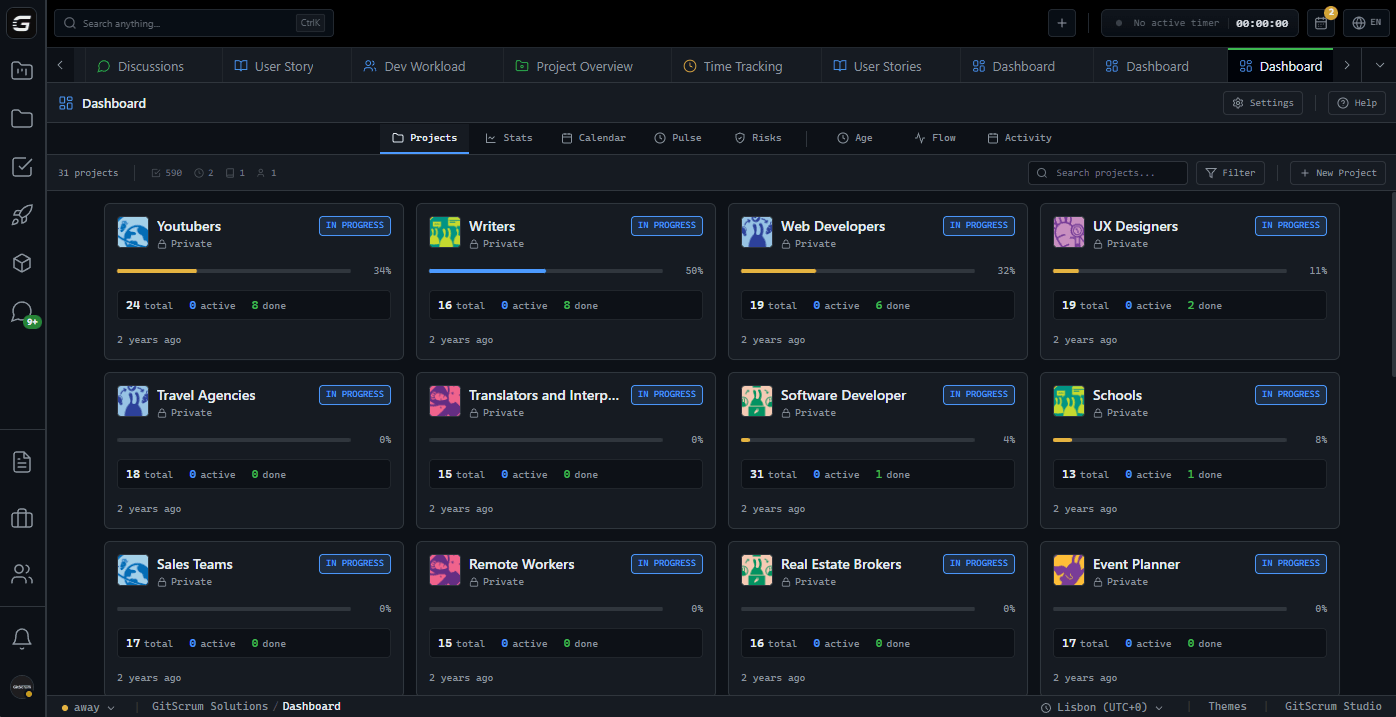
Single interface for all work activities

Consistent UX patterns throughout

One mental model to maintain

Flow state achievable

Cognitive capacity reserved for problem-solving

03

How It Works

1

One Tab, All Work

Consolidate browser chaos: 'GitScrum open in one tab. Tasks: here. Documents: here. Time tracking: here. Activity feed: here. Search everything: here. IDE and GitScrum—two tabs for development work. Not eight competing applications demanding attention.'

2

Consistent Navigation

Learn once, use everywhere: 'Sidebar navigation same on every page. Search works same way across tasks, docs, projects. Keyboard shortcuts consistent throughout. Master the interface once—proficiency applies everywhere. No re-learning for each module.'

3

Unified Mental Model

One way of thinking: 'Everything is a project containing tasks. Tasks have comments, attachments, time logs. Consistent hierarchy. Consistent interactions. Brain doesn't have to switch between 'Jira thinks about work this way' vs 'Notion thinks about work that way.'

4

Protected Focus

Enable deep work: 'Developer opens GitScrum → sees assigned tasks → opens task with full context → works. No tool-hopping interrupts flow. Notifications consolidated in one place—check when ready, not constant context switches. Focus periods become achievable.'

04

Why GitScrum

GitScrum addresses Cognitive Overload from Juggling Multiple Tool Interfaces through Kanban boards with WIP limits, sprint planning, and workflow visualization

Problem resolution based on Kanban Method (David Anderson) for flow optimization and Scrum Guide (Schwaber and Sutherland) for iterative improvement

Capabilities

  • Kanban boards with WIP limits to prevent overload
  • Sprint planning with burndown charts for predictable delivery
  • Workload views for capacity management
  • Wiki for process documentation
  • Discussions for async collaboration
  • Reports for bottleneck identification

Industry Practices

Kanban MethodScrum FrameworkFlow OptimizationContinuous Improvement

Frequently Asked Questions

Still have questions? Contact us at customer.service@gitscrum.com

Won't learning a new tool add to cognitive load initially?

Short-term yes, long-term massive reduction. Learning one tool thoroughly versus juggling eight tools superficially. Initial investment pays off quickly—most developers report feeling 'lighter' within weeks as the constant context-switching disappears.

What about specialized tools we still need (IDE, design tools)?

Keep specialized tools that do specialized work: IDE for coding, design tools for design. The consolidation is project management overhead—tasks, docs, time, coordination. You'll still have your IDE and design tools, just fewer management tools competing for attention.

How does GitScrum reduce cognitive load compared to other PM tools?

Most PM tools add complexity. GitScrum is opinionated about keeping things simple: consistent patterns, minimal configuration needed, sensible defaults. The interface stays out of your way. Complexity available when needed, simplicity by default.

Is there research supporting cognitive load from tool switching?

Extensively. Studies show each tool switch costs 23+ minutes of refocusing time. Cognitive load theory shows working memory has limits—multiple interfaces consume that capacity. Developers consistently report improved focus and reduced fatigue after consolidating tools.

Ready to solve this?

Start free, no credit card required. Cancel anytime.

Works with your favorite tools

Connect GitScrum with the tools your team already uses. Native integrations with Git providers and communication platforms.

GitHubGitHub
GitLabGitLab
BitbucketBitbucket
SlackSlack
Microsoft TeamsTeams
DiscordDiscord
ZapierZapier
PabblyPabbly

Connect with 3,000+ apps via Zapier & Pabbly