







VS Code

GitScrum for VS Code, Google Antigravity, Cursor and Windsurf!

GitScrum logo
Solution

Standup Updates 4x Daily 2026 | One Entry, Full Visibility

Meeting→Slack→board→time tracker. Same status, 4 entries daily. 10 devs × 15 min = 2.5 hrs lost. Update once, reflects everywhere automatically. Free trial.

Standup Updates 4x Daily 2026 | One Entry, Full Visibility

The daily standup is meant to be a quick synchronization—what you did yesterday, what you are doing today, any blockers.

In theory, fifteen minutes. In practice, the information from standup needs to travel to multiple destinations.

The verbal update happens in the morning meeting, but not everyone attends or remembers what was said. So you post the same update in the team Slack channel for asynchronous visibility.

But the Slack message does not update your task status, so you open the project board and move cards or update task comments to reflect what you shared verbally and in Slack. If you track time, you also need to log what you worked on yesterday in the time tracking system—essentially restating your standup update in yet another format.

For distributed teams, the standup might happen asynchronously in the first place—typed into Slack or a standup bot. But that still does not update the project board or time tracker automatically.

The same information gets entered multiple times every single day. Multiply by team size—ten developers each spending fifteen minutes on redundant status entry means two and a half hours of team productivity lost daily just to administrative overhead.

The updates also drift apart. What you said in standup might differ slightly from what you posted in Slack, which might not match the task board, which definitely does not match the time log.

Inconsistency breeds confusion. GitScrum unifies daily updates with project management.

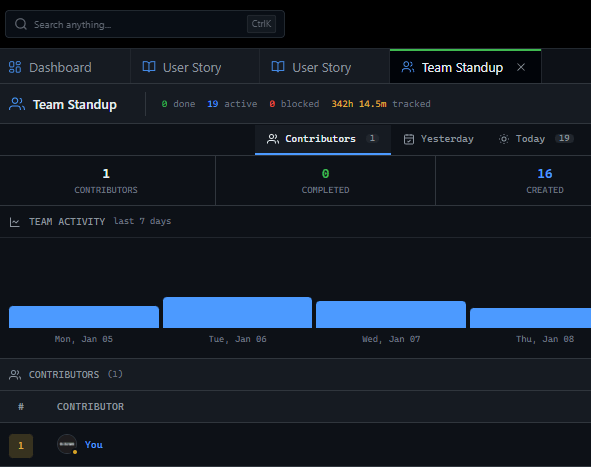
Update your status once and it reflects in your tasks, team visibility, and time tracking. No redundant entry, no drift between sources.

One update, complete visibility.

The GitScrum Advantage

One unified platform to eliminate context switching and recover productive hours.

01

problem.identify()

The Problem

Same standup information entered in meeting, Slack, board, and time tracker

Four different tools for the same daily status update

Redundant entry consumes hours of team time daily

Updates drift apart across different tools

Inconsistent information creates confusion

Administrative overhead detracts from actual work

02

solution.implement()

The Solution

Single daily update reflects across all visibility channels

Status update integrated with task and time tracking

No redundant entry across multiple tools

Consistent information across entire platform

Hours of team time recovered daily

Focus on work instead of administrative overhead

03

How It Works

1

Single Status Entry

Enter daily update once in unified platform

2

Task Integration

Status automatically updates related tasks and boards

3

Time Association

Work logged connects to time tracking automatically

4

Team Visibility

Team feed shows all updates without separate Slack posts

04

Why GitScrum

GitScrum addresses Daily Standup Updates Repeated in Multiple Formats and Tools through Kanban boards with WIP limits, sprint planning, and workflow visualization

Problem resolution based on Kanban Method (David Anderson) for flow optimization and Scrum Guide (Schwaber and Sutherland) for iterative improvement

Capabilities

  • Kanban boards with WIP limits to prevent overload
  • Sprint planning with burndown charts for predictable delivery
  • Workload views for capacity management
  • Wiki for process documentation
  • Discussions for async collaboration
  • Reports for bottleneck identification

Industry Practices

Kanban MethodScrum FrameworkFlow OptimizationContinuous Improvement

Frequently Asked Questions

Still have questions? Contact us at customer.service@gitscrum.com

Why do standup updates need to be entered multiple times?

Different tools serve different purposes but need the same information. The verbal standup syncs the team present in the meeting. Slack captures it for those who missed the meeting or need to reference later. The project board needs tasks updated to reflect what was discussed. Time tracking needs to know what you worked on. Each tool has its own data store and does not share with the others, so the same information must be entered separately in each.

How much time does redundant status entry cost?

Individually, entering your standup in four places might take ten to twenty minutes daily. But multiply by team size—a ten-person team loses one hundred to two hundred minutes daily, which is nearly two to four hours of team productivity. Over a week, that's ten to twenty hours. Over a month, forty to eighty hours of team capacity consumed by administrative overhead that adds no value to the actual work.

How does unified status management solve this?

When daily updates integrate with project management, time tracking, and team visibility, you enter your status once. Update what you worked on and it automatically reflects in your task status, logs time, and appears in the team activity feed. No separate Slack post needed because teammates can see your updates in the shared activity stream. No redundant data entry across multiple disconnected tools. One update, complete visibility everywhere.

Ready to solve this?

Start free, no credit card required. Cancel anytime.

Works with your favorite tools

Connect GitScrum with the tools your team already uses. Native integrations with Git providers and communication platforms.

GitHubGitHub
GitLabGitLab
BitbucketBitbucket
SlackSlack
Microsoft TeamsTeams
DiscordDiscord
ZapierZapier
PabblyPabbly

Connect with 3,000+ apps via Zapier & Pabbly