







VS Code

GitScrum for VS Code, Google Antigravity, Cursor and Windsurf!

GitScrum logo
Solution

Why Devs Hate Jira 2026 | Faster Alternative for Teams

'Developers hate Jira' auto-completes on Google. Slow UI, 47 statuses, JQL queries. GitScrum: sub-100ms UI, Cmd+K shortcuts, 4 simple columns. $8.90/user. 2 free. Free trial.

Why Devs Hate Jira 2026 | Faster Alternative for Teams

Ask any developer about Jira.

Watch their face. The grimace is universal.

Why developers hate Jira: 1. Slow, sluggish UI — Every click has latency.

Loading spinners everywhere. After years of using VS Code's instant response, Jira feels like molasses.

2. Mandatory fields that break flow — Can't save a ticket without filling 12 required fields.

Your quick bug report becomes a 5-minute form-filling exercise. 3.

Workflow states that don't match reality — 47 status options. None quite fit what you're actually doing.

So you pick wrong, or stop updating altogether. 4.

Poor keyboard navigation — Developers live on keyboards. Jira requires constant mouse clicking.

No Cmd+K command palette. No Vim-style shortcuts.

5. JQL learning curve — Want to find your tickets?

Learn a query language. A query language for project management.

6. GitHub integration via plugins — The thing developers use most (GitHub) requires marketplace plugins to integrate properly.

The pattern: Jira was built for managers tracking resources, not developers doing work. Every UX decision prioritizes reporting over working.

The GitScrum Advantage

One unified platform to eliminate context switching and recover productive hours.

01

problem.identify()

The Problem

Jira UI is slow—every click has noticeable latency

Mandatory fields interrupt quick task creation

47 workflow states when 5 would work

No keyboard-first navigation like VS Code

JQL query language to find your own tickets

GitHub integration requires marketplace plugins

Built for managers tracking, not developers working

Updates feel like homework, not progress tracking

02

solution.implement()

The Solution

Sub-100ms interactions—no loading spinners

Minimal required fields—quick capture by default

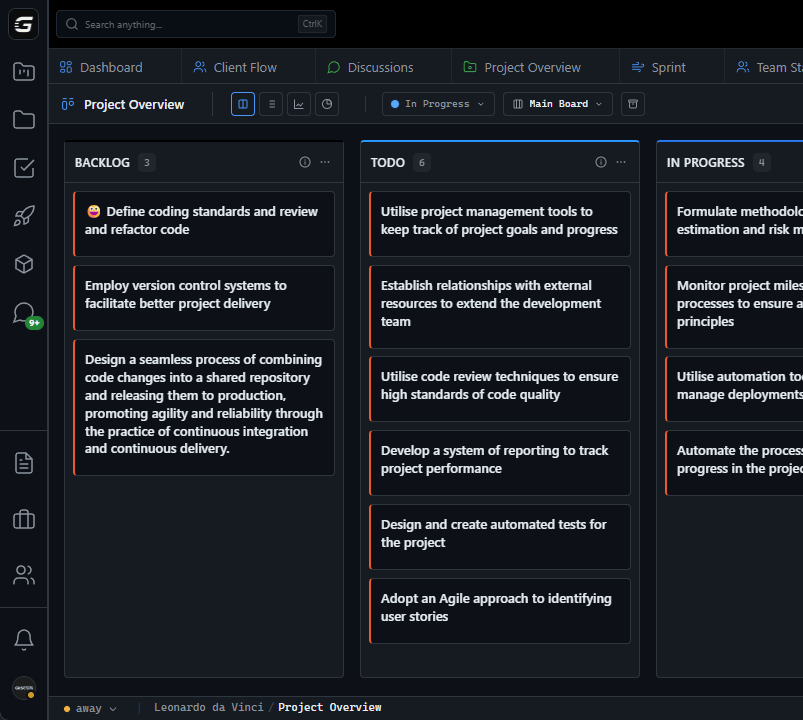
Simple workflows: Backlog, To Do, In Progress, Done

Cmd+K command palette, J/K navigation, keyboard shortcuts

Find tasks with simple search, not query languages

Native GitHub integration—no plugins needed

Built for developers working, not managers reporting

Updates happen automatically from GitHub activity

03

How It Works

1

Experience the Speed

First time using GitScrum: notice the instant response. Click something. It happens immediately. No spinners. No waiting. After Jira's latency, this feels like a revelation.

2

Navigate Like a Developer

Cmd+K: command palette opens. Type what you want. J/K keys move between cards like Vim. E to edit. Space to select. Your hands stay on the keyboard where they belong.

3

Create Tasks Without Forms

Press N for new task. Type title. Press Enter. That's it. Add details later if you want. No mandatory fields blocking your thought. Quick capture respects your flow.

4

Let GitHub Do the Updates

Open a PR? Card moves to review. Merge? Card moves to done. Your Git workflow updates your project board. No more opening Jira to update status after every commit.

04

Why GitScrum

GitScrum addresses Why Developers Hate Jira and What to Use Instead through Kanban boards with WIP limits, sprint planning, and workflow visualization

Problem resolution based on Kanban Method (David Anderson) for flow optimization and Scrum Guide (Schwaber and Sutherland) for iterative improvement

Capabilities

  • Kanban boards with WIP limits to prevent overload
  • Sprint planning with burndown charts for predictable delivery
  • Workload views for capacity management
  • Wiki for process documentation
  • Discussions for async collaboration
  • Reports for bottleneck identification

Industry Practices

Kanban MethodScrum FrameworkFlow OptimizationContinuous Improvement

Frequently Asked Questions

Still have questions? Contact us at customer.service@gitscrum.com

Our company mandates Jira—can teams use GitScrum anyway?

Some teams run GitScrum for daily work and sync to Jira for corporate reporting. Not ideal, but it isolates developers from Jira's friction while satisfying organizational requirements.

Jira has features GitScrum doesn't—aren't we losing functionality?

Jira has features most teams never use. The question: do you use them? Most developer complaints are about core functionality (speed, simplicity, GitHub integration) where GitScrum excels.

Our managers like Jira's reporting—will GitScrum satisfy them?

GitScrum provides sprint reports, velocity charts, burndown charts, time tracking reports. Different format than Jira, but the data managers need is there. Show them a demo.

Is developer hatred of Jira really that widespread?

Search 'developers hate Jira' or check Reddit/HackerNews. It's not a fringe opinion—it's the dominant developer sentiment. The question is whether your organization prioritizes developer experience.

Ready to solve this?

Start free, no credit card required. Cancel anytime.

Works with your favorite tools

Connect GitScrum with the tools your team already uses. Native integrations with Git providers and communication platforms.

GitHubGitHub
GitLabGitLab
BitbucketBitbucket
SlackSlack
Microsoft TeamsTeams
DiscordDiscord
ZapierZapier
PabblyPabbly

Connect with 3,000+ apps via Zapier & Pabbly