







VS Code

GitScrum for VS Code, Google Antigravity, Cursor and Windsurf!

GitScrum logo
Solution

Kanban Board GitHub Sync 2026 | Auto-Move Cards

Cards sit wrong columns, humans forget to update. GitScrum: cards auto-move with GitHub—branch → PR → merge. Real-time sync. 2 users free forever. Free trial.

Kanban Board GitHub Sync 2026 | Auto-Move Cards

The classic kanban board has a problem in software development: it depends on humans to update card positions.

Humans forget. Humans are busy coding.

Humans update status in batches at the end of the day (or week). The result: kanban boards that lie.

Cards show one thing, reality shows another. The Kanban Accuracy Problem: 1.

Card in 'To Do' - Reality: Developer created branch 2 days ago - Reality: 15 commits already pushed - Reality: Work is 80% complete - Board: Shows 'To Do' because nobody moved it 2. Card in 'In Progress' - Reality: PR was opened yesterday - Reality: Code review approved - Reality: Ready to merge - Board: Shows 'In Progress' because that's where it was dragged 3.

Card in 'Done' - Reality: PR was rejected - Reality: Needs rework - Reality: Work reopened - Board: Shows 'Done' because someone moved it prematurely When Boards Lie, Teams Suffer: - Standup meetings rely on board status → discussions based on fiction - WIP limits based on column counts → limits meaningless - Cycle time metrics from card movements → data inaccurate - Stakeholder visibility from board view → false confidence GitHub-Synced Kanban Solution: Connect kanban board to GitHub. Let code activity drive card position: 1.

Branch Created → Card moves to 'In Progress' - Developer creates branch for task - Card automatically moves from backlog/to-do - No manual drag needed - Work officially started 2. PR Opened → Card moves to 'Review' - Developer opens pull request - Card automatically moves to review column - Code ready for team evaluation - Review status visible on card 3.

PR Approved → Card moves to 'Ready to Merge' - Reviewers approve the PR - Card shows approval status - Work cleared for completion - Optional: auto-move or stay for merge decision 4. PR Merged → Card moves to 'Done' - Code merged to main branch - Card automatically completes - Work definitively finished - No manual status update ever 5.

PR Closed (without merge) → Card returns to 'In Progress' - PR rejected or abandoned - Card moves back - Reflects actual work state - Prevents false 'Done' status Real-Time Board Updates: With GitHub sync, kanban boards update in real-time: - Push commit → activity appears on card - Open PR → card moves instantly - Merge PR → card completes immediately No polling delay. No batch updates.

No manual intervention. Kanban Features in GitScrum: 1.

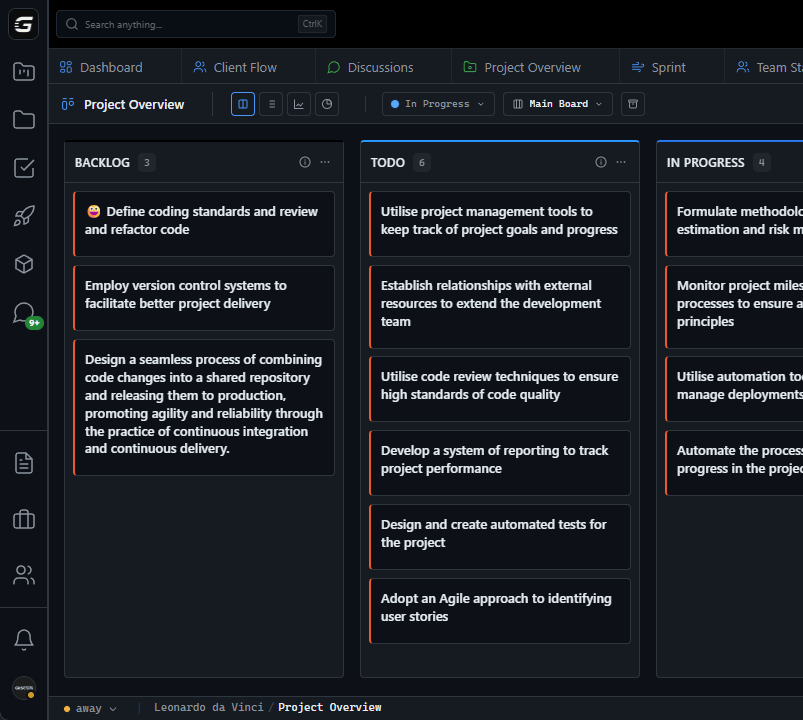
Customizable Columns - Default: To Do, In Progress, Review, Done - Add custom columns: Testing, Blocked, QA - Configure GitHub triggers per column - WIP limits per column 2. GitHub Activity Overlay - Commit count on cards - Last activity timestamp - PR status indicator - Branch health (stale detection) 3.

Swimlanes - By assignee: see who's working on what - By type: features vs bugs vs chores - By priority: urgent vs normal - By project/epic: grouped work streams 4. Filtering - By assignee, type, priority, label - By date range, activity level - By GitHub status (has PR, no commits, etc.) - Saved filter views 5.

Card Details - Full task description - Checklist items - Time tracking - Comment thread - GitHub activity log - File attachments 6. Automation Rules - Auto-assign based on triggers - Auto-label based on content - Slack notifications on column changes - Custom webhook actions For Continuous Flow Teams: Kanban with GitHub sync works perfectly for teams not using sprints: - Unlimited backlog - Pull-based work selection - WIP limits for flow optimization - Cycle time tracking from commit to merge - No artificial timeboxes For Sprint Teams: Kanban boards can also work within sprints: - Sprint-scoped board view - Burndown based on card completion - Sprint goal tracking - Retrospective data from card metrics The WIP Limit Reality: WIP limits only work when the board is accurate.

If cards don't move automatically: - Developers start new work without moving cards - WIP limits appear not exceeded when they are - Flow optimization impossible - Bottlenecks hidden by stale board state GitHub-synced kanban makes WIP limits meaningful again. $8.90/user/month for kanban boards with native GitHub sync.

2 users free forever. Boards that reflect reality, automatically.

The GitScrum Advantage

One unified platform to eliminate context switching and recover productive hours.

01

problem.identify()

The Problem

Kanban cards require manual movement to reflect work status

Developers forget to update card positions while coding

Board state lags behind actual development progress

WIP limits become meaningless with inaccurate boards

Cycle time metrics corrupted by delayed card movements

Standup discussions based on fictional board status

02

solution.implement()

The Solution

Automatic card movement based on GitHub activity

Branch creation moves card to In Progress

PR lifecycle drives card through workflow columns

Real-time sync—no polling delays

WIP limits based on accurate board state

Cycle time metrics from actual code delivery

03

How It Works

1

Set Up Columns with GitHub Triggers

Define kanban columns. Configure which GitHub events move cards to which columns. Branch created → In Progress. PR opened → Review. PR merged → Done.

2

Work in Normal Git Flow

Developers work in GitHub as usual. Create branches, commit code, open PRs, merge when ready. No change to git workflow.

3

Watch Board Update Automatically

Cards move through columns as GitHub activity occurs. Real-time updates. No manual dragging. Board always reflects reality.

4

Trust Your Metrics

WIP limits work because board is accurate. Cycle time measures actual work duration. Bottlenecks visible from real data.

04

Why GitScrum

GitScrum addresses Kanban Board with GitHub Sync through Kanban boards with WIP limits, sprint planning, and workflow visualization

Problem resolution based on Kanban Method (David Anderson) for flow optimization and Scrum Guide (Schwaber and Sutherland) for iterative improvement

Capabilities

  • Kanban boards with WIP limits to prevent overload
  • Sprint planning with burndown charts for predictable delivery
  • Workload views for capacity management
  • Wiki for process documentation
  • Discussions for async collaboration
  • Reports for bottleneck identification

Industry Practices

Kanban MethodScrum FrameworkFlow OptimizationContinuous Improvement

Frequently Asked Questions

Still have questions? Contact us at customer.service@gitscrum.com

Can I still move cards manually?

Yes. Automatic movement from GitHub is additive—you can still drag cards when needed. Manual movement for blocked items, priority changes, or special cases works alongside automation.

What if a task doesn't have a GitHub branch?

Cards without GitHub activity work like traditional kanban—manual movement. Hybrid boards support both automated and manual cards simultaneously.

How do WIP limits work with automatic movement?

WIP limits apply regardless of how cards move. If automation would exceed a WIP limit, you're notified and can configure how to handle it—block, warn, or override.

Can I customize which GitHub events trigger which movements?

Yes. Configure triggers per column. Branch created, PR opened, PR approved, PR merged, PR closed—each can trigger different column transitions based on your workflow.

Ready to solve this?

Start free, no credit card required. Cancel anytime.

Works with your favorite tools

Connect GitScrum with the tools your team already uses. Native integrations with Git providers and communication platforms.

GitHubGitHub
GitLabGitLab
BitbucketBitbucket
SlackSlack
Microsoft TeamsTeams
DiscordDiscord
ZapierZapier
PabblyPabbly

Connect with 3,000+ apps via Zapier & Pabbly