







VS Code

GitScrum for VS Code, Google Antigravity, Cursor and Windsurf!

GitScrum logo
Solution

Kanban Board Optimization 2026 | WIP Limits Flow Metrics

Kanban as task lists without flow optimization. GitScrum: WIP limits, cycle time tracking, cumulative flow diagrams, column automation. 2 users free. Free trial.

Kanban Board Optimization 2026 | WIP Limits Flow Metrics

Most teams use Kanban boards as glorified sticky notes.

Tasks move from left to right, but there's no optimization happening. No one measures cycle time.

No one limits WIP. No one automates handoffs.

The board is a visualization tool, not a workflow engine. GitScrum elevates Kanban to its true potential.

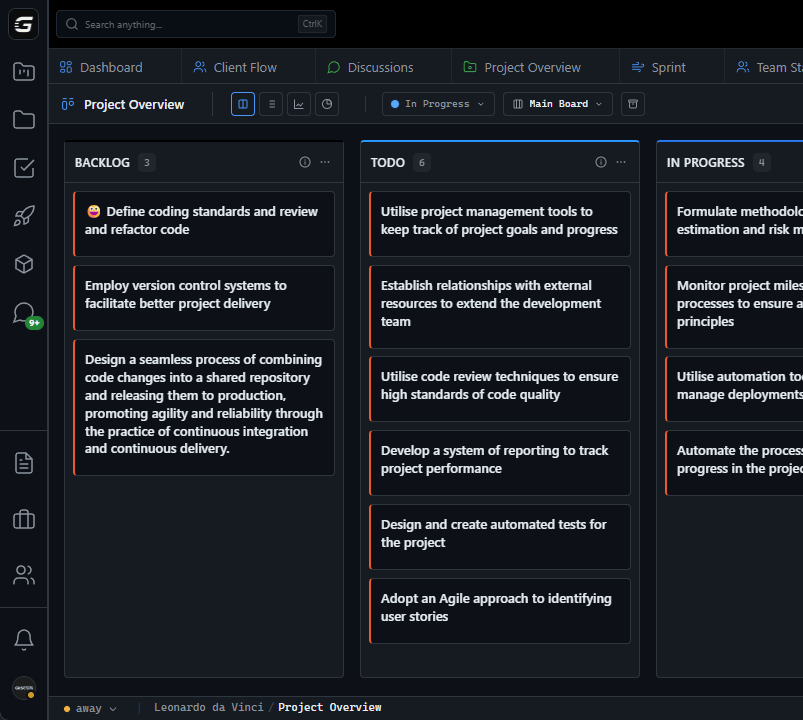
Each column becomes a workflow stage with configurable automation: auto-assign users when tasks enter 'Code Review', apply labels automatically in 'QA', auto-archive completed work after N days. WIP limits enforce flow control at each stage.

Column status settings (To Do, In Progress, Done) categorize work for accurate reporting. The cumulative flow diagram shows work distribution across stages over time—immediately revealing when work piles up in specific columns.

Cycle time tracking measures how long tasks spend in each column, pinpointing slow stages. Color-coded columns, real-time WebSocket updates, and keyboard shortcuts create a sophisticated flow management system from what used to be a simple board.

The GitScrum Advantage

One unified platform to eliminate context switching and recover productive hours.

01

problem.identify()

The Problem

Kanban boards are simple task visualizations with no workflow automation

No cycle time tracking—impossible to know how long work spends in each stage

Manual handoffs between columns create delays and dropped assignments

No cumulative flow data to visualize work distribution and identify pileups

Column settings don't affect reporting or analytics—just cosmetic organization

02

solution.implement()

The Solution

Column-level automation: auto-assign users, apply labels, notify subscribers on task entry

WIP limits per column with enforced blocking when capacity is reached

Column status (To Do/In Progress/Done) affects reports, analytics, and burndown charts

Cumulative flow diagrams show work distribution across columns over time

Cycle time tracking measures time in each column for process optimization

03

How It Works

1

Configure Column Automation

Each column has a dropdown menu with powerful options. Set 'Assign User' to automatically assign tasks to specific team members when they enter the column. 'Assign Label' auto-tags tasks. 'Subscribers' notifies people of column entry.

2

Set Column Status

Each column has a status: To Do, In Progress, or Done. This isn't cosmetic—it affects how tasks are counted in burndown charts, velocity calculations, and completion rates. 'Backlog' should be To Do, 'Development' In Progress, 'Released' Done.

3

Enable WIP Limits

Set WIP limits (1-15 tasks) per column to control flow. When a column reaches capacity, task movement is blocked until work moves forward. This prevents bottlenecks from being hidden by endless accumulation.

4

Monitor Cumulative Flow

The cumulative flow diagram shows stacked areas for each column over time. If 'Code Review' area is expanding while 'Done' stays flat, work is piling up in review. Visual diagnosis of flow problems at a glance.

5

Analyze Cycle Time

Track how long tasks spend in each column. If average cycle time for 'In Progress' is 2 days but 'Code Review' is 5 days, reviews are your bottleneck. Use data to focus improvement efforts where they matter most.

04

Why GitScrum

GitScrum addresses Kanban Board Optimization for Continuous Delivery through Kanban boards with WIP limits, sprint planning, and workflow visualization

Problem resolution based on Kanban Method (David Anderson) for flow optimization and Scrum Guide (Schwaber and Sutherland) for iterative improvement

Capabilities

  • Kanban boards with WIP limits to prevent overload
  • Sprint planning with burndown charts for predictable delivery
  • Workload views for capacity management
  • Wiki for process documentation
  • Discussions for async collaboration
  • Reports for bottleneck identification

Industry Practices

Kanban MethodScrum FrameworkFlow OptimizationContinuous Improvement

Frequently Asked Questions

Still have questions? Contact us at customer.service@gitscrum.com

How do I set up column automation?

Click the three-dot menu in any column header. You'll see options for WIP Limit, Assign User, Assign Label, Auto Archive, and Subscribers. Each automates different aspects of task handling when work enters that column.

What's the difference between column status settings?

'To Do' for planning/backlog columns, 'In Progress' for active work stages, 'Done' for completion. These settings affect analytics: burndown charts use status to determine what counts as completed work.

How do I read a cumulative flow diagram?

Each colored band represents a column. Band width shows task count over time. Expanding bands indicate work accumulation (potential bottleneck). Stable bands show healthy flow. Narrowing bands mean work is completing.

Can I automate task assignment based on column?

Yes. Use 'Assign User' in column settings to auto-assign specific team members when tasks enter. Great for 'Code Review' (assign reviewers) or 'QA' (assign testers) columns.

How do I identify bottlenecks with Kanban metrics?

Look for: (1) columns consistently at WIP limit, (2) expanding bands in cumulative flow diagram, (3) high cycle time for specific columns. Any of these signals a stage that needs improvement.

Ready to solve this?

Start free, no credit card required. Cancel anytime.

Works with your favorite tools

Connect GitScrum with the tools your team already uses. Native integrations with Git providers and communication platforms.

GitHubGitHub
GitLabGitLab
BitbucketBitbucket
SlackSlack
Microsoft TeamsTeams
DiscordDiscord
ZapierZapier
PabblyPabbly

Connect with 3,000+ apps via Zapier & Pabbly