







VS Code

GitScrum for VS Code, Google Antigravity, Cursor and Windsurf!

GitScrum logo
Solution

Linear PM Review for Devs 2026 | Gaps + Alternative

Linear set the dev-first standard but has gaps: no time tracking, 250-issue cap, no client portals. GitScrum fills them at $8.90/user. Free trial.

Linear PM Review for Devs 2026 | Gaps + Alternative

Linear revolutionized project management for developers.

No more Jira's 3-second page loads. No more clicking through nested menus.

Just Cmd+K, type what you want, done. The startup world adopted it overnight.

But Linear optimized for one use case: internal product teams at VC-backed startups. When you run an agency, freelance, or need client visibility, the gaps hurt: No Native Time Tracking: You're bolting on Toggl or Harvest, switching contexts, losing the 'everything in one place' benefit Linear promises.

Limited Reporting: Burndown charts? Velocity trending?

Client-ready reports? You're exporting to spreadsheets or paying for additional tools.

Pricing Escalation: Linear's free tier caps at 250 issues. Growing teams hit paywalls fast.

Roadmaps and advanced features require premium plans. No Client Portals: Agencies need clients to see progress without full access.

Linear doesn't solve this without workarounds. GitScrum was built by developers who loved Linear's philosophy but needed more: Same Speed: Sub-100ms response times.

Cmd+K command palette. Keyboard shortcuts for everything.

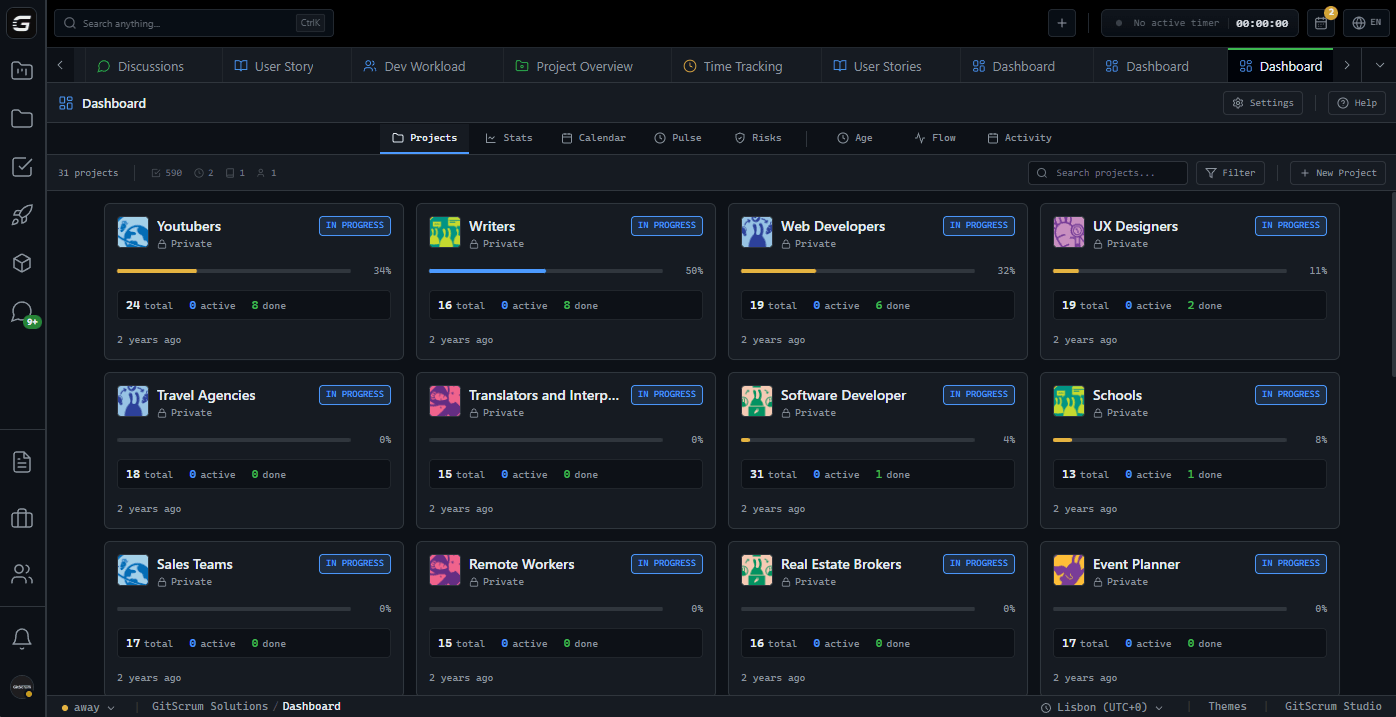
Dark mode native. Time Tracking Built-In: One-click timers on any task.

Billable rates per project. Export reports for invoicing.

No context switching to Toggl. Real Analytics: Burndown charts, velocity tracking across sprints, team performance metrics—all auto-generated from your actual work.

Client Portals: Give clients visibility into their project without exposing internal discussions. Professional dashboards they can bookmark.

Pricing: $8.90/user/month with 2 users free forever. No issue caps.

All features included.

The GitScrum Advantage

One unified platform to eliminate context switching and recover productive hours.

01

problem.identify()

The Problem

Linear lacks native time tracking—requires third-party tools

Limited reporting capabilities for agencies and client work

Free tier caps at 250 issues—paywalls hit fast

No client portal for external stakeholder visibility

Roadmaps and advanced features locked behind premium tiers

Optimized for internal teams, not client-facing workflows

02

solution.implement()

The Solution

Built-in time tracking with one-click timers on every task

Burndown charts and velocity tracking auto-generated

2 users free forever—no issue caps, no feature restrictions

Client portals for professional stakeholder visibility

All features included at $8.90/user/month

Same keyboard-first, developer-native experience as Linear

03

How It Works

1

Familiar Speed, More Features

If you've used Linear, GitScrum feels familiar: Cmd+K command palette, keyboard shortcuts, sub-100ms responses. But with time tracking, burndown charts, and client features built-in.

2

Track Time Without Switching

One-click timer on any task. Set billable rates per project or client. End-of-month reports export for invoicing. No Toggl, no Harvest, no context switching.

3

Client Visibility Built-In

Create client portals with project dashboards they can bookmark. They see progress without accessing internal discussions. Professional, branded experience.

4

Analytics That Matter

Burndown charts update automatically as work completes. Velocity tracking across sprints. Team performance metrics. All generated from actual work—no manual updates.

04

Why GitScrum

GitScrum addresses Linear Project Management Tool Review for Developers through Kanban boards with WIP limits, sprint planning, and workflow visualization

Problem resolution based on Kanban Method (David Anderson) for flow optimization and Scrum Guide (Schwaber and Sutherland) for iterative improvement

Capabilities

  • Kanban boards with WIP limits to prevent overload
  • Sprint planning with burndown charts for predictable delivery
  • Workload views for capacity management
  • Wiki for process documentation
  • Discussions for async collaboration
  • Reports for bottleneck identification

Industry Practices

Kanban MethodScrum FrameworkFlow OptimizationContinuous Improvement

Frequently Asked Questions

Still have questions? Contact us at customer.service@gitscrum.com

How does GitScrum compare to Linear's speed?

GitScrum matches Linear's performance: sub-100ms response times, Cmd+K command palette, keyboard shortcuts for every action. We're built by developers who demand the same speed Linear delivers.

What does GitScrum include that Linear doesn't?

Native time tracking with one-click timers, burndown charts and velocity tracking, client portals for stakeholder visibility, and all features at $8.90/user/month with 2 users free forever—no premium tiers needed.

Can I migrate from Linear?

Yes. Export your Linear data and import into GitScrum. Issues, labels, and assignees transfer cleanly. Most teams migrate in under an hour.

Is GitScrum good for agencies?

GitScrum was built with agencies in mind: time tracking for billing, client portals for visibility, project-level reporting for profitability analysis. Features Linear doesn't prioritize for internal teams.

Ready to solve this?

Start free, no credit card required. Cancel anytime.

Works with your favorite tools

Connect GitScrum with the tools your team already uses. Native integrations with Git providers and communication platforms.

GitHubGitHub
GitLabGitLab
BitbucketBitbucket
SlackSlack
Microsoft TeamsTeams
DiscordDiscord
ZapierZapier
PabblyPabbly

Connect with 3,000+ apps via Zapier & Pabbly