







VS Code

GitScrum for VS Code, Google Antigravity, Cursor and Windsurf!

GitScrum logo
Solution

Developer Flow State 2026 | WIP Limits & Focus Score

Flow state: 15-25 min to enter, seconds to lose. GitScrum protects focus with WIP limits, focus scores, and workload balancing. 2 users free. Free trial.

Developer Flow State 2026 | WIP Limits & Focus Score

Flow state—that deep concentration where complex code flows effortlessly—takes 15-25 minutes to enter but can be destroyed in seconds by an interruption.

For developers, flow isn't a luxury; it's where the hardest problems get solved. Yet most work environments actively destroy flow: constant notifications, ad-hoc requests, overloaded task lists.

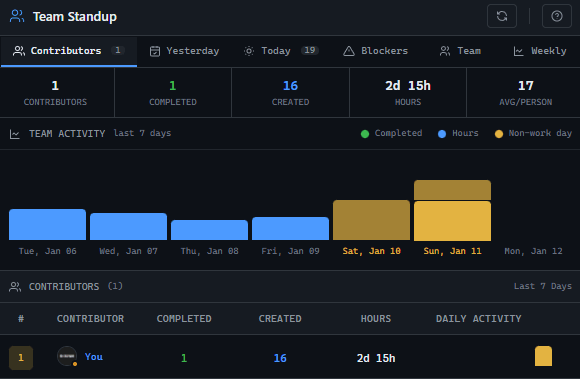
GitScrum protects flow through systematic mechanisms: WIP limits cap concurrent work (you can't start new tasks until current ones finish), focus score monitoring alerts when fragmentation becomes dangerous, workload balancing prevents overcommitment that forces context switching, and load distribution metrics identify unsustainable work patterns before they trigger burnout. The Profile Health dashboard shows deep work indicators: peak hours (sustained work blocks), outside hours percentage (working after hours to compensate), and days without closure (incomplete work weighing on mental load).

These aren't productivity surveillance—they're health indicators that protect the flow state developers need.

The GitScrum Advantage

One unified platform to eliminate context switching and recover productive hours.

01

problem.identify()

The Problem

Developers constantly interrupted before achieving deep focus—flow state never reached

Too many concurrent tasks prevents mental depth—shallow work becomes the norm

Overcommitment forces constant context switching to 'stay productive'

No visibility into flow state health—teams don't know deep work is missing

Urgent requests bypass any protections—'just this one thing' destroys hours of focus

02

solution.implement()

The Solution

WIP limits on columns: Cap concurrent work per developer/column—finish before starting new

Focus score monitoring: Profile Health shows 0-100 focus score—alert when dropping into danger zone

Workload capacity visualization: Dev Workload shows allocated vs capacity with color coding

Load distribution alerts: Track average daily hours, peak hours, outside hours—flag unsustainable patterns

Deep work indicators: Days without closure, engagement score—identify incomplete work weighing on minds

03

How It Works

1

Configure WIP Limits

Go to Board Settings > Column Configuration. Set WIP limits for each column (e.g., 'In Progress' limited to 3 tasks per developer). When the limit is reached, the column is visually flagged and new tasks can't enter until existing ones move forward. This enforces finish-before-starting discipline.

2

Monitor Focus Scores

Check Profile Health > Context Switching for each developer weekly. The focus score (0-100) reflects overall context management. ≥70 is healthy, 50-69 needs monitoring, <50 is critical. When scores drop, investigate: too many projects? Excessive interruptions? The data shows what's breaking flow.

3

Balance Workload Capacity

Use Dev Workload view to visualize allocated hours vs capacity for each developer. Green status means capacity available for deep work. Yellow (100%+) means overcommitted—flow is impossible. Red (120%+) means crisis. Drag tasks to rebalance before overload destroys flow state across the team.

4

Track Load Distribution Patterns

The Load Distribution card shows average daily hours, peak hours (red if >10h indicates burnout risk), outside hours percentage (>5% means compensating for fragmented days), and heatmap of last 14 days. Sustained peaks or high outside-hours work signals flow is being destroyed—people work after hours because they couldn't focus during normal hours.

5

Address Deep Work Blockers

Risk Indicators show 'days without closure' (incomplete tasks weighing on mental bandwidth) and disengagement score. High incomplete task counts prevent flow—the brain keeps processing open loops. Work with developers to close or defer tasks, reducing open items. Each closed task frees mental space for flow.

04

Why GitScrum

GitScrum addresses Maintaining Developer Flow State During Sprints through Kanban boards with WIP limits, sprint planning, and workflow visualization

Problem resolution based on Kanban Method (David Anderson) for flow optimization and Scrum Guide (Schwaber and Sutherland) for iterative improvement

Capabilities

  • Kanban boards with WIP limits to prevent overload
  • Sprint planning with burndown charts for predictable delivery
  • Workload views for capacity management
  • Wiki for process documentation
  • Discussions for async collaboration
  • Reports for bottleneck identification

Industry Practices

Kanban MethodScrum FrameworkFlow OptimizationContinuous Improvement

Frequently Asked Questions

Still have questions? Contact us at customer.service@gitscrum.com

How long does it take to enter flow state?

Research shows it typically takes 15-25 minutes of uninterrupted focus to enter flow state. Once achieved, flow can be sustained for 90-120 minutes before mental fatigue requires a break. The key protection is preventing interruptions during that initial 15-25 minute ramp-up—this is where WIP limits and workload balancing help most.

What destroys flow state fastest?

Any interruption that requires context switching: notifications, 'quick questions' from teammates, ad-hoc meeting invites, or being assigned a new urgent task mid-work. Even a 30-second interruption can destroy flow because the brain must offload current context, handle the interruption, then spend 15-25 minutes rebuilding the original context.

How do WIP limits protect flow?

WIP limits prevent the 'too many plates spinning' problem. Without limits, developers accumulate tasks in 'In Progress' status—each one a mental thread they're tracking. With WIP limits (e.g., max 3 tasks in progress), developers must finish current work before starting new work. Fewer concurrent tasks means deeper focus on each one.

What does high 'outside hours' work indicate about flow?

High outside-hours percentage (>5%) often indicates developers couldn't achieve flow during normal hours—they're compensating by working after hours when interruptions are lower. This is a red flag: the work environment is so fragmented that deep work only happens outside normal schedules. Address the root cause (meetings, interruptions) rather than accepting after-hours work as normal.

How do I balance protecting flow with team collaboration needs?

Create structured collaboration times vs flow time. For example: mornings are meeting-free deep work blocks, afternoons have standup and collaboration slots. Use async communication (task comments, documentation) for non-urgent questions. The goal isn't isolation—it's intentional interruption patterns that allow flow to happen predictably.

Ready to solve this?

Start free, no credit card required. Cancel anytime.

Works with your favorite tools

Connect GitScrum with the tools your team already uses. Native integrations with Git providers and communication platforms.

GitHubGitHub
GitLabGitLab
BitbucketBitbucket
SlackSlack
Microsoft TeamsTeams
DiscordDiscord
ZapierZapier
PabblyPabbly

Connect with 3,000+ apps via Zapier & Pabbly