







VS Code

GitScrum for VS Code, Google Antigravity, Cursor and Windsurf!

GitScrum logo
Solution

Project Status Visibility 2026 | Real-Time Dashboards

Interruptions cost 23 min focus recovery each. GitScrum dashboards show live project status with GitHub auto-sync. Zero manual updates needed. Free trial.

Project Status Visibility 2026 | Real-Time Dashboards

The pattern repeats daily in development teams: A manager needs to know project status for a stakeholder meeting.

They walk over to a developer or send a Slack message. The developer stops coding, takes 23 minutes to regain deep focus afterward, and the manager gets information that's already becoming stale.

This happens because project management tools like Jira don't provide real-time visibility. Developers have to manually update status, which they often forget or delay.

Dashboards show outdated information. Managers can't trust the tool, so they ask directly.

The interrupt-and-ask cycle becomes normal, even though it destroys developer productivity. GitScrum breaks this cycle with dashboards that show real-time project status.

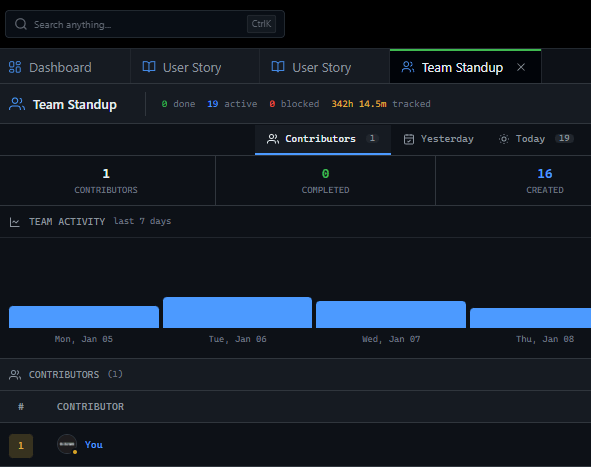
GitHub integration means task status updates automatically when code events occur—no manual updates required. Managers can check the dashboard anytime and see accurate information.

They stop interrupting developers because the tool actually tells them what they need to know.

The GitScrum Advantage

One unified platform to eliminate context switching and recover productive hours.

01

problem.identify()

The Problem

Managers interrupt developers multiple times daily to ask for status updates

Each interruption costs developers 23 minutes of focus recovery time

Jira dashboards show outdated information because developers don't update manually

Managers can't trust the tool, so they default to asking directly

Status meetings proliferate because tools don't provide self-service visibility

02

solution.implement()

The Solution

Real-time dashboards show current project status without requiring manual updates

GitHub integration auto-updates task status when code events occur

Managers get self-service visibility—check the dashboard instead of asking developers

Fewer interruptions mean developers maintain focus and productivity

Accurate, current information replaces stale Jira reports and verbal status requests

03

How It Works

1

Configure Project Dashboards

Set up dashboards that show the metrics managers care about: sprint progress, task completion, blockers, velocity trends. These update in real-time as work progresses.

2

Enable GitHub Auto-Sync

Connect GitHub repositories. When PRs are created, reviewed, and merged, task status updates automatically. The dashboard reflects code reality without manual intervention.

3

Redirect Questions to Dashboards

When managers ask for status, point them to the dashboard. Over time, they learn to check it first. The tool provides the answers they need without developer interruption.

4

Reduce Status Meetings

With real-time visibility available, status meetings can be shortened or eliminated. Reserve meeting time for actual discussions, not status recitations.

04

Why GitScrum

GitScrum addresses Managers Can't See Project Status Without Asking Developers through Kanban boards with WIP limits, sprint planning, and workflow visualization

Problem resolution based on Kanban Method (David Anderson) for flow optimization and Scrum Guide (Schwaber and Sutherland) for iterative improvement

Capabilities

  • Kanban boards with WIP limits to prevent overload
  • Sprint planning with burndown charts for predictable delivery
  • Workload views for capacity management
  • Wiki for process documentation
  • Discussions for async collaboration
  • Reports for bottleneck identification

Industry Practices

Kanban MethodScrum FrameworkFlow OptimizationContinuous Improvement

Frequently Asked Questions

Still have questions? Contact us at customer.service@gitscrum.com

What if managers don't trust dashboard data?

Trust comes from accuracy over time. GitHub integration ensures status reflects code reality—when PRs merge, tasks update. Start by using dashboards alongside verbal check-ins. As managers see the dashboard is accurate, they'll rely on it more and interrupt less.

Won't managers still want face-to-face updates?

Some will, especially for complex situations or concerns. That's fine—dashboards don't eliminate all communication. They eliminate routine status questions that interrupt developer focus. Reserve conversations for topics that actually benefit from discussion.

How do we handle information that dashboards can't capture?

Dashboards show quantitative status: tasks done, in progress, blocked. Qualitative context—concerns, risks, technical challenges—still benefits from brief discussion or async written updates. The goal is eliminating unnecessary interruptions, not all communication.

What about stakeholders outside the development team?

Share dashboard access with stakeholders who need visibility. Alternatively, configure scheduled report emails that summarize project status. Either approach provides information without requiring developers to stop working and explain.

Ready to solve this?

Start free, no credit card required. Cancel anytime.

Works with your favorite tools

Connect GitScrum with the tools your team already uses. Native integrations with Git providers and communication platforms.

GitHubGitHub
GitLabGitLab
BitbucketBitbucket
SlackSlack
Microsoft TeamsTeams
DiscordDiscord
ZapierZapier
PabblyPabbly

Connect with 3,000+ apps via Zapier & Pabbly