







VS Code

GitScrum for VS Code, Google Antigravity, Cursor and Windsurf!

GitScrum logo
Solution

Code Reviewer Load Distribution 2026 | Auto-Assign

Unbalanced code reviews create bottlenecks. GitScrum auto-assigns reviewers with WIP limits and workload visibility per column. Balance load instantly. Free trial.

Code Reviewer Load Distribution 2026 | Auto-Assign

Code review bottlenecks often trace back to load imbalance.

One senior developer becomes the default reviewer for everything because they're 'the expert.' Another team member rarely reviews because they're perceived as too junior or too slow. The result: the expert burns out, reviews pile up, and the junior never develops review skills.

Meanwhile, there's no visibility into who's reviewing what, so managers can't identify or fix the imbalance. GitScrum attacks this problem through assignee-centric workflow design.

Create a 'Code Review' column and configure auto-assignment: when tasks enter, specific team members are automatically assigned and notified. Rotate reviewers by configuring multiple assignees—tasks get distributed across the team.

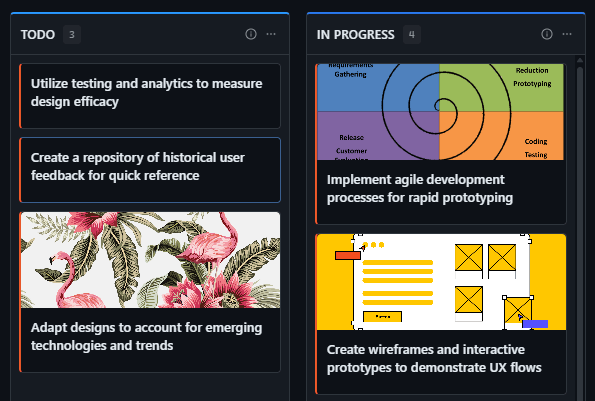
Set WIP limits on the column to prevent any one reviewer from being overloaded: if the column has a limit of 6 and there are 3 reviewers, each effectively handles ~2 reviews max. Visual board layout shows who's assigned to what at a glance.

Task counts per assignee reveal load distribution. Cycle time tracking measures if certain reviewers are slower—data for coaching conversations, not blame.

The goal: reviews flow quickly because load is balanced, reviewers have capacity, and no single person is a bottleneck.

The GitScrum Advantage

One unified platform to eliminate context switching and recover productive hours.

01

problem.identify()

The Problem

One or two 'expert' reviewers become bottlenecks while others rarely participate in code review

No visibility into who's reviewing what makes it impossible to balance workload proactively

Junior developers never get assigned reviews so they never develop the skill

Manual reviewer assignment creates overhead and often defaults to whoever is asked first

No data on reviewer performance metrics to identify who needs coaching or support

02

solution.implement()

The Solution

Column auto-assignment: Configure 'Code Review' column to auto-assign specific team members when tasks enter—round-robin or all reviewers

WIP limits per column: Set maximum tasks in review (e.g., 6)—prevents overload and creates natural work distribution

Visual assignee tracking: Board view shows who's assigned to each task—instant visibility into current load distribution

Cycle time per assignee: Track how long reviews take per reviewer—data for performance conversations, not blame

Column notifications: All configured subscribers receive alerts when tasks enter Code Review—no missing reviews

03

How It Works

1

Create Dedicated Review Column

Add a 'Code Review' column to your board. Set the status to 'In Progress' (status 2) so it counts as active work in reports. This separates review work from development work, making reviewer load visible at a glance.

2

Configure Auto-Assignment

Open column settings. In 'Assign User' section, add team members who should be assigned when tasks enter. Add multiple reviewers for automatic distribution. When a task is dragged into Code Review, all configured users are assigned and notified.

3

Set WIP Limit

In column settings, set a WIP limit based on reviewer capacity. If you have 3 reviewers and each can handle 2 reviews, set limit to 6. When limit is reached, no more tasks can enter—forcing the team to complete existing reviews before adding more work.

4

Monitor Load Distribution

Use board view to see who's assigned to tasks in Code Review. Count tasks per reviewer to spot imbalances. If one reviewer has 5 tasks while another has 1, manually redistribute or adjust auto-assignment rules. The visual board makes imbalances obvious.

5

Track Reviewer Performance

Cycle time metrics show how long tasks stay in Code Review. Filter by assignee to compare reviewer speeds. If one reviewer consistently takes longer, it's data for a coaching conversation—maybe they need help, different assignments, or reduced load. Use data, not assumptions.

04

Why GitScrum

GitScrum addresses Managing Reviewer Load Distribution Across Development Teams through Kanban boards with WIP limits, sprint planning, and workflow visualization

Problem resolution based on Kanban Method (David Anderson) for flow optimization and Scrum Guide (Schwaber and Sutherland) for iterative improvement

Capabilities

  • Kanban boards with WIP limits to prevent overload
  • Sprint planning with burndown charts for predictable delivery
  • Workload views for capacity management
  • Wiki for process documentation
  • Discussions for async collaboration
  • Reports for bottleneck identification

Industry Practices

Kanban MethodScrum FrameworkFlow OptimizationContinuous Improvement

Frequently Asked Questions

Still have questions? Contact us at customer.service@gitscrum.com

How do I automatically distribute reviews across multiple team members?

Open your Code Review column settings and add multiple team members to the 'Assign User' automation. When any task enters the column, all listed members are assigned. For true round-robin distribution, you'd manually maintain balance, but auto-assignment ensures no review is ever unassigned. Combined with WIP limits, this prevents any one reviewer from being overloaded.

What WIP limit should I set for Code Review?

Calculate based on reviewer capacity. If you have 3 reviewers and each can reasonably handle 2 reviews simultaneously, set the limit to 6. This ensures no one gets overloaded. Start conservative (lower limit) and increase if reviewers have idle time. The goal is smooth flow without accumulation—if reviews pile up at the limit, you either need faster reviews or more reviewers.

How do I identify which reviewers are overloaded?

Look at your Code Review column on the board. Each task shows assignees. Count tasks per reviewer—if one person has 5 and another has 1, there's an imbalance. You can also filter the board by assignee to see just one person's workload. Cycle time data helps too: if one reviewer's tasks consistently take longer, they may be overloaded or need support.

Can I rotate reviewers automatically?

GitScrum doesn't have built-in round-robin rotation. However, you can achieve balanced distribution by: (1) Adding all potential reviewers to auto-assignment—they all get notified, (2) Using WIP limits to prevent overflow, (3) Manually adjusting assignments when you spot imbalance on the board. The visual nature of the board makes imbalances obvious, enabling quick manual correction.

How do I help junior developers become effective reviewers?

Include them in the auto-assignment list so they receive review notifications. Pair them with seniors on the same review by assigning multiple people. Use the task comments for review discussions—juniors learn by seeing how seniors review. Track their cycle time separately; longer times are expected initially but should improve with experience. The key is getting them into the review rotation, not excluding them.

Ready to solve this?

Start free, no credit card required. Cancel anytime.

Works with your favorite tools

Connect GitScrum with the tools your team already uses. Native integrations with Git providers and communication platforms.

GitHubGitHub
GitLabGitLab
BitbucketBitbucket
SlackSlack
Microsoft TeamsTeams
DiscordDiscord
ZapierZapier
PabblyPabbly

Connect with 3,000+ apps via Zapier & Pabbly