







VS Code

GitScrum for VS Code, Google Antigravity, Cursor and Windsurf!

GitScrum logo
Solution

Pivotal Tracker Alternatives 2026 | Why Teams Switch

Pivotal Tracker slowed post-VMware acquisition. No native time tracking or client portals. Workflow feels rigid in 2026. Modern alternative with velocity at $8.90/user. Free trial.

Pivotal Tracker Alternatives 2026 | Why Teams Switch

Pivotal Tracker is agile project management history.

Launched in 2006, it pioneered velocity-based sprint planning before most teams knew what agile meant. The automatic velocity calculation and story point system influenced an entire generation of PM tools.

But history has a cost. In 2026, Tracker's age shows.

Pivotal Tracker's Modern Challenges: Slowed Development: Pivotal was acquired by VMware in 2019, then spun off. The product development pace has slowed significantly.

Features that modern teams expect—native time tracking, client portals, deep GitHub integration—haven't materialized. Opinionated to a Fault: Tracker's workflow is highly opinionated.

Stories, chores, bugs, epics—with specific rules for each. This structure made sense when teams were learning agile.

In 2026, it often feels like a constraint rather than guidance. Basic GitHub Integration: Tracker connects to GitHub but lacks depth.

No automatic PR linking. No commit-to-card status updates.

Developers still switch contexts between tools. No Time Tracking: For agencies and client work, time tracking is essential.

Tracker doesn't offer it natively. Teams need separate tools, creating fragmented workflows.

No Client Visibility: Client portals don't exist. Sharing progress with stakeholders means either giving them Tracker access (overwhelming) or manual reporting (time-consuming).

Pricing Opaque: Tracker's pricing starts free for 5 collaborators, then jumps to $10/user for Startup and $12.50/user for Pro. The feature differences between tiers are confusing.

Why Development Teams Choose GitScrum: Velocity + Modern Features: GitScrum offers velocity tracking and burndown charts—the core concepts Tracker pioneered—plus native time tracking, client portals, and deep GitHub integration. Flexible Workflow: Use sprints with any workflow structure.

Not locked into Tracker's stories/chores/bugs taxonomy. Adapt the tool to your process, not the reverse.

Native GitHub Integration: PRs link to tasks automatically. Commits update card status.

Branches created from tasks. No context switching between code and project management.

Built-In Time Tracking: Track time on any task. Generate reports for clients.

See where development hours actually go. No separate subscription needed.

Client Portals: Give stakeholders visibility without PM tool complexity. Branded portals with just the information clients need to see.

Clear Pricing: $8.90/user/month. All features included.

2 users free forever. No confusing tier limitations.

The GitScrum Advantage

One unified platform to eliminate context switching and recover productive hours.

01

problem.identify()

The Problem

Pivotal Tracker development has slowed since VMware acquisition

No native time tracking for agencies and client work

Opinionated workflow feels rigid rather than helpful in 2026

GitHub integration lacks depth—no automatic PR linking

No client portals for stakeholder visibility

Confusing pricing tiers with unclear feature differences

02

solution.implement()

The Solution

Active development with modern features teams expect

Native time tracking built into project management

Flexible workflow that adapts to your process

Deep GitHub integration with automatic PR linking

Client portals for stakeholder visibility

Clear pricing at $8.90/user/month with all features

03

How It Works

1

Velocity + Modern Agile

GitScrum offers velocity tracking and burndown charts—Tracker's core concepts—plus all the modern features that never came.

2

Deep GitHub Integration

PRs link automatically. Commits update card status. Branches created from tasks. Your code and project management stay connected.

3

Built-In Time Tracking

Track time on any task without separate subscriptions. Generate client reports. See where development hours actually go.

4

Client Portals

Give stakeholders visibility without overwhelming them with PM tool complexity. Branded portals with just what clients need.

04

Why GitScrum

GitScrum addresses Pivotal Tracker Agile Software Development through Kanban boards with WIP limits, sprint planning, and workflow visualization

Problem resolution based on Kanban Method (David Anderson) for flow optimization and Scrum Guide (Schwaber and Sutherland) for iterative improvement

Capabilities

  • Kanban boards with WIP limits to prevent overload
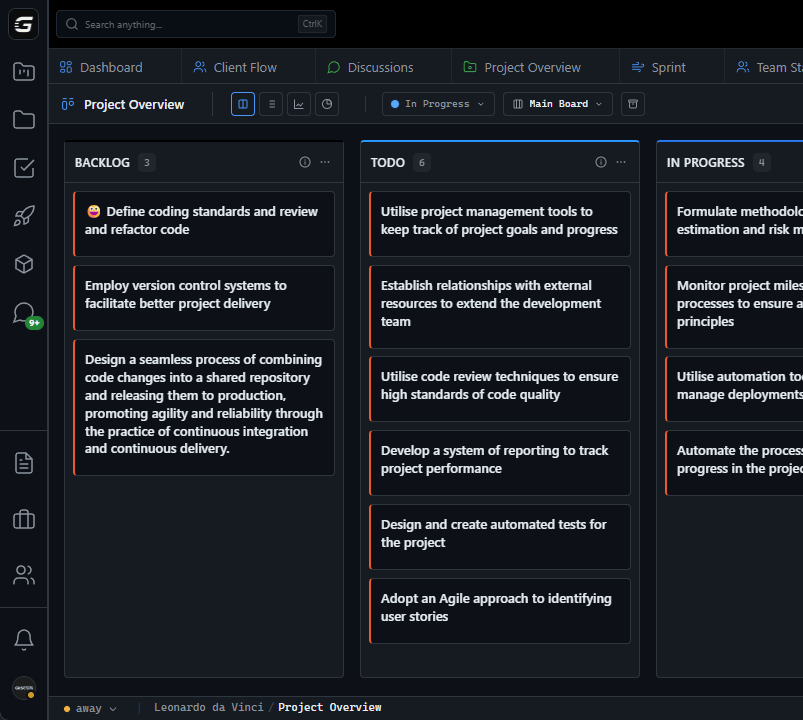
  • Sprint planning with burndown charts for predictable delivery
  • Workload views for capacity management
  • Wiki for process documentation
  • Discussions for async collaboration
  • Reports for bottleneck identification

Industry Practices

Kanban MethodScrum FrameworkFlow OptimizationContinuous Improvement

Frequently Asked Questions

Still have questions? Contact us at customer.service@gitscrum.com

Does GitScrum support velocity tracking like Pivotal Tracker?

Yes. GitScrum includes velocity tracking and burndown charts—the core agile concepts Tracker pioneered. Plus automatic capacity planning and historical velocity data across sprints.

Can I use GitScrum's sprint features without rigid story/chore/bug taxonomy?

Absolutely. GitScrum sprints work with any workflow structure. Create your own task types and categories. Adapt the tool to your process—not the reverse.

How does GitScrum's GitHub integration compare?

GitScrum offers deep GitHub integration: automatic PR linking, commit-to-card status updates, branch creation from tasks. No context switching between code and project management.

Can I migrate my Pivotal Tracker projects?

Yes. Export your Tracker projects as CSV and import into GitScrum. Stories, points, and project structure transfer cleanly. Most teams migrate in under an hour.

Ready to solve this?

Start free, no credit card required. Cancel anytime.

Works with your favorite tools

Connect GitScrum with the tools your team already uses. Native integrations with Git providers and communication platforms.

GitHubGitHub
GitLabGitLab
BitbucketBitbucket
SlackSlack
Microsoft TeamsTeams
DiscordDiscord
ZapierZapier
PabblyPabbly

Connect with 3,000+ apps via Zapier & Pabbly