
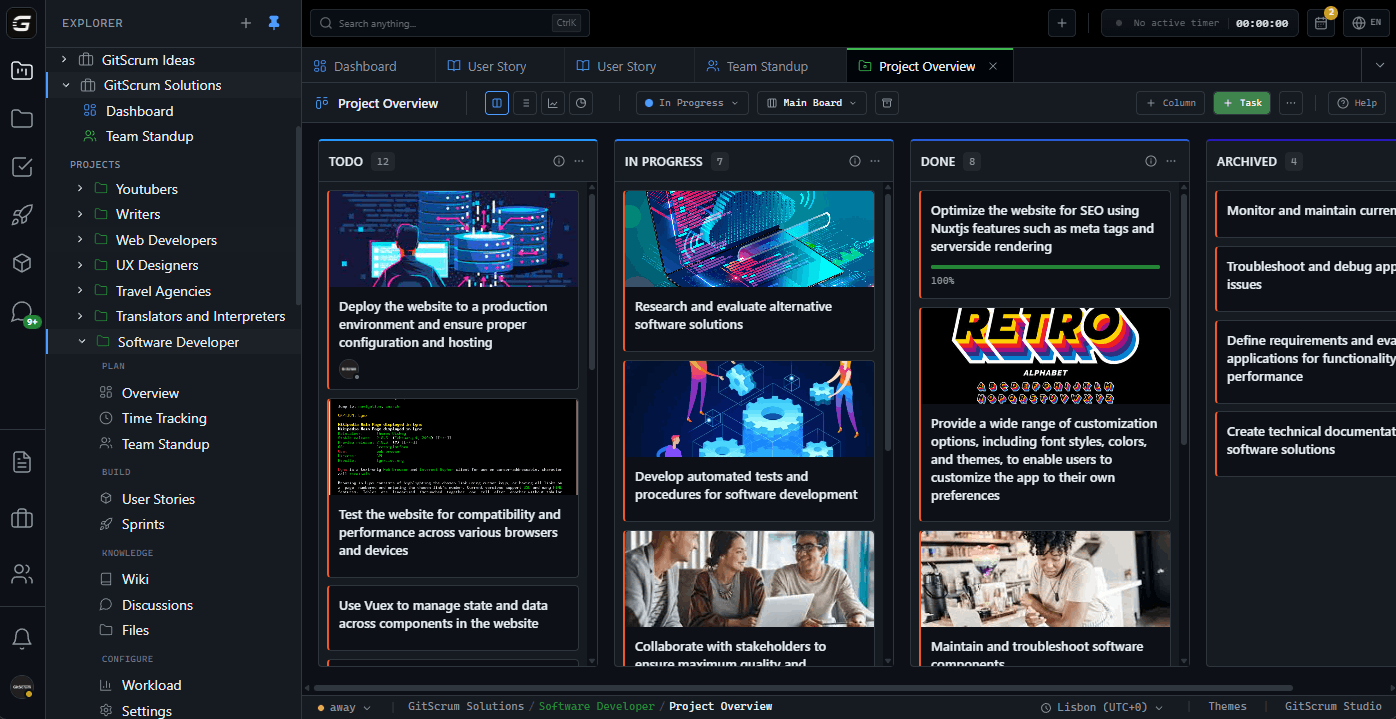
Why Sprint Planning Fails Common sprint planning problems: 1.
No Ready Backlog - Stories aren't refined - Acceptance criteria missing - Dependencies unknown - Team debates during planning 2. Unknown Capacity - How many points can we do?
- No velocity history - PTO not accounted for - Over-commit every sprint 3. Poor Estimation - Story points inconsistent - No historical comparison - Individual estimates vary wildly - Gaming points for metrics 4.
Meeting Marathon - Planning takes 4+ hours - Team fatigued before sprint starts - Decisions made poorly - Sprint doomed from day one Result: Failed sprints, demoralized teams. The Sprint Planning Framework Scrum sprint planning has two parts: Part 1: What (45-60 min) - Product Owner presents sprint goal - Team reviews top backlog items - Acceptance criteria confirmed - Team commits to scope Part 2: How (45-60 min) - Team breaks stories into tasks - Technical approach discussed - Dependencies identified - Sprint backlog created Total: 1.5-2 hours for 2-week sprint.
If your planning takes longer, something is broken. GitScrum Sprint Planning Features 1.
Ready Backlog Preparation Before planning meeting: - Backlog prioritized by Product Owner - Stories marked 'Ready' when: - Acceptance criteria complete - Story points estimated - Dependencies identified - Small enough for sprint GitScrum Ready indicators: - ✓ Has acceptance criteria - ✓ Has story points - ✓ No unresolved dependencies - ✓ Discussed in refinement Ready view shows only plannable stories. 2.
Velocity-Based Capacity GitScrum tracks velocity: - Points completed per sprint - Rolling average (3, 5, 10 sprints) - Trend direction - Variability measure Capacity calculation: - Last 3 sprint average: 42 points - Upcoming sprint: Standard capacity - Planned PTO: -5 points - Sprint capacity: 37 points Don't guess. Use data.
3. Story Point Estimation Fibonacci sequence: 1, 2, 3, 5, 8, 13, 21 GitScrum estimation features: - Point picker on every story - Historical comparison ('similar to GS-234') - Team estimation sessions - Point adjustment after planning Consistency tracking: - Average points by story type - Estimation accuracy over time - Point inflation detection 4.
Sprint Goal Setting Every sprint needs a goal: - What will we achieve? - How will we demo it?
- What's the business value? GitScrum sprint goal: - Text field on sprint - Visible throughout sprint - Reference for scope decisions - Reviewed at sprint review 5.
Drag-Drop Sprint Population Planning meeting workflow: 1. Open sprint planning view 2.
See Ready backlog on left 3. See sprint backlog on right 4.
Drag stories into sprint 5. Watch capacity meter fill 6.
Stop when near capacity 7. Save sprint, start working Visual capacity indicator: ████████░░ 34/37 points (92% capacity) Green: Safe Yellow: Near limit Red: Over-committed 6.
Sprint Backlog Management Once sprint starts: - Stories visible in sprint view - Board filtered to sprint items - Burndown tracking begins - Scope change tracking active Mid-sprint changes: - Added stories flagged - Removed stories tracked - Scope change visible in charts - Retrospective data captured The 30-Minute Sprint Planning With prepared backlog and velocity data: Minutes 0-5: Sprint goal - PO states sprint objective - Team confirms understanding - Goal documented Minutes 5-20: Story selection - Review top Ready items - Confirm estimates still valid - Drag to sprint backlog - Monitor capacity meter Minutes 20-25: Capacity check - Review total commitment - Identify high-risk items - Adjust if needed Minutes 25-30: Task breakdown - Quick task decomposition - Assign or leave unassigned - Identify blocking dependencies Done. Sprint started.
No marathon. Pre-Requisites for Fast Planning Backlog Refinement (separate session): - Happens before planning - Stories elaborated - Acceptance criteria written - Story points estimated - 'Ready' criteria met Time: 1-2 hours per week (not during planning) GitScrum refinement support: - Ready checklist per story - Discussion threads on stories - Historical reference linking - Refinement session tracking Capacity vs Velocity Velocity: What you've done - Historical data - Average completed points - Trend over time Capacity: What you can do - Based on velocity - Adjusted for availability - PTO, holidays, focus time GitScrum capacity planning: - Set team member availability % - Holiday calendar integration - Auto-adjusted capacity recommendation - Never over-commit again Sprint Types in GitScrum Standard Sprint: - Fixed duration (1-4 weeks) - Commitment at start - Scope locked (mostly) - Review at end Shorter Iterations (1 week): - Faster feedback - Less planning overhead - Higher ceremony frequency Longer Iterations (3-4 weeks): - More complex stories - Fewer interruptions - Risk of scope creep GitScrum supports any duration.
Sprint Comparison Over Time GitScrum sprint history: Sprint Planned Completed Velocity Accuracy ------ ------- --------- -------- -------- Sprint 23 45 pts 42 pts 42 93% Sprint 22 40 pts 38 pts 38 95% Sprint 21 50 pts 35 pts 35 70% Sprint 20 42 pts 40 pts 40 95% Insights: - Sprint 21 over-committed (red flag) - Average velocity: 38.75 - Optimal commitment: 38-40 points Common Planning Anti-Patterns 'Stretch Goals' - Problem: Commit 40, add 10 'stretch' - Reality: Team stressed, stretch never done - Solution: Commit to achievable, add more if done early 'Velocity Ratchet' - Problem: 'We did 42 last sprint, let's do 45' - Reality: Burnout, quality drops - Solution: Sustainable pace, stable velocity 'Story Tetris' - Problem: Fitting stories to hit exact capacity - Reality: Rarely works out - Solution: Under-commit slightly, buffer exists 'No Velocity' - Problem: New team, no historical data - Reality: Guess until data exists - Solution: Start conservative, build data quickly GitScrum helps avoid these with data and visibility. Integration with Git Workflow Sprint planning + Git: 1.
Stories committed to sprint 2. Developers claim stories 3.
Create branches per story 4. Commits reference story IDs 5.
GitScrum tracks code progress 6. PRs merged = stories done Velocity becomes code-verified.
For Scrum Masters Your planning toolkit: - Prepared backlog verification - Capacity calculation - Meeting facilitation view - Real-time commitment tracking - Historical comparison - Red flags on over-commitment For Product Owners Your planning toolkit: - Priority ordering - Sprint goal setting - Scope decision support - Stakeholder communication data - Release planning projection For Developers Your planning toolkit: - Clear story understanding - Estimation support - Capacity visibility - Reasonable commitment - Focus from day one Pricing for Sprint Planning 2 users: $0/month (free forever) 3 users: $8.90/month 10 users: $71.20/month All sprint planning features included: - Velocity tracking - Capacity planning - Story point estimation - Sprint goal management - Burndown charts - Historical analysis - Git integration No 'Sprint Premium' tier. No 'Velocity Analytics' add-on.
Everything included. Compare to Jira Premium (10 users): - Jira: ~$175/month - GitScrum: $71.20/month - Savings: $1,245/year Same sprint planning capabilities, less cost.
Start Planning Better Sprints 1. Sign up free (30 seconds) 2.
Create project with Scrum template 3. Import or create backlog 4.
Estimate stories with points 5. Run first sprint planning 6.
Build velocity data 7. Plan faster every sprint $8.90/user/month.
2 users free forever. Sprint planning that works.
Sprints that succeed.
The GitScrum Advantage
One unified platform to eliminate context switching and recover productive hours.







