
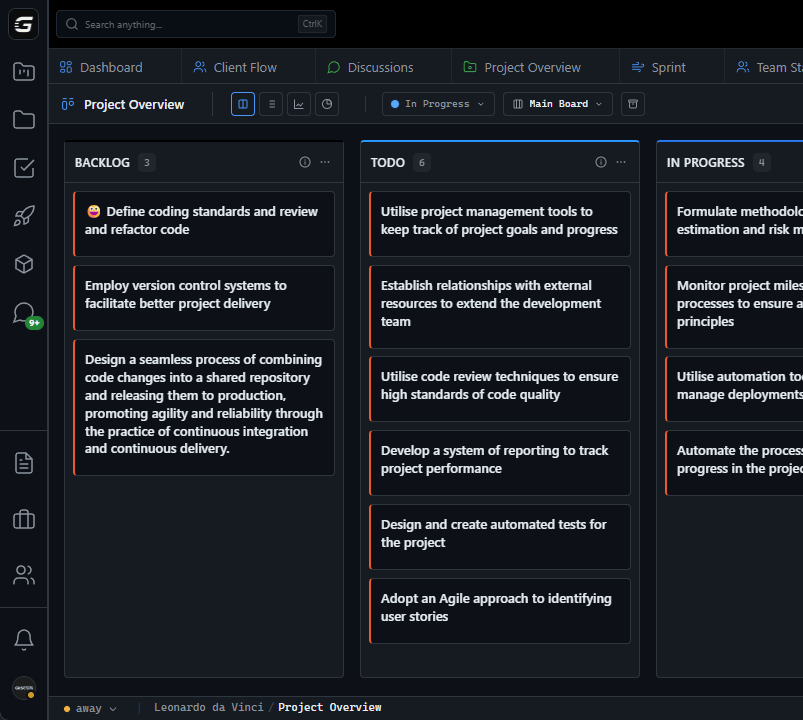







Kanban: The Misunderstood Method What most think Kanban is: - Columns on a board - Cards that move - Pretty colors - 'Visual project management' What Kanban actually is: - A method for managing work flow - Based on Toyota Production System - Designed to reduce waste - Optimize for throughput, not busyness The Five Principles of Kanban 1.
Visualize Work - Make all work visible - See the whole system - Identify blockers immediately 2. Limit Work in Progress (WIP) - Stop starting, start finishing - Prevent multitasking waste - Force prioritization 3.
Manage Flow - Optimize for throughput - Identify and remove bottlenecks - Measure cycle time 4. Make Policies Explicit - Clear definition of done - Visible workflow rules - Everyone understands the system 5.
Improve Collaboratively - Use data to drive decisions - Continuous experiments - Team-driven optimization Most 'Kanban' tools: Principle 1 only GitScrum: All 5 principles WIP Limits: The Most Ignored Feature WIP = Work in Progress Why WIP limits matter: Without limits: - Developer A starts 5 tasks - None finish quickly - Context switching destroys productivity - Everything 'in progress', nothing done With limits (e.g., WIP = 2 per developer): - Developer A has 2 tasks max - Must finish before starting new - Focused work, faster completion - Flow instead of chaos GitScrum WIP limits: - Set per column - Visual warning when exceeded - Enforced or advisory (your choice) - Team-level and individual limits Example configuration: Column WIP Limit ------ --------- Backlog None Ready 10 In Progress 5 Review 3 Testing 3 Done None Cycle Time: The Metric That Matters Cycle time = Time from 'In Progress' to 'Done' Why cycle time matters: - Predictability: Average cycle time = expected completion - Bottleneck detection: Where do cards stall? - Improvement tracking: Is process getting better?
GitScrum cycle time tracking: - Automatic measurement per card - Historical averages - Percentile distributions (50th, 85th, 95th) - Trend visualization Example insights: 'Feature tasks average 3.2 days cycle time' 'Bug fixes average 0.8 days' '85% of tasks complete within 5 days' Lead Time vs Cycle Time Lead time: Created → Done (customer perspective) Cycle time: Started → Done (team perspective) Both matter: - Lead time for customer expectations - Cycle time for team optimization GitScrum tracks both automatically. Flow Metrics Dashboard GitScrum provides: Throughput: - Cards completed per day/week - Trend over time - Comparison to previous periods Cumulative Flow Diagram: - Visual of work stages over time - Bottleneck identification - WIP trends - Cycle time estimation Aging Work: - Cards by time in current stage - Outliers highlighted - Risk of blocked work visible Block Frequency: - How often work is blocked - Common blocker types - Average block duration Kanban for Development Teams Typical dev workflow columns: Backlog → Ready → Dev → Code Review → QA → Done GitScrum default columns: - Backlog: Future work, not yet sized - Ready: Refined, ready to start - In Progress: Currently being coded - Review: PR open, awaiting review - Testing: QA or automated tests - Done: Merged, deployed, complete Git Integration + Kanban The magic combination: 1.
Card in 'Ready' column 2. Developer pulls card to 'In Progress' 3.
Creates branch (feature/GS-123-user-auth) 4. Makes commits ('Add login form GS-123') 5.
Card shows commit activity 6. Opens PR → Card auto-moves to 'Review' 7.
PR merged → Card auto-moves to 'Done' Manual movement optional. Git events drive board.
Pull-Based Work Push system (bad): - Manager assigns tasks - Developer has no choice - Work piles up regardless of capacity Pull system (Kanban): - Ready column has refined work - Developer finishes current task - Developer pulls next from Ready - Self-organizing flow GitScrum enables pull: - Clear Ready column - WIP limits prevent overload - Team members claim work - No external assignment needed Kanban vs Scrum: When to Use Which Choose Kanban when: - Work comes continuously (bugs, support) - No fixed release cadence - Team size fluctuates - Can't commit to time boxes - Flow efficiency matters more than velocity Choose Scrum when: - Work can be planned in advance - Regular release cycles exist - Team is stable - Stakeholders need predictable schedules - Velocity measurement matters Choose Scrumban when: - Need time boxes but also flow - Want WIP limits in sprints - Transitioning between methods - Best of both worlds GitScrum supports all three. Comparison: Kanban Tools Feature GitScrum Trello Jira Monday Asana ------- -------- ------ ---- ------ ----- Kanban board Yes Yes Yes Yes Yes WIP limits Yes Plugin Yes Plugin No Cycle time tracking Yes No Yes No No Cumulative flow Yes No Yes No No Git integration Native Plugin Plugin Plugin No Auto-move on PR Yes No Plugin No No Lead time tracking Yes No Yes No No Aging work view Yes No Yes No No Price/user $8.90 $5+ $17.50+ $12+ $13.49+ GitScrum: Full Kanban at competitive price.
Swim Lanes Horizontal divisions for: - Different work types (Feature, Bug, Chore) - Different teams or individuals - Different priorities (Expedite, Standard) GitScrum swim lanes: - Create by type, assignee, or custom field - Collapse/expand - Separate WIP limits per lane - Visual clarity for complex boards Example swim lanes: ┌─────────────────────────────────────────────┐ │ Expedite (WIP: 1) │ │ ┌───┐ │ │ │P0 │ │ │ └───┘ │ ├─────────────────────────────────────────────┤ │ Standard (WIP: 5) │ │ ┌───┐ ┌───┐ ┌───┐ │ │ │F1 │ │F2 │ │B1 │ │ │ └───┘ └───┘ └───┘ │ └─────────────────────────────────────────────┘ Card Design for Information Density GitScrum cards show: - Title - Assignee avatar - Due date (if set) - Labels/tags - Story points (if estimated) - Time in column (aging) - Commit indicator (if linked) - Comment count - Checklist progress Information at a glance. No click needed for basics.
Filtering and Views Filter board by: - Assignee - Label - Due date range - Blocked status - Story points - Custom fields Saved views: - 'My work' (assigned to me) - 'Blocked items' (needs attention) - 'High priority' (P0, P1 labels) - 'This sprint' (sprint backlog) Quick switching between views. Board Templates GitScrum templates: Software Development: Backlog → Ready → Dev → Review → QA → Done Bug Tracking: Reported → Triaged → Fixing → Testing → Resolved Support Tickets: New → Investigating → Waiting → Resolved → Closed Content Pipeline: Ideas → Writing → Editing → Review → Published Customize any template or start blank.
Mobile Kanban GitScrum mobile app: - Full board view - Drag to move cards - Quick card creation - Filter and search - Notifications on changes Manage flow from anywhere. Automation Rules GitScrum automation: - When card moves to X → notify Y - When PR merged → move to Done - When WIP exceeded → alert team - When card blocked → create notification - When aging > X days → flag card Reduce manual overhead.
Kanban Adoption Path Week 1: Setup - Create board with basic columns - Import current work - Don't set WIP limits yet Week 2: Observe - Watch how work flows - Note where cards pile up - Identify bottlenecks Week 3: Limit WIP - Set conservative limits - Team agrees to respect them - Adjust based on actual capacity Week 4+: Optimize - Review cycle time data - Address bottlenecks - Experiment with changes - Continuous improvement Pricing for Kanban 2 users: $0/month (free forever) 3 users: $8.90/month 5 users: $26.70/month 10 users: $71.20/month All Kanban features included: - WIP limits - Cycle time - Cumulative flow - Git integration - Automation - Mobile app No 'Kanban Premium' tier. Everything for everyone.
Start with Kanban Today 1. Sign up free (30 seconds) 2.
Create project with Kanban template 3. Add your current work to Backlog 4.
Pull first items to In Progress 5. Respect WIP limits 6.
Watch flow improve $8.90/user/month. 2 users free forever.
Real Kanban. Real flow.
The GitScrum Advantage
One unified platform to eliminate context switching and recover productive hours.


