







VS Code

GitScrum for VS Code, Google Antigravity, Cursor and Windsurf!

GitScrum logo
Solution

Kanban Software Dev Teams 2026 | PR Status Visible

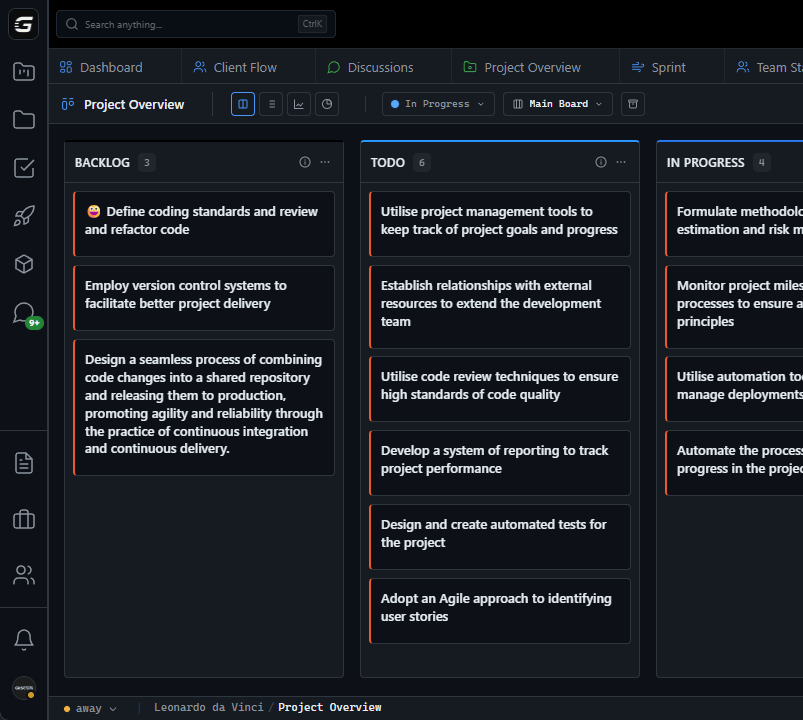
Generic kanban misses code context. GitScrum: cards show PR status, commits, review state. Real-time GitHub sync. 2 users free forever. Free trial.

Kanban Software Dev Teams 2026 | PR Status Visible

The Kanban Problem in Software Development Generic kanban boards were designed for manufacturing, not code: The Manufacturing Model: - Card represents a widget - Widget moves through stations - Each station is a physical location - Status is binary: at station or not The Software Reality: - Card represents a feature/bug - Feature exists in multiple states simultaneously - Code in branch, PR open, review pending, CI running - Status is complex: code exists but work isn't 'done' Where Generic Kanban Fails Problem 1: Status Lies - Card says 'In Progress' but no commits in 3 days - Card says 'In Review' but PR has merge conflicts - Card says 'Done' but PR hasn't been merged - Manual status updates lag reality by hours or days Problem 2: Missing Context - Which branch has this work?

- How many commits so far? - Who's reviewing?

- Are tests passing? - Any merge conflicts?

Generic kanban shows none of this. Problem 3: Duplicate Tracking - GitHub has issue status - Kanban has card status - PR has review status - Developer updates all three (or doesn't) - Which is the truth?

Problem 4: No WIP Enforcement - Kanban principle: limit work in progress - Generic boards: unlimited cards per column - Result: 15 items 'In Progress', nothing actually moving GitScrum: Kanban That Understands Code GitScrum kanban boards connect directly to GitHub: Cards Know Their Code: - Each card links to GitHub issue/branch - Commit count visible on card - PR status shown (open/draft/merged) - Review status (approved/changes requested) - CI status (passing/failing) Automatic Status Updates: - Branch created? Card moves to 'In Progress' - PR opened?

Card shows PR indicator - Review approved? Card reflects it - PR merged?

Card moves to 'Done' No manual dragging required for code-driven changes. How GitScrum Kanban Works Board Setup: 1.

Connect GitHub organization 2. Create board with custom columns 3.

Add cards (or import from GitHub issues) 4. Link cards to branches/PRs Daily Use: - Open board to see current state - Cards update from GitHub activity - Drag to change priority (not status) - Status changes come from code activity Visual Indicators: - PR icon: Pull request exists - Check icon: CI passing - X icon: CI failing - Eye icon: In review - Clock icon: Waiting for review - Merge icon: Ready to merge - Number badge: Commit count Column Configuration Default Development Columns: 1.

Backlog - Not started 2. To Do - Planned for current sprint 3.

In Progress - Branch exists, commits happening 4. In Review - PR open, awaiting review 5.

Ready to Merge - Approved, CI passing 6. Done - PR merged Custom Columns: - Add any columns you need - Configure triggers for auto-movement - Set WIP limits per column - Archive columns for completed work WIP Limits That Actually Work Kanban principle: Limit work in progress.

Generic board WIP: - Set limit to 3 - People ignore it - 8 items pile up in 'In Progress' - Bottleneck invisible GitScrum WIP: - Set limit to 3 per developer - Visual warning when exceeded - Can't start new work until something moves - Forces completion before starting Real WIP tracking: - Count by assignee, not just column - See who's overloaded - Balance work across team - Actually enforce flow principles GitScrum vs Generic Kanban | Feature | Generic Kanban | GitScrum | |---------|----------------|----------| | Card status source | Manual drag | GitHub activity | | PR visibility | None | Full status shown | | CI status | None | Pass/fail visible | | Review status | None | Approved/changes shown | | WIP enforcement | Optional/ignored | Active per-person limits | | GitHub sync | None or one-way | Two-way real-time | | Commit visibility | None | Count and activity | | Merge conflicts | Hidden | Visible warning | Board Views Kanban View: - Classic column-based layout - Drag to reorder within columns - Visual WIP indicators - Expandable card details Swim Lane View: - Rows by assignee - See each person's work - Balance load visually - Identify bottlenecks Timeline View: - Cards by due date - Sprint timeline overlay - Deadline visibility - Planning context List View: - Compact table format - Sortable columns - Bulk operations - Quick filtering Filtering and Search Filter by: - Assignee - Label/tag - Sprint - Repository - PR status - CI status - Due date - Custom fields Saved Filters: - Create personal views - Share team views - Quick toggle between filters - Dashboard widgets Integration with Sprint Planning Kanban + Sprints: - Sprint board view - Backlog feeds kanban - Cards auto-populate from sprint - Sprint progress from card movement Pure Kanban: - No sprints needed - Continuous flow supported - Throughput metrics - Cycle time tracking Team Collaboration Features Comments: - Comment directly on cards - mention team members - Sync with GitHub issue comments - Threaded discussions Assignment: - Assign one or multiple people - See assignee avatars on cards - Reassign with drag or click - Workload balancing view Notifications: - Assignment notifications - Mention notifications - Status change alerts - Configurable preferences Pricing for Development Teams - 2 users: FREE forever - 3+ users: $8.90/user/month - All kanban features included - Unlimited boards - Full GitHub integration 5-person team: $26.70/month - Unlimited kanban boards - All views (kanban, swimlane, timeline, list) - WIP limit enforcement - GitHub PR/CI integration 10-person team: $71.20/month - Everything above - Team workload views - Cross-team boards - Advanced analytics The Bottom Line Generic kanban boards show status someone typed. GitScrum kanban boards show status from your code.

When your kanban reflects reality: - No manual status updates - PR problems visible immediately - WIP limits actually enforced - Flow problems identified early GitScrum: Kanban boards that understand software development. 2 users free.

$8.90/user/month. See what's actually happening in your code.

The GitScrum Advantage

One unified platform to eliminate context switching and recover productive hours.

01

problem.identify()

The Problem

Generic kanban boards don't understand software development workflow

Card status relies on manual updates that lag reality

No visibility into PR status, CI results, or code activity

Duplicate tracking between kanban and GitHub

WIP limits are ignored with no enforcement

Bottlenecks hidden until sprint review reveals problems

02

solution.implement()

The Solution

Kanban cards show PR status, CI results, and commit activity

Automatic status updates from GitHub activity

Visual indicators for review state, merge conflicts, CI status

Two-way sync eliminates duplicate tracking

WIP limits enforced per person, not just per column

Bottlenecks visible in real-time, not after the fact

03

How It Works

1

Connect GitHub

Link your repositories. Issues become cards. Branches and PRs automatically associate with cards.

2

Configure Board

Create columns matching your workflow. Set WIP limits per column and per person. Configure automation triggers.

3

Cards Update Automatically

Branch created moves card to In Progress. PR opened shows review status. Merged PR moves card to Done. No manual dragging.

4

See Real Status

Visual indicators show CI status, review state, commit count, merge conflicts. Know what's actually happening, not what someone said.

04

Why GitScrum

GitScrum addresses Kanban Board for Software Development Teams through Kanban boards with WIP limits, sprint planning, and workflow visualization

Problem resolution based on Kanban Method (David Anderson) for flow optimization and Scrum Guide (Schwaber and Sutherland) for iterative improvement

Capabilities

  • Kanban boards with WIP limits to prevent overload
  • Sprint planning with burndown charts for predictable delivery
  • Workload views for capacity management
  • Wiki for process documentation
  • Discussions for async collaboration
  • Reports for bottleneck identification

Industry Practices

Kanban MethodScrum FrameworkFlow OptimizationContinuous Improvement

Frequently Asked Questions

Still have questions? Contact us at customer.service@gitscrum.com

How does GitScrum kanban differ from Trello or Asana?

Trello/Asana are generic—cards move when you drag them. GitScrum cards move based on GitHub activity: branch creation, PR status, merges. Less manual work, more accuracy.

Can I use kanban without sprints?

Yes. GitScrum supports pure kanban (continuous flow) or kanban within sprints. Choose what works for your team. Many teams start with kanban and add sprints later.

How do WIP limits work per person?

Set a limit (e.g., 3) per team member. If someone has 3 items in progress, they can't start new work until something moves. Visual warnings show who's at limit.

Does it work with multiple repositories?

Yes. One board can pull issues from multiple repos. Filter by repo, or see everything together. GitHub organization-wide visibility.

Ready to solve this?

Start free, no credit card required. Cancel anytime.

Works with your favorite tools

Connect GitScrum with the tools your team already uses. Native integrations with Git providers and communication platforms.

GitHubGitHub
GitLabGitLab
BitbucketBitbucket
SlackSlack
Microsoft TeamsTeams
DiscordDiscord
ZapierZapier
PabblyPabbly

Connect with 3,000+ apps via Zapier & Pabbly