







VS Code

GitScrum for VS Code, Google Antigravity, Cursor and Windsurf!

GitScrum logo
Solution

Distributed Team Dashboards 2026 | Timezone-Aware PM

Timezone gaps = no status meeting overlap. Need overnight progress visibility. Localized timestamps, contribution heatmaps, 24/7 async data. Free trial.

Distributed Team Dashboards 2026 | Timezone-Aware PM

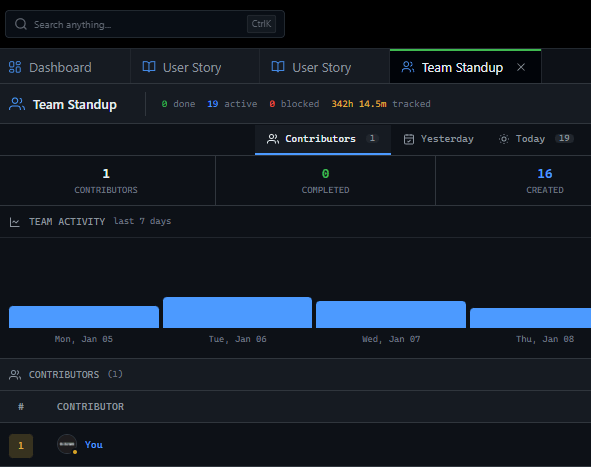
Distributed teams face unique visibility challenges—time zone gaps mean no overlap for status meetings, and asynchronous work requires persistent visibility into progress made while you slept.

GitScrum addresses this with dashboards that display timezone-localized timestamps, contribution heatmaps showing activity across all hours, and workspace-wide aggregations that update regardless of who's online. The manager overview and health dashboards provide bird's-eye visibility into multiple projects simultaneously, while the team allocation widget shows workload distribution across the entire distributed team.

The GitScrum Advantage

One unified platform to eliminate context switching and recover productive hours.

01

problem.identify()

The Problem

Teams lack visibility into bottlenecks and delays

Manual coordination wastes time and creates errors

No unified view of work across teams and stages

Blockers remain hidden until they cause major delays

Metrics and reporting require manual data gathering

02

solution.implement()

The Solution

Automated workflows eliminate manual coordination overhead

Real-time dashboards provide instant visibility into work status

Unified boards show all work across teams in one place

Blocker tracking surfaces hidden delays before they escalate

Built-in metrics provide automatic reporting without manual effort

03

How It Works

1

Timezone-Localized Views

Dashboards display timestamps in each user's local timezone for clear context

2

Contribution Heatmaps

View activity patterns across all hours to understand when distributed team members are productive

3

Manager Overview Dashboard

Get bird's-eye visibility into multiple projects with health scores and risk indicators

4

Team Allocation Widget

See workload distribution across the entire distributed team from any location

04

Why GitScrum

GitScrum addresses Dashboard Visibility for Distributed Development Teams through Kanban boards with WIP limits, sprint planning, and workflow visualization

Problem resolution based on Kanban Method (David Anderson) for flow optimization and Scrum Guide (Schwaber and Sutherland) for iterative improvement

Capabilities

  • Kanban boards with WIP limits to prevent overload
  • Sprint planning with burndown charts for predictable delivery
  • Workload views for capacity management
  • Wiki for process documentation
  • Discussions for async collaboration
  • Reports for bottleneck identification

Industry Practices

Kanban MethodScrum FrameworkFlow OptimizationContinuous Improvement

Frequently Asked Questions

Still have questions? Contact us at customer.service@gitscrum.com

How does GitScrum help with dashboard visibility for distributed development teams?

GitScrum provides integrated tools including dashboards, team-standups, project-management, time-tracking that work together to address this challenge. The unified platform eliminates the need for multiple disconnected tools and manual coordination.

How quickly can teams see results?

Most teams see immediate improvements in visibility and coordination within the first sprint. Quantifiable productivity gains typically appear within 2-4 weeks as teams adapt to the streamlined workflows.

Ready to solve this?

Start free, no credit card required. Cancel anytime.

Works with your favorite tools

Connect GitScrum with the tools your team already uses. Native integrations with Git providers and communication platforms.

GitHubGitHub
GitLabGitLab
BitbucketBitbucket
SlackSlack
Microsoft TeamsTeams
DiscordDiscord
ZapierZapier
PabblyPabbly

Connect with 3,000+ apps via Zapier & Pabbly